# LangChain 解析自研设计 agent Content Studio 并开源其 harness
> 原标题:How We Built Our Design Agent
- 来源:LangChain:Blog
- 发布时间:2026-10-27T16:45:00.000Z
- AIHOT:https://aihot.news/items/l63udrrcunv0qy04ve4s71g02
- 原文:https://www.langchain.com/blog/design-agent
## 摘要
LangChain 详解自家设计 agent Content Studio 如何在 Slack 中根据一条提示生成视频、幻灯片和社媒图等代码化资产,已累计产出超 3000 件资产、80 多套幻灯片,单次请求模型成本从约 $8 降至约 50 美分。
## 推荐理由
LangChain 复盘自研设计 agent 从早期差评到可用的过程,并开源了 harness,读者可借鉴其教品味、建环境和异步子代理的具体做法。
## 正文 · 中文译文
上面的宣传片由 Content Studio 制作,它是我们的设计智能体,只需在 Slack 中给出一个提示词,就能创建视频、社交图形、重建的 UI 图像、幻灯片等。该智能体产出的每一项资产都以代码形式编写。
Content Studio 完全基于 [Managed Deep Agents](https://www.langchain.com/blog/introducing-managed-deep-agents) 在内部构建。它现在是我们公司内部使用最广泛的 GTM 智能体之一,但起初并非如此。早期的反馈……并不理想。

那么,我们是如何从如此低的质量走到今天这一步的?
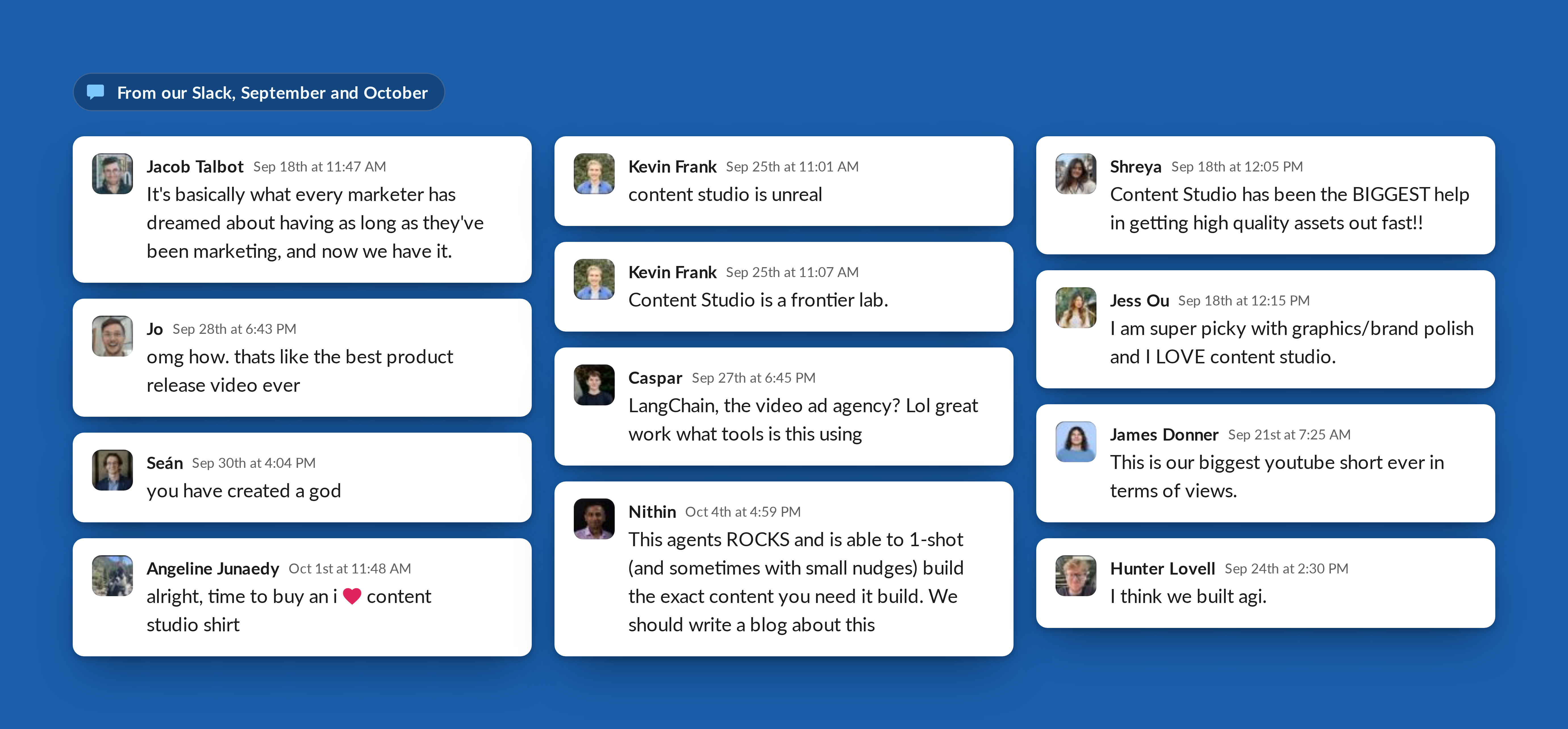
我们花了四个月时间,教 Content Studio 我们的品味和设计原则,主要方式就是看着它在全公司面前出错。
本文介绍了我们的 GTM 工程团队如何与设计团队合作,从零开始构建 Content Studio:好设计对我们意味着什么,我们如何把品味教给智能体,以及让它能从静态图到发布影片制作任何内容的 harness。
> **We've open-sourced our design agent.** Fork the [open-source repo](https://github.com/langchain-ai/design-agent), add your brand tokens, fonts and skills, and deploy it to your team's Slack with [Managed Deep Agents](https://docs.langchain.com/langsmith/python/managed-deep-agents-overview).
>
> 然后请在 10 月 28 日参加我们的 [GTM Engineering Live](https://events.langchain.com/gtm-engineering-live-series/design-agent/)。我们将深入介绍 harness 和 UX 的内部机制,并展示本文未能容纳的工作。
## 构建可规模化的设计智能体
LangChain 发展迅速。我们有持续不断的产品发布活动、网络研讨会、博客和活动。每项计划都需要资产,从博客头图和图表到幻灯片、视频和广告创意。我们的设计团队人手紧张,重复性请求挤占了更具战略性和创新性的工作。作为一家精益初创公司,我们需要一种低摩擦的方式,让公司任何人都能创作高质量、符合品牌调性的作品。
为满足这些需求,我们构建了 Content Studio,一个存在于 Slack 中的设计智能体。团队成员描述他们想要的内容,并附上相关内容或简报,智能体就会返回完成的、符合品牌调性的文件。为了构建 Content Studio,我们需要三样东西:
1. **我们设计师的专业判断**,将其写入智能体的技能和检查中,让它知道什么是好的。
2. **围绕模型的自定义环境**,包括一台视频编辑计算机,以及覆盖设计工作每一层的工具。
3. **合适的 UX**,让整个团队可以围绕一个在单个 Slack 线程中运行数小时的项目进行协作。
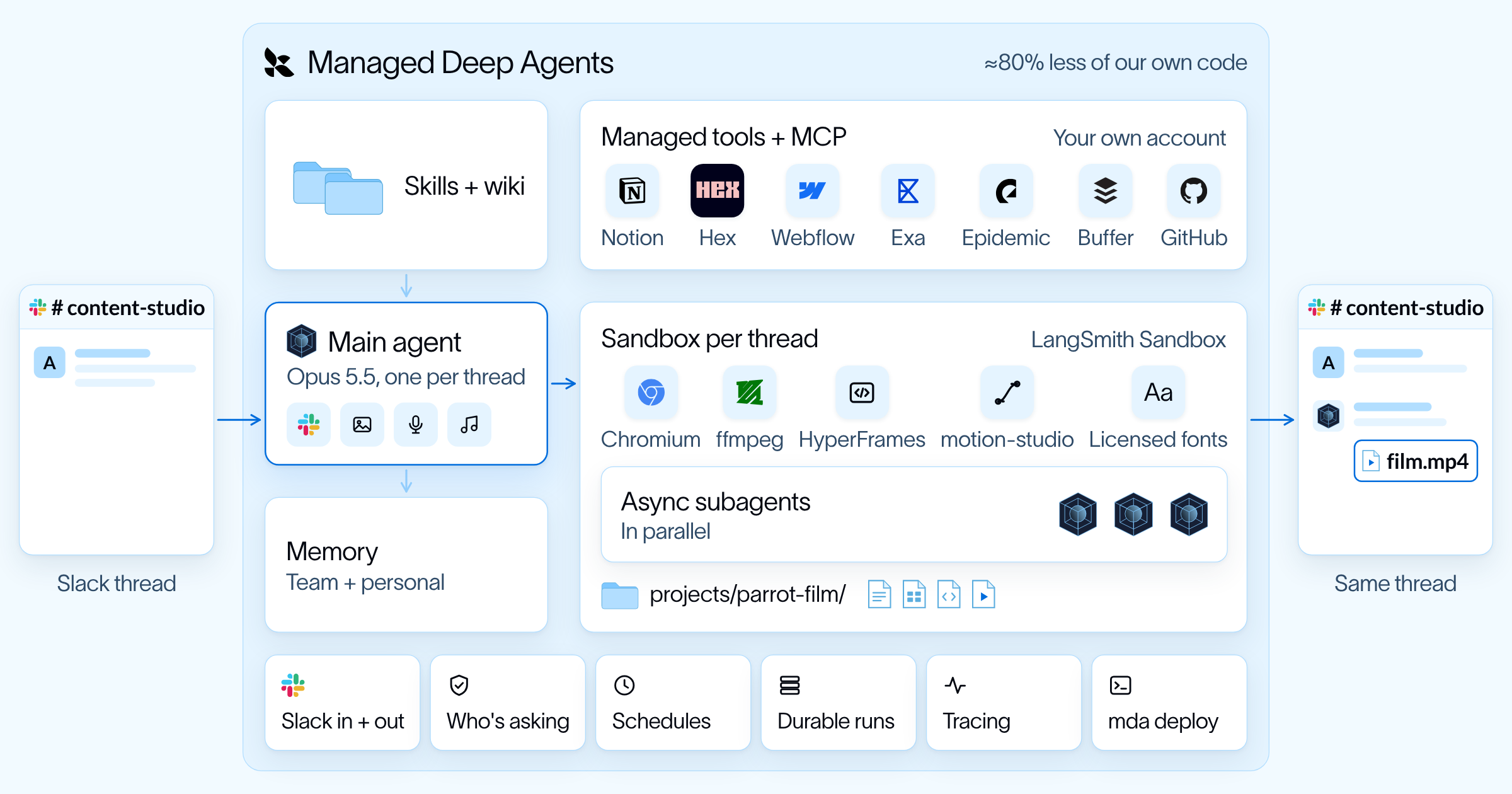
[Managed Deep Agents](https://docs.langchain.com/langsmith/python/managed-deep-agents-overview) 提供了我们在公司内部将 Content Studio 投入生产所需的一切:托管的 [LangSmith Sandbox](https://www.langchain.com/langsmith/sandboxes)、与 Slack 的集成、托管工具、限定范围的智能体记忆以及智能体运行调度。这让小团队能够把时间花在设计工作、技能、工具和 Slack 体验上,而不是基础设施上。
## 关键成果
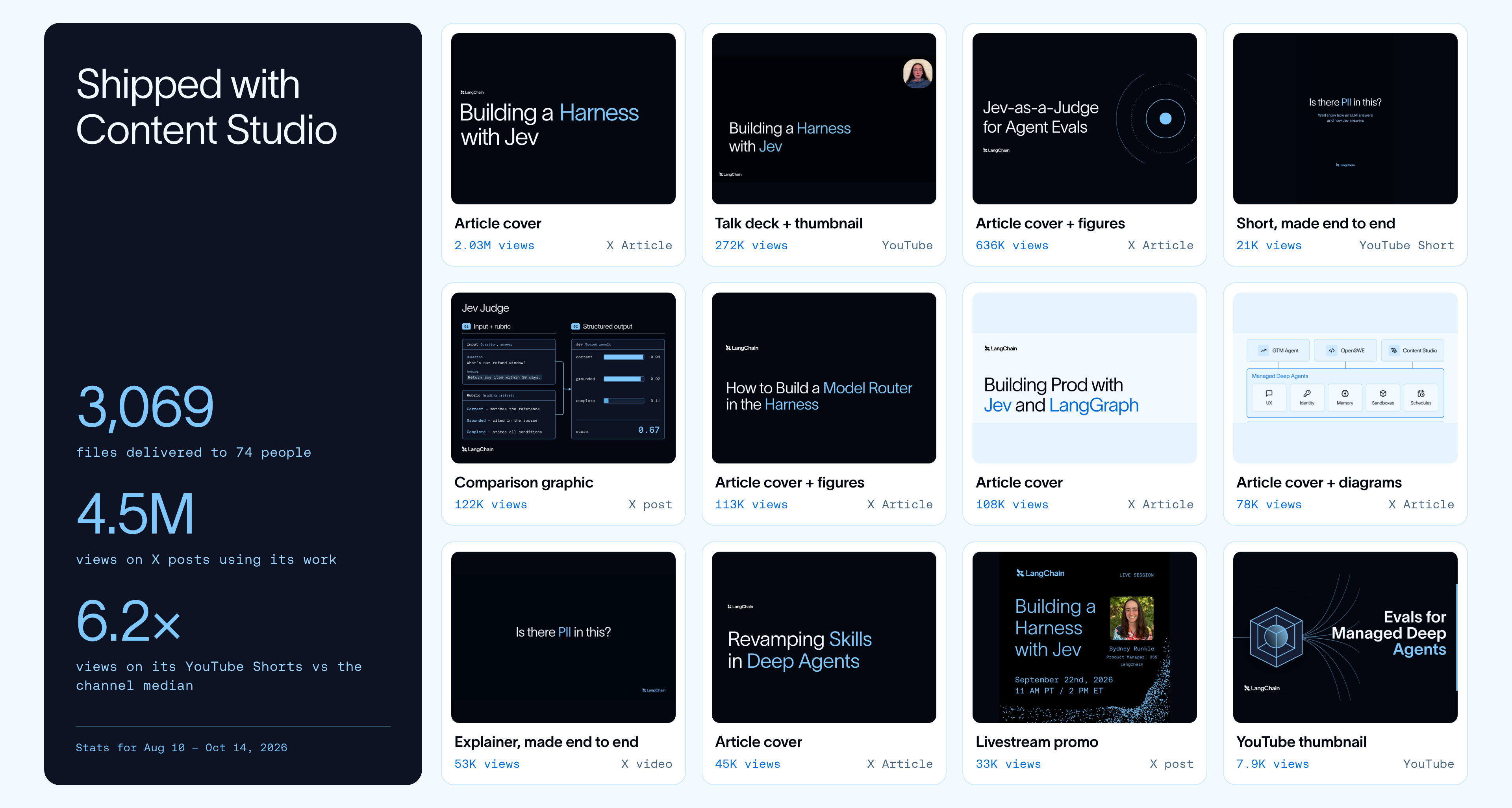
- Content Studio 已在全公司交付了 3,000 多项资产,其中包括 80 多份幻灯片。其中一份幻灯片甚至被用在我们观看量最高的自然 YouTube 视频中。
- 使用其作品发布的帖子在 X 上获得了约 450 万次浏览。
- 在 LangChain 账号上,使用其视觉内容的帖子获得的点赞数约为其他帖子的 2 倍,收藏数约为 3.7 倍。
- 如今四分之三的请求来自营销部门之外,75% 的用户是每周都会回来的回头客。
- 现在一次请求的模型花费中位数约为 50 美分,低于 9 月中旬的约 8 美元。迁移到 [Managed Deep Agents](https://docs.langchain.com/langsmith/python/managed-deep-agents-overview) 后,我们自己的代码减少了约 80%。
## AI 真的擅长设计吗?
在深入构建之前,让我们先讨论一下本世纪最大的争论:AI 真的能做出好设计吗?
模型在执行方面已经很强,能够编写 HTML 和 CSS、图表规格和动画时间线。然而,它没有我们的上下文,所以会沿用熟悉的模式,也就是[Anthropic 所说的“分布收敛”](https://claude.com/resources/articles/improving-frontend-design-through-skills)。结果可能看起来很精致,却和上百个其他作品如出一辙,或者动画很精美却始终无法传达要点。熟悉并不总是坏事,但我们希望我们的智能体做出符合其目的的选择。
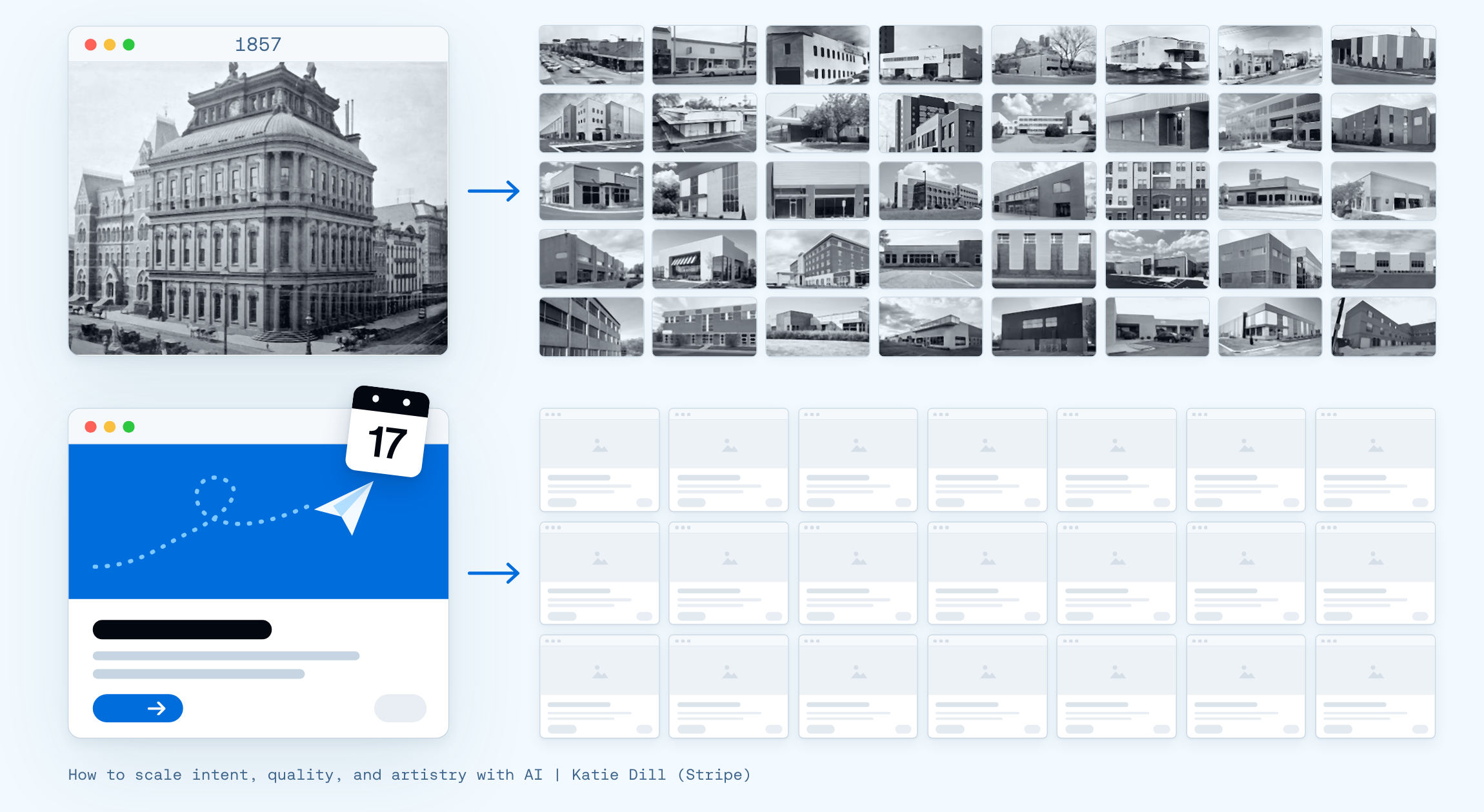
Stripe 设计主管[Katie Dill](https://www.youtube.com/watch?v=GLvFTMtw4Jk) 做了一个很有帮助的类比。二战后,在快速建设的压力下,建造者们一遍又一遍地复制现代主义的简洁造型和裸露表面。这些复制品保留了外观,却失去了背后的思考和个性。她的警告是,AI 也可能对软件做同样的事。她称之为“僵尸 UI”,并说我们需要有自己的观点,因为“如果你没有,AI 会替你给出一个。”
我们不认为 AI 不擅长设计。它只是没有自己的观点,除非你提供给它,而给它我们的观点意味着教它我们的品味。
## 教设计智能体品味
品味是区分作品正确与优秀的判断力。在设计领域,两个布局可以使用正确的字体、颜色和间距,但只有一个能传达要点。品味来自 Dill 所说的“真正擅长留意”。
正是这种留意让我们学会了识别 AI 垃圾,它最常出现在简报把某个决定留给智能体的时候。
例如,下面左侧的图片是由本地编码智能体使用我们的品牌技能(包括颜色、字体、标志等)创建的。但最终结果遗漏了关键要素,例如正确的标志组合、文本对齐,以及哪些颜色是我们的主品牌色与次品牌色。
同样的提示在 Content Studio 中生成了一张完全符合品牌的图片。这是因为本地智能体用它所见过最多的内容填补了简报未覆盖的每一个决定。而通过这套方法,Content Studio 用我们的选择填补了同样的空白。
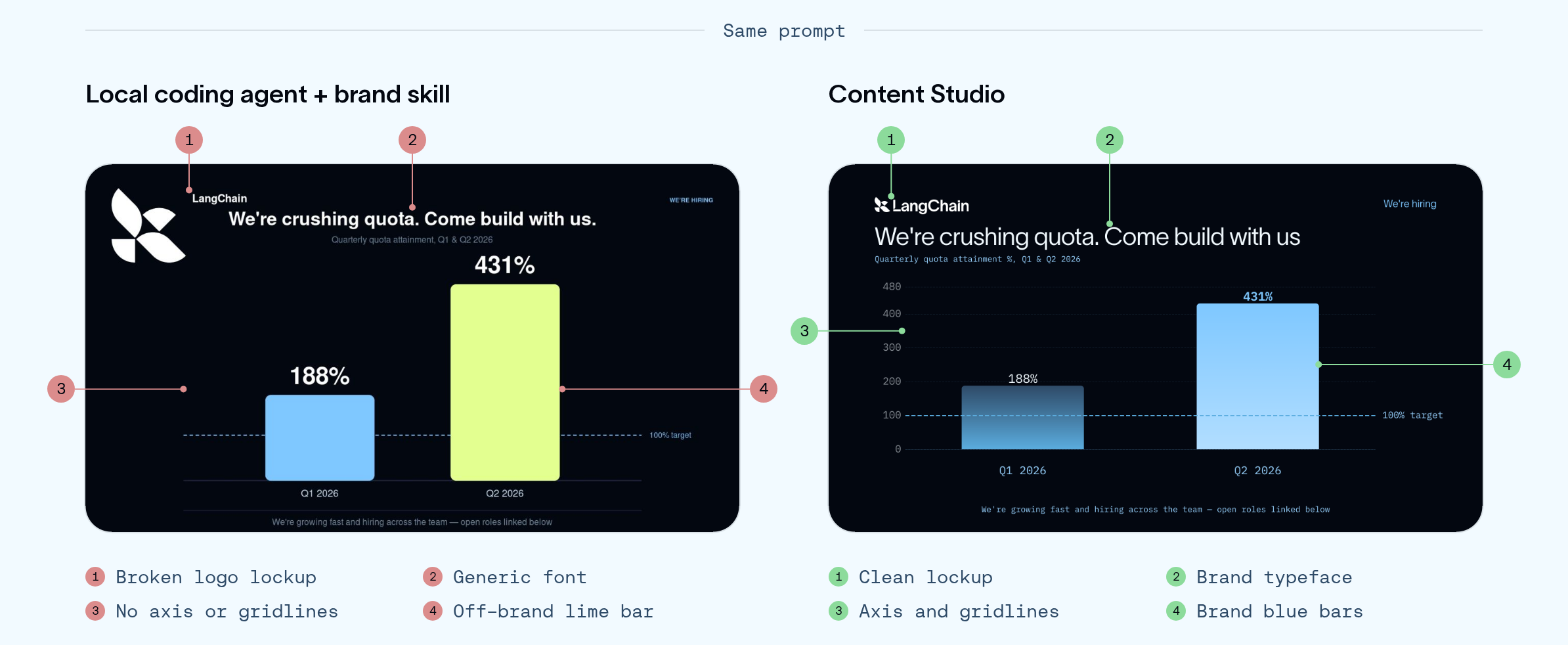
左:使用我们品牌技能的本地编码智能体。右:Content Studio,来自同一提示。
我们给 Content Studio 的指南从基础开始,包括颜色令牌、字体粗细、间距和对齐。但大部分改进来自我们在此基础上添加的内容。我们引入了设计原则,比如每帧只有一个焦点、针对常见 AI 设计模式的防护措施,以及每条反馈背后的理由。结合更好的底层模型,这些帮助 Content Studio 学会更像设计师一样思考和沟通。
它一开始并非如此。在我们早期的一个动态图形中,一只鸟飞出屏幕,身后拖着一条光带,持续不到一秒。我们要求没有尖锐边缘,但第一版回来得很笨拙,边缘生硬且圆钝。设计师会理解我们的意思。边缘应该柔化,同时尾部沿鸟运动的反方向逐渐变细并淡出。
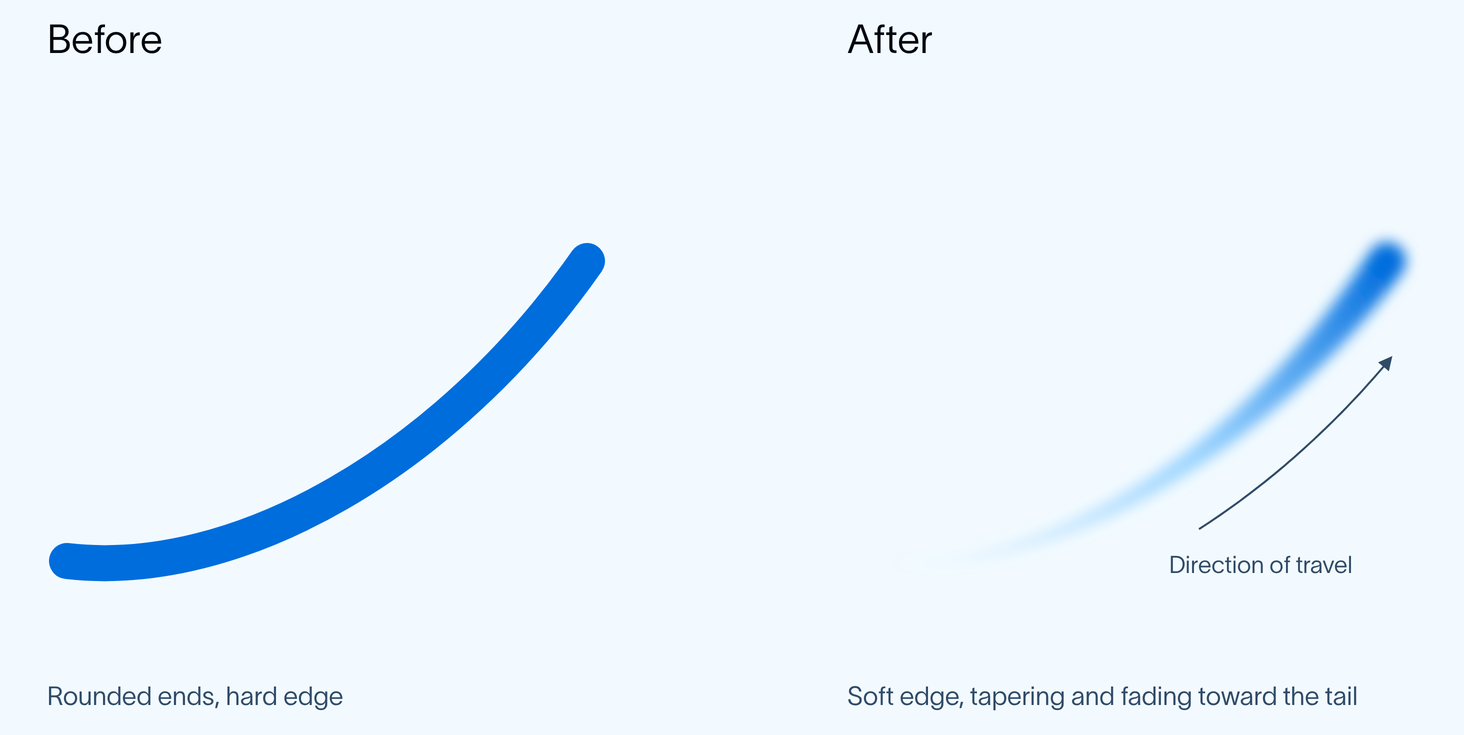
“没有尖锐边缘”的早期版本(左)和我们真正的意思(右)。
到后来的迭代中,智能体已经能用设计师的眼光评估那个细节。它用一张快速草图确定鸟尾应该在哪里,然后构建了自己的逐帧检查,以确保光带保持附着。大多数观众永远不会刻意注意到这个细节,但如果哪里不对,他们会感觉到。

智能体自己的检查:光带的根部(黄色)保持在鸟的尾部(品红色)上,直到它离开。
可量化的问题最容易解决。默认大小写过去经常在评审中被提及,但现在自动检查能捕获每一处实例。更难的决策则更主观,比如一个创意想法是否足够有力、信息是否清晰传达,或者执行是否能引起受众共鸣。当设计师做出这类判断时,我们会将推理过程记录到一项技能中,以便智能体将其应用于未来的草稿。
Content Studio 改变了谁能做设计工作。产品经理、工程师或创始人可以在 Slack 中向智能体下达简报,然后带着符合品牌且可直接交付的成果离开。现在四分之三的请求来自营销部门之外。对于设计师而言,角色已更接近创意总监,负责设定方向并审核作品,而非亲自制作每一个素材。
把设计判断做对只是流程的一部分。我们还需要为智能体提供执行判断的工具和环境。
## 构建媒体 harness
设计师会在多个工具间工作,从用于静态图像的 Photoshop 和用于动态的视频引擎,到用于原型设计和协作的共享画布。他们还依赖品牌指南、设计资产和公司文档。
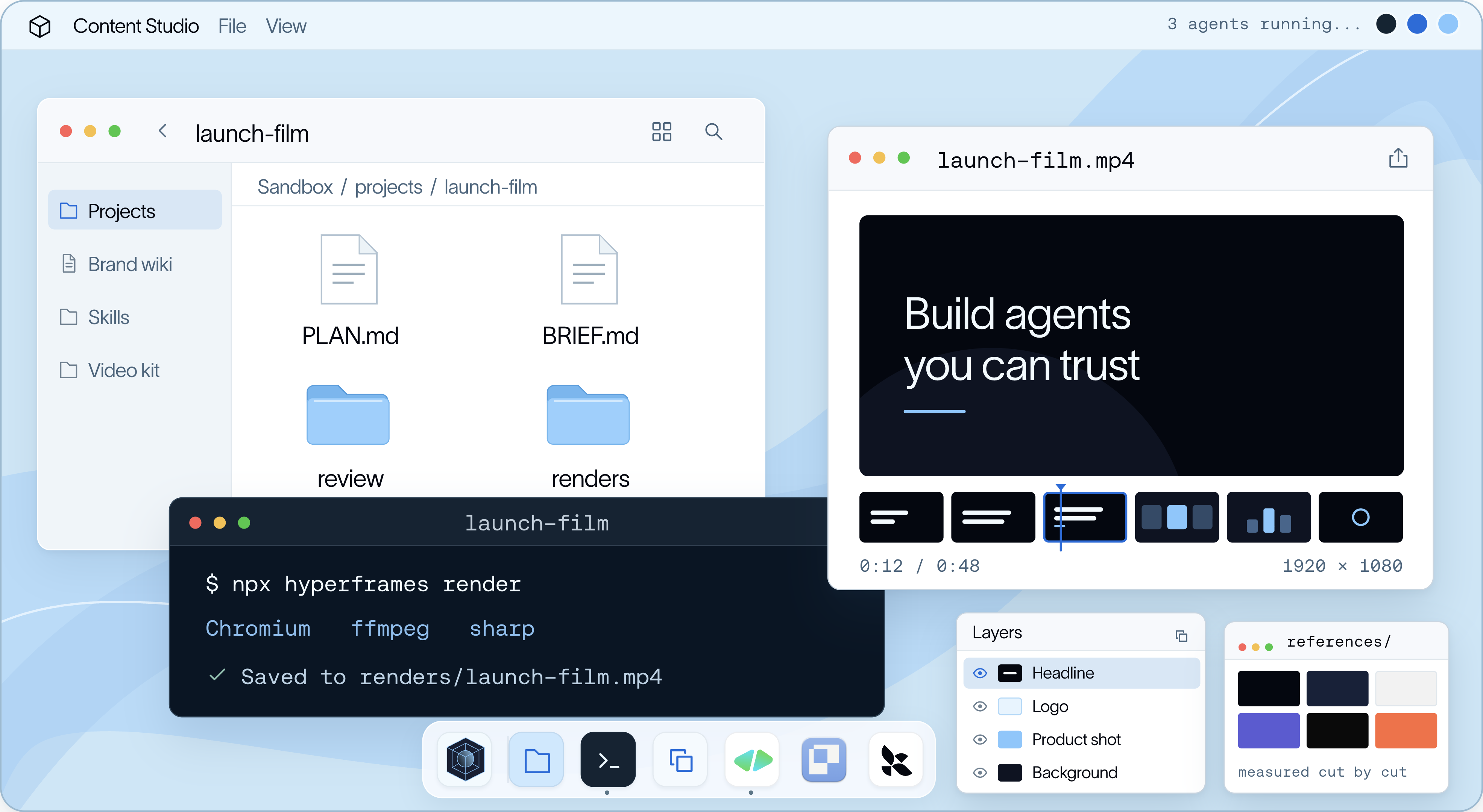
智能体需要类似的配置:一台可供工作的计算机、用于设计流程不同环节的工具,以及设计师带入工作中的上下文。harness 将这些部分整合在一起。[Deep Agents](https://docs.langchain.com/oss/python/deepagents/overview) 提供底层 [harness](https://www.langchain.com/blog/the-anatomy-of-an-agent-harness),包括智能体循环、规划、文件、子智能体和上下文管理。[Managed Deep Agents](https://docs.langchain.com/langsmith/python/managed-deep-agents-overview) 将其打包并在生产环境中运行。我们围绕它构建了环境,为智能体提供一台计算机,使其能够维护项目、跨工具工作并检查结果。
### harness\_v1
我们第一版 harness 试图替模型做设计。早期模型需要大量帮助才能制作出我们愿意交付的动态图形或发布影片。为了弥补模型当时还无法自行解决的问题,我们的直觉是将更多自身的设计判断写入指令和代码。
因此,我们构建了一个设计系统,包含 115 个可复用的 UI 组件,用于标题、布局和动画,并附有关于何时以及如何使用它们的指导。这为模型提供了一组现有设计作为基础,减少了它必须从零开始的创意决策数量。
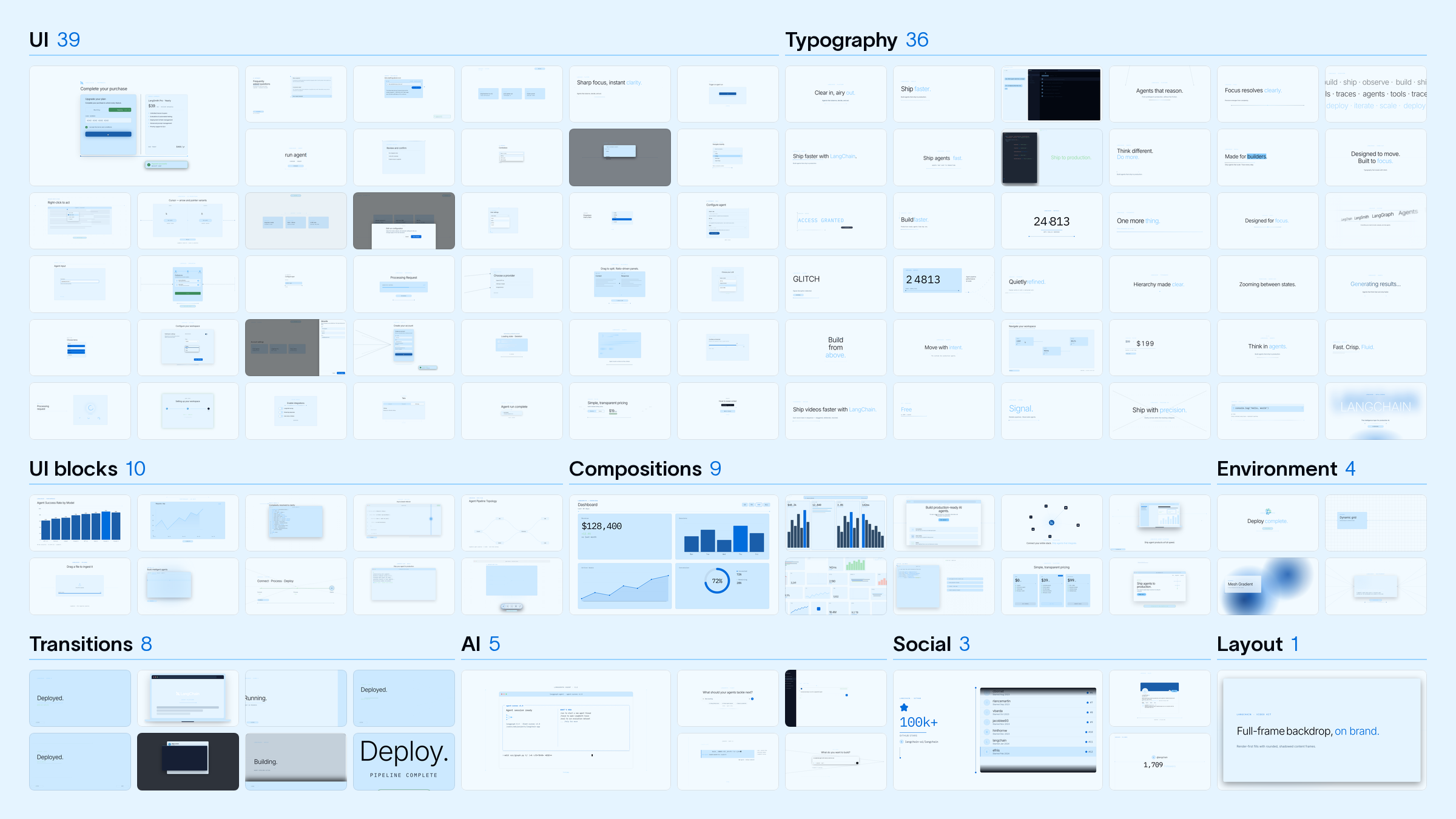
这有助于它保持品牌一致性,但智能体会为每一帧重复相同的布局和动画,缺乏多样性:
我们知道模型最终会擅长这项任务,因此持续为那一刻构建环境,在此过程中试验技能和工具。有时我们会添加更多参考或更详细的指令来帮助模型。其他时候我们会完全移除它们,看看模型自己能做什么。
但结果仍未达到我们的期望,缩小差距需要越来越多的工程工作。我们不断向技能中添加规则、编写更多动态代码、构建更多组件,以弥补模型做不到的事情。
随后 Opus 5.5 到来,我们立即看到了质量跃升。我们重新审视了技能,移除了大部分硬编码规则,保留了设计原则和高层指导。结果进一步改善,多样性增加,重复减少。模型终于做出了我们此前试图替它预先构建的创意决策。
这就是我们的[苦涩教训](http://www.incompleteideas.net/IncIdeas/BitterLesson.html)。为弥补模型弱点而设计的规则,会随着模型能力的提升而变得不再有用。真正持久的是模型周围的环境,包括它使用的工具、它汲取的上下文,以及人们如何引导它的工作。我们没有预先构建创意决策,而是专注于让这套执行框架足够灵活,以便充分利用每一代新模型。
### 设计师的电脑
为了展示这套框架的实际运作,我们让 Content Studio 制作一部影片,完整呈现它如何端到端地配合一个视频项目。最终成品的主角是一只像素丛林中的鹦鹉,旁白以 David Attenborough 的风格讲述(由 ElevenLabs 配音)。我们就用它来逐层拆解这套框架:计算机、工具,以及其工作背后的上下文。
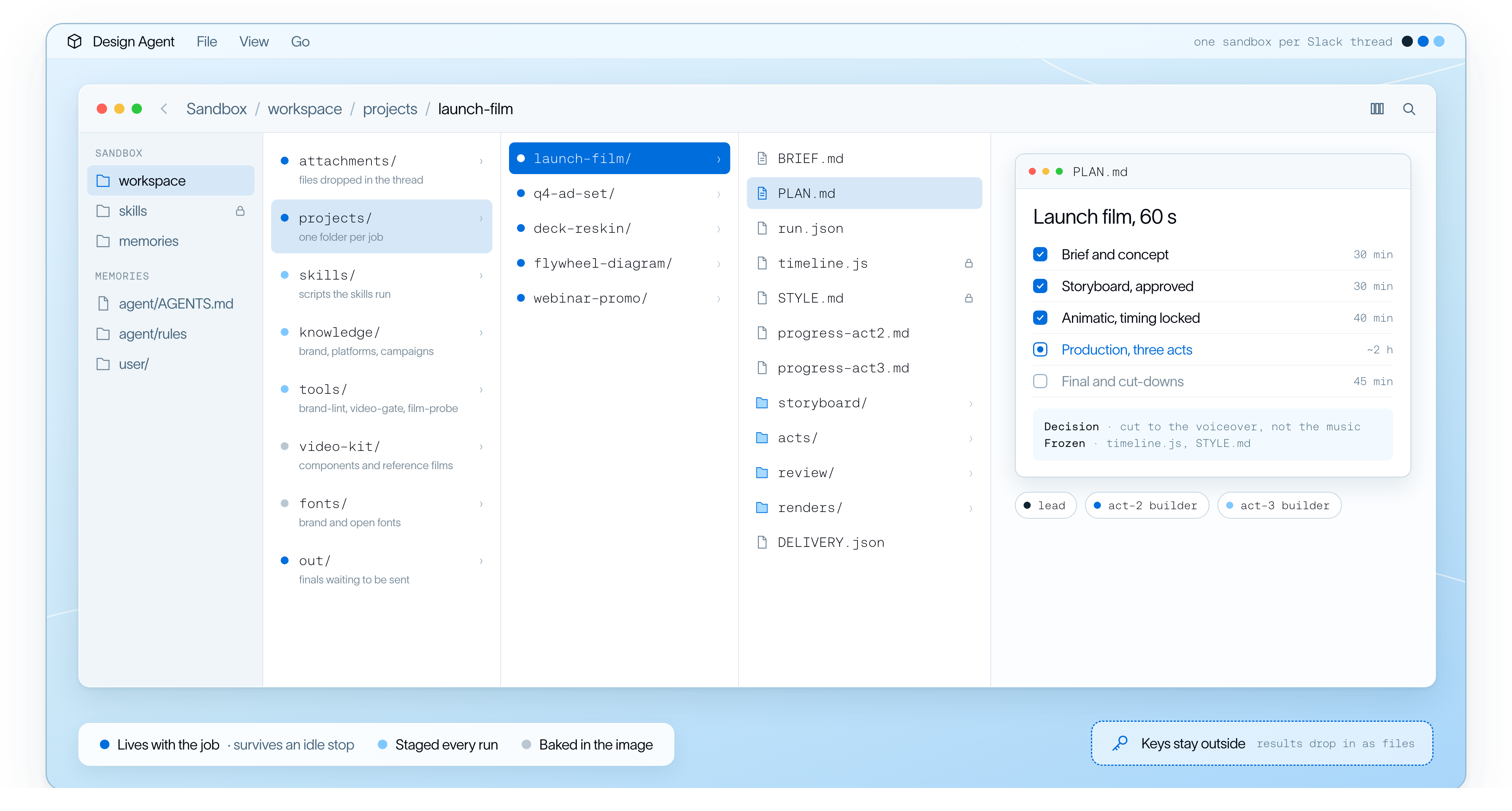
设计是迭代的。你做出东西,看一看,再修改,往往要反复很多次。因此,智能体需要一台能在整个对话过程中持续工作的计算机。每个 Slack 线程都会获得自己的 [LangSmith Sandbox](https://www.langchain.com/langsmith/sandboxes),这是一台带有文件系统和 shell 的隔离 Linux 机器,项目在该线程的整个生命周期内都存放在那里。
智能体创建的一切都是用代码构建的,无论是幻灯片的 HTML 页面、图表的数据规范,还是视频的动画时间线。这使得迭代变得容易,无需从头再来。如果有人要求让鹦鹉更早出场,智能体只需修改一个时间值并重新渲染,而不会影响画面或文案。而如果使用平面图像或生成的视频片段,哪怕是很小的修改,也可能意味着要重新制作整个素材。
简报、计划、场景代码、音频和渲染结果都存放在同一个项目文件夹中,参与任务的每个子智能体都基于它工作。
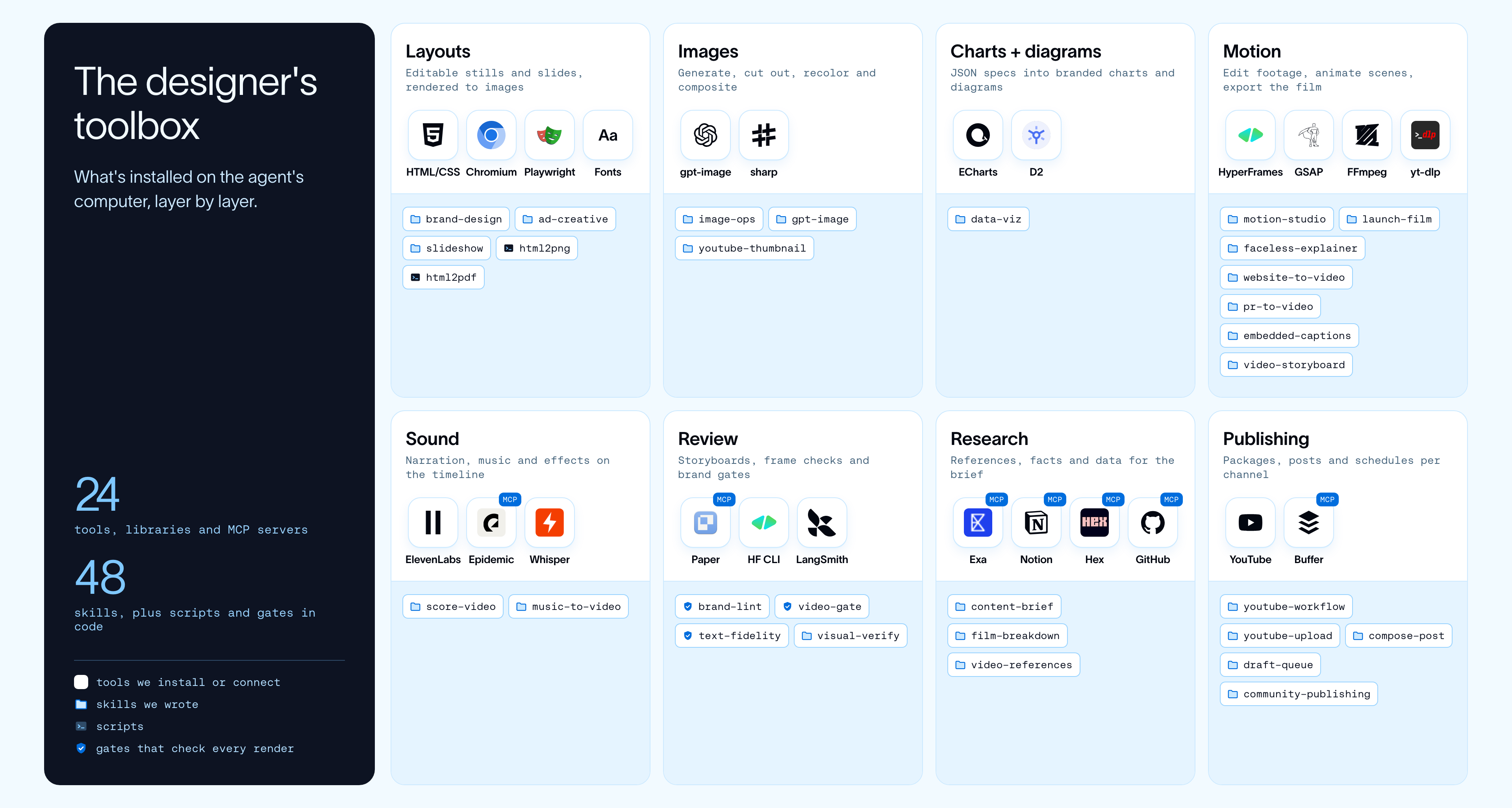
在此基础上,我们安装了设计师在每一层工作中都会用到的工具:
动态效果是最困难的一层。它由两个引擎驱动:
1. **用于编辑的 HyperFrames:**[HyperFrames](https://hyperframes.heygen.com/) 是 HeyGen 的开源视频框架,它把视频变成一个网页。片段、屏幕录制、字幕和文字都只是该页面上的元素,由 [GSAP](https://gsap.com/) 时间线来移动它们。因此,当有人要求为网络研讨会加字幕或剪辑产品演示时,智能体就像编辑网页一样编辑它。它的 CLI 基本上就是智能体的编辑套件:检查合成、拉取一帧来查看、渲染剪辑。我们还安装了 [HeyGen 的官方技能](https://github.com/heygen-com/hyperframes/tree/main/skills),让智能体从构建该格式的人那里学习它。
2. **用于动画的 `motion-studio`:**网页无法让快速运动产生模糊、让物体发光或在 3D 中旋转标志,而这正是我们为原创动画想要的质感。所以我们构建了自己的 canvas 引擎。智能体编写代码,绘制每一帧的每一个像素,引擎将最多 16 个瞬间融合到每一帧中,就像相机快门让运动产生模糊一样。鹦鹉影片就是这样制作的。
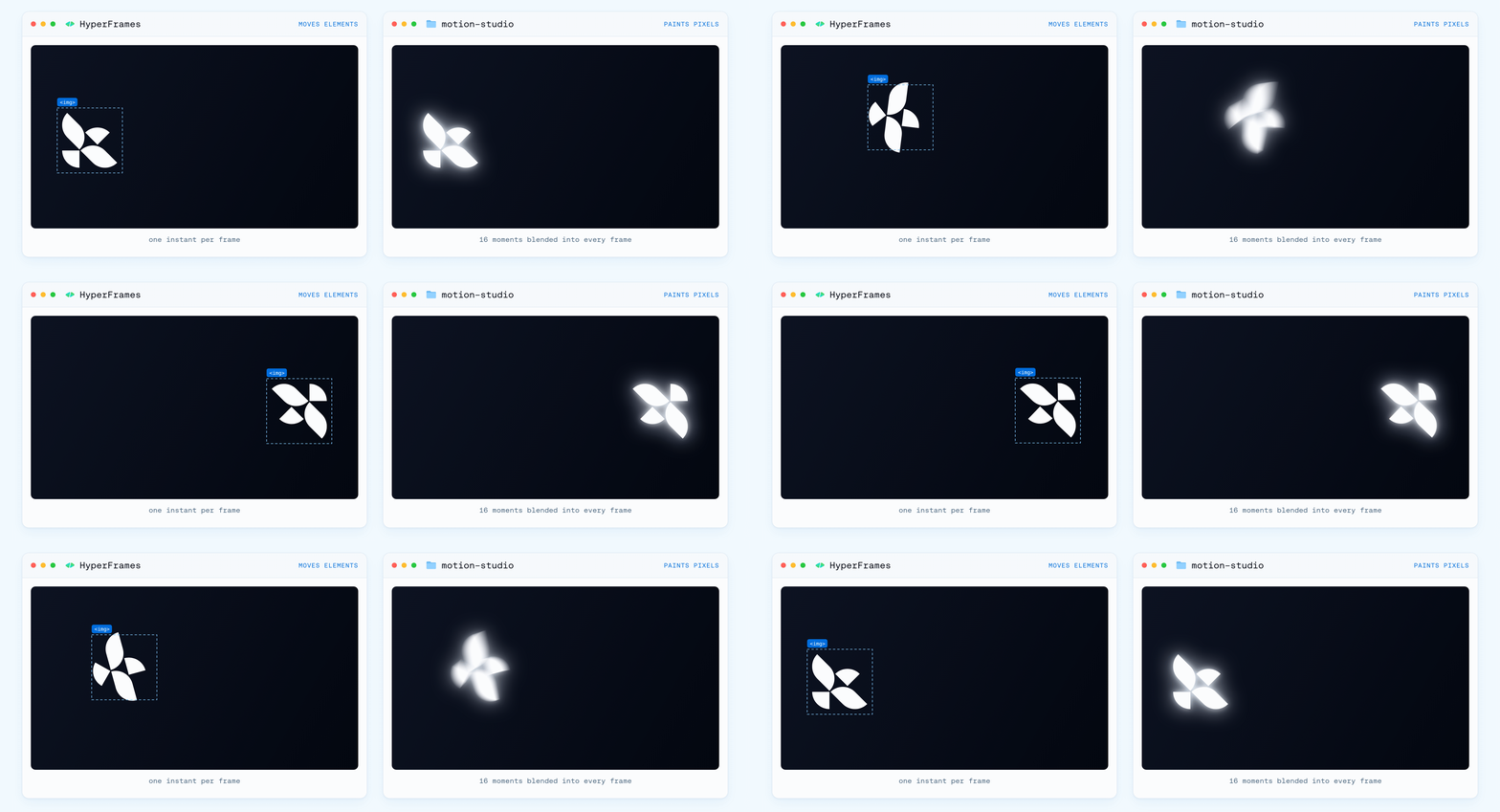
两个引擎都根据时间戳渲染每一帧,因此第十秒的一帧无论何时渲染看起来都一样。这让智能体可以检查单个瞬间而无需渲染整部影片,同时也让我们能够并行渲染多帧。音频运行在同一条时间线上,使旁白、音乐和音效与画面保持同步。
有了这套设置,智能体几乎可以创作任何东西。但如果没有进一步的指导,它会默认采用模型自身的设计选择,而不是我们的。下一个挑战是教会它在我们的品牌和设计标准内工作。
### 设计师的大脑
我们围绕四项不同的功能来组织智能体的知识,每项功能都有明确的目的。技能指导如何执行特定任务,而 wiki 则提供关于我们公司以及什么样的工作才算优秀的背景信息。任何可衡量的内容都由 gate 处理,即用代码编写的确定性检查。一个独立的记忆层则记录人们随时间教给智能体的内容。
#### 技能
智能体处理请求时做的第一件事是判断这属于哪类工作。这由我们的 `media-production` 技能处理。我们称它为**路由技能**,因为它的大部分内容就是一张表。每一行将一种请求(营销活动、改版、缩略图、帖子、YouTube 打包、发布影片、短动画)映射到处理它的路径和专用技能。路由器还会决定这项工作是否需要共享视觉画布,并且它会把小修改排除在完整流程之外。
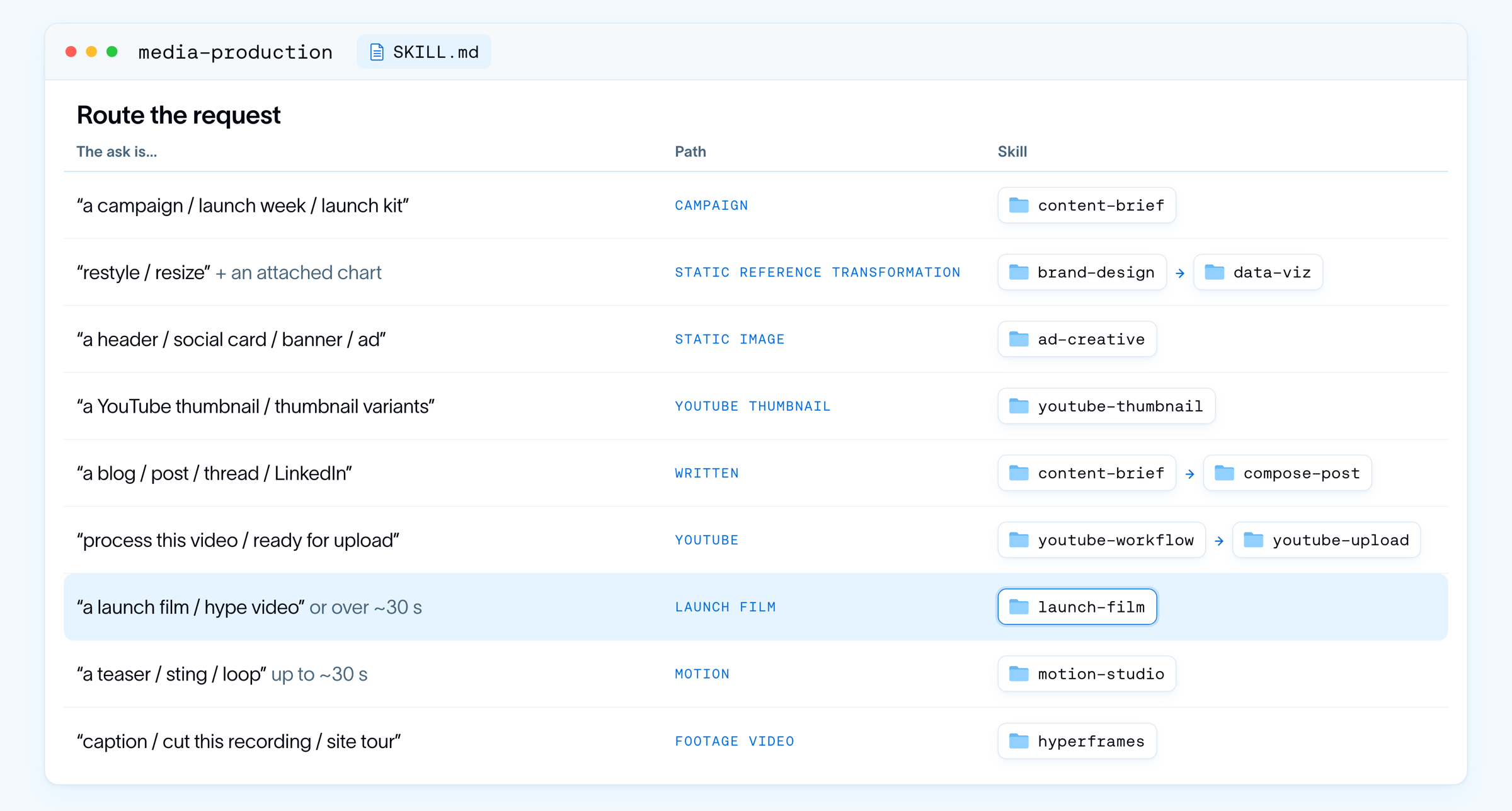
对于像上面那样的影片,路由器会选择 `launch-film` 技能,该技能专为执导大型动态影像制作而设计。我们的 48 个技能(总共接近 1,000 个文件)每一个都按工作而非主题来划定范围,因此其描述读起来像一条路由规则,包括何时不应使用它。
技能之间相互组合,而不是彼此重复。`launch-film` 负责执导,`motion-studio` 负责制作画面和声音,因此动画的技艺只写一次。`launch-film` 还包含它将启动的子智能体的角色简报,以及一个真实 88 秒发布影片的案例研究,我们用代码逐镜头重建了该影片。正是在这个案例研究中,智能体学会了如何在子智能体之间拆分影片。它在硬切场景处切分,让一个子智能体保持连续的镜头运动,并在任何人并行工作之前冻结共享代码。
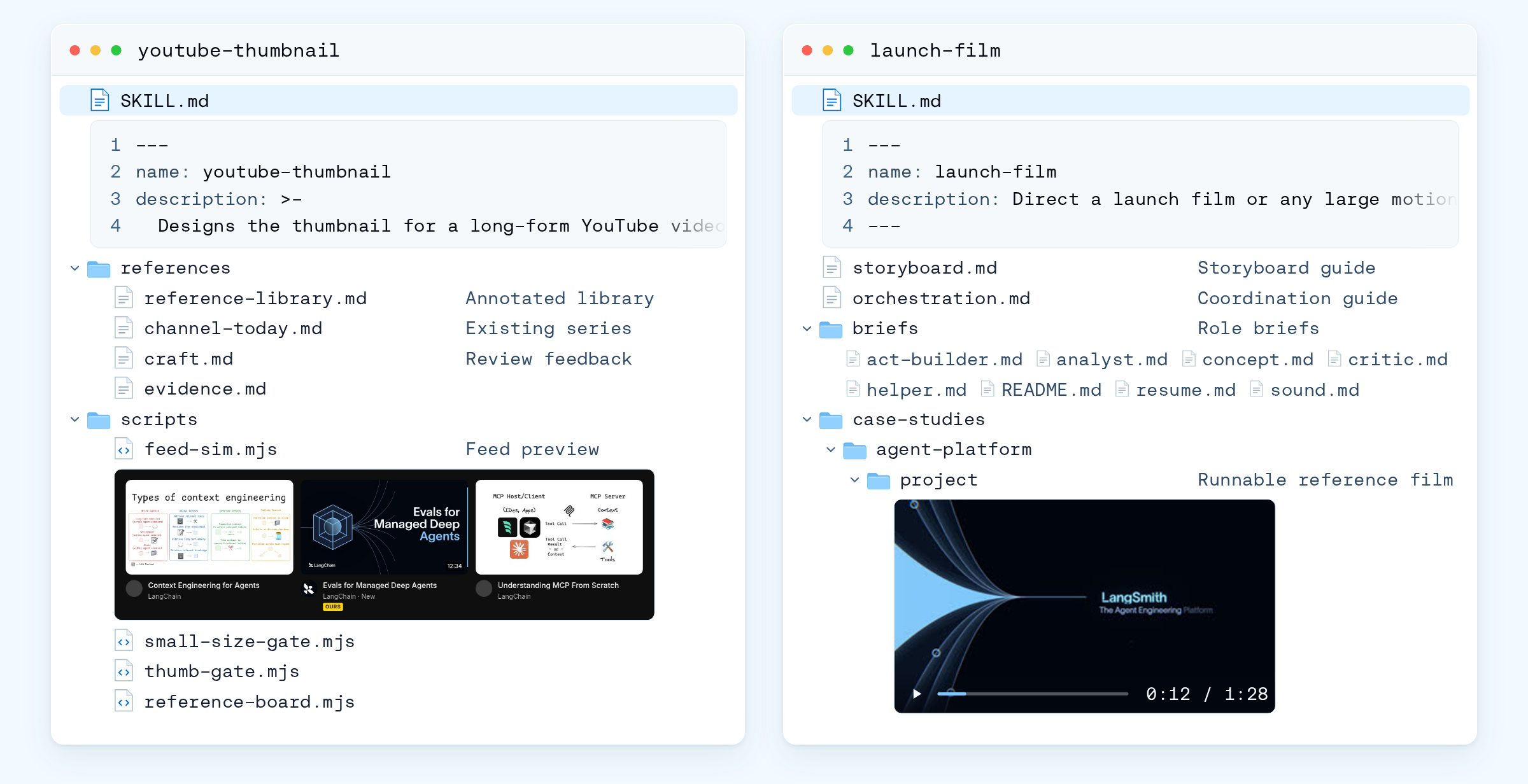
描述对工具的重要性不亚于对技能。为了降低上下文占用,我们把 MCP 工具放在内置搜索之后。智能体一开始只加载我们自己的工具,并根据需要加载额外的工具 schema,使用跨工具名称和描述的关键词搜索。
#### Wiki
技能解释如何完成一项工作,而 wiki 则提供做好这项工作所需的背景和参考资料。它涵盖从品牌令牌、图形语言和语调,到平台、营销活动和产品信息的一切内容。一个专门的动态影像 wiki 涵盖执导、技艺、声音和评审,以及 70 部参考影片的拆解。
我们不在各个技能中重复这些信息,而是直接链接到 wiki。这使共享知识集中在一处,也让更新更容易。当字体规则之类的内容发生变化时,我们只需更新一次,每个技能都可以引用最新版本。
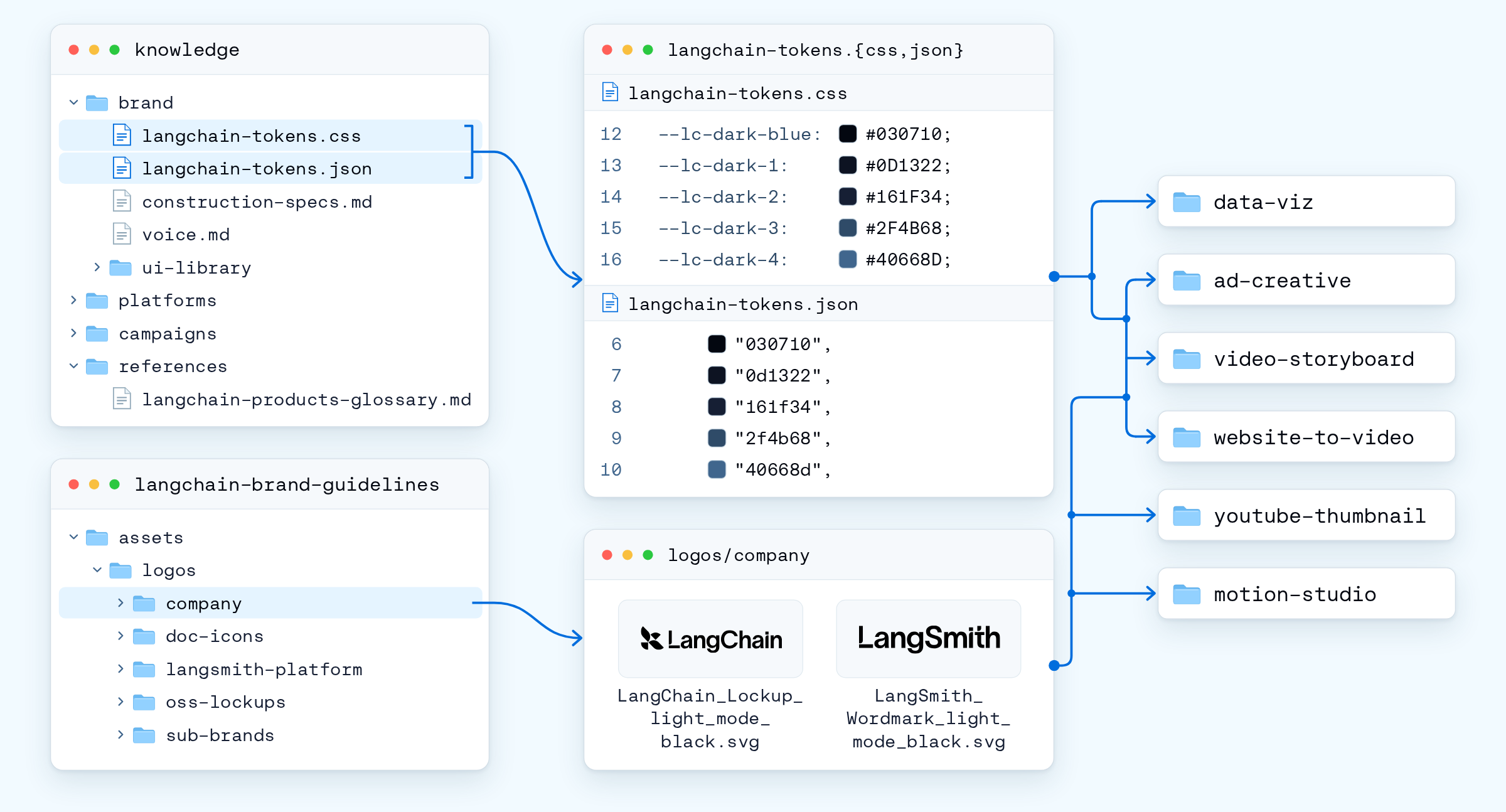
了解我们的工作方式并不一定能让动态设计变得更便宜。一个错误的创意决策仍然可能耗费数小时的渲染时间。
### 规范驱动的设计
动态影像一旦出错,代价尤其高昂,无论是在渲染时间还是 token 上。一个故事板帧渲染大约需要 50 毫秒,而一秒成片则需要 8 到 40 秒。由于子智能体要编写、渲染并评审每一幕,这些成本会迅速累积。因此,智能体先在故事板中构思,在那里可以低成本地探索不同方向,等方向获批后再进入完整制作。
为了支持这种探索,我们给智能体提供了一个参考影片库来汲取灵感,就像设计师从情绪板中获取灵感一样。当它找不到合适的视觉风格时,它会使用图像模型生成新的参考,先快速起草,再对最有希望的方案进行细化。这些图像有助于确立视觉方向,而故事板和最终影片仍然使用真实字体和品牌资产在代码中构建。
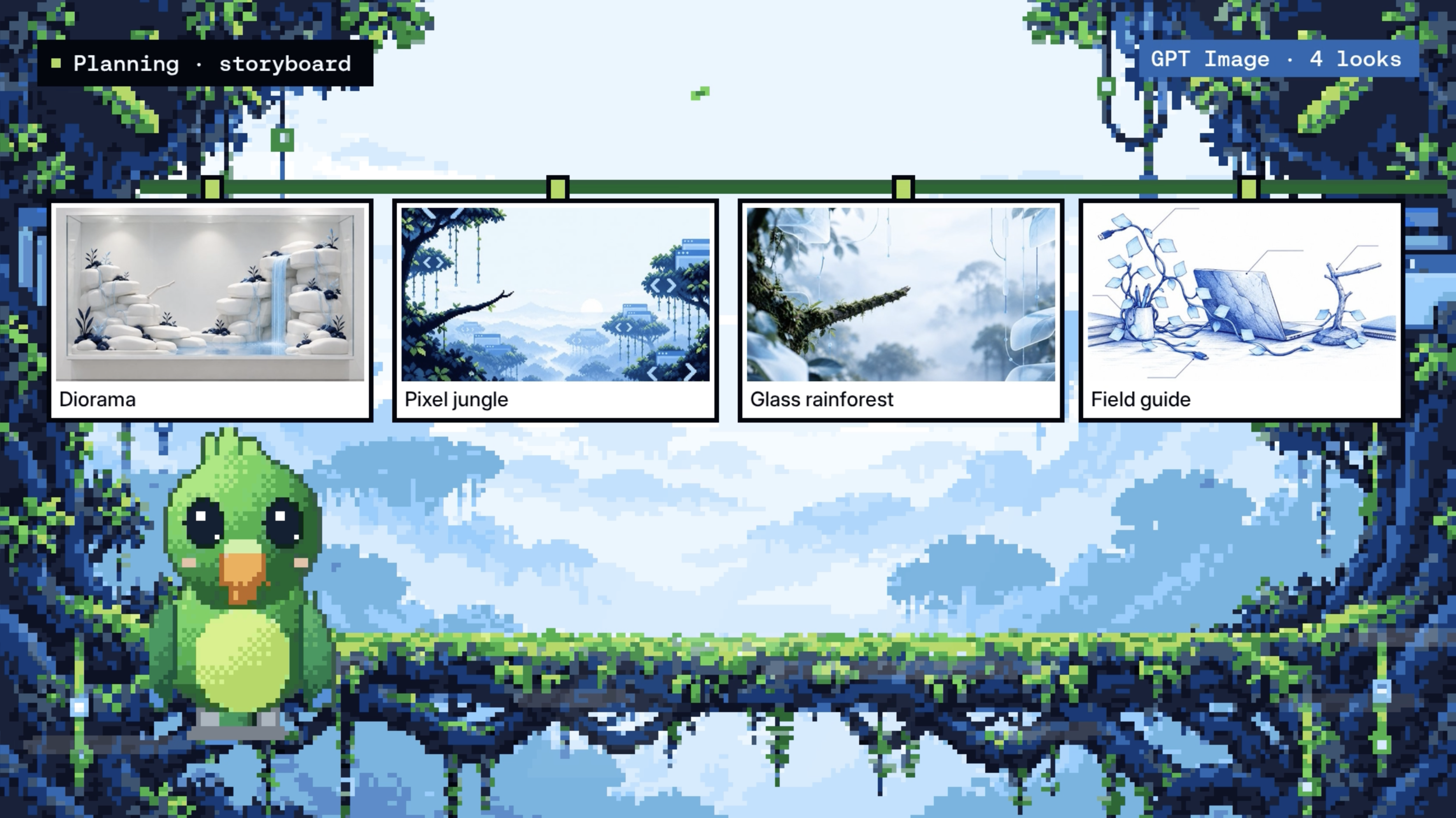
一旦我们选定方向,获批的故事板就成为其余影片构建所依据的规格。随后项目经历三个阶段:
1. 故事板,用于就视觉创意、文案和镜头达成一致。
2. 动态分镜,即与音频同步的粗剪,用于检查静帧无法呈现的节奏。
3. 制作阶段,由子智能体构建、检查并渲染获批的镜头。
我们最初在技能说明中描述了这个顺序,但智能体有时为了节省时间而跳过评审。现在流水线在代码中强制执行这一顺序,因此组装会等到每一幕都通过评审后才进行,而说明仍然指导创意决策。必须始终遵守的顺序存在于代码中,而判断则留在提示词里。
#### 指向,而非提示
在这些方向之间做选择是团队的决定。Slack 很适合用来请求工作和接收工作,但讨论串是线性文本,而故事板是空间性的,因此反馈最终变成描述某个东西在哪里,而不是直接指向它,而且每一次更改,哪怕只是改一个词,都必须作为新的提示词重新交给智能体。
[Paper](https://paper.design/) 为我们解决了这个问题。它是一个专为智能体设计的设计画布,带有一个 MCP 服务器,让智能体可以直接控制文件。人们可以在同一个文件中工作,并排比较不同方向,在特定画面上留下评论,或者自己进行编辑。由于画布是共享的,智能体可以回到文件中,利用这些评论和编辑来指导其下一次迭代。
挑战在于 Paper 的智能体工具只能在其桌面应用内运行,而我们的智能体在云沙箱中运行。为了弥合这一差距,我们在一个始终在线的 Linux 工作节点上以无头模式运行 Paper Desktop,使用虚拟显示和经过身份验证的桥接来连接两者。一次设置即可支持整个团队。

即使获得批准,将故事板转化为成片也可能需要数小时。到那时,这项工作已类似于一个小型项目,多个部分并行构建,需要汇聚到一起。协调所有这些工作超出了单次智能体回合所能处理的范围。
### 智能体作为幕僚长
回想一下前面提到的鹦鹉影片,当时制作正在 Slack 中进行到中途。一个人分享了一份参考,另一个人建议了不同的开场,第三个人在第四帧上留下了反馈,而这一切都发生在智能体仍在构建的时候。这就像一场头脑风暴,而负责记录的人同时也负责制作影片。同步子智能体在这里效果不佳,因为主智能体必须等待它们完成,在此期间人们无法与它交互。
为了解决这个问题,我们将子智能体改为异步,并将主智能体的角色从执行者转变为幕僚长。它将复杂项目分解为更小、隔离的任务,分配给子智能体,并并行运行这些工作。同时,它会在情况变化时让团队保持知情,以便人们可以继续提供反馈并引导项目。
对于每个任务,主智能体会创建一个子智能体配置,其中包含明确的简报,涵盖其角色、相关上下文、文件所有权以及如何验证工作。它还会根据任务的复杂程度选择模型和投入级别。
我们还为主智能体添加了一小组用于协调工作的工具:
- `start_task` 在后台将一部分工作交给子智能体
- `check_tasks` 显示正在运行的内容并读取已完成的报告
- `cancel_task` 和 `resume_task` 停止不再符合简报的工作,或从上次中断处继续
- `report_progress` 让子智能体在任务进行中发送更新
- `schedule_wakeup` 为主智能体提供一个计时器,以触发另一次运行并继续任务
在底层,每个子智能体都是普通的 [Deep Agents](https://docs.langchain.com/oss/python/deepagents/subagents) `task` 工具,作为后台任务运行。当它完成时,我们的代码会排队启动主智能体的一次新运行,并携带结果。人们也可以在运行中途引导主智能体,因为在其工作期间到达的消息会被插入到下一次模型调用之前。子智能体通过项目文件夹进行协调,每个子智能体只写入自己拥有的文件,并将进度保存在磁盘上。

由于工作在后台运行,线程必须显示正在发生的事情。主智能体通过计划和预计完成时间、带有运行中子智能体的实时状态行、渲染进度和花费、每次编辑的确认,以及任何内容公开前的批准卡片来保持更新。
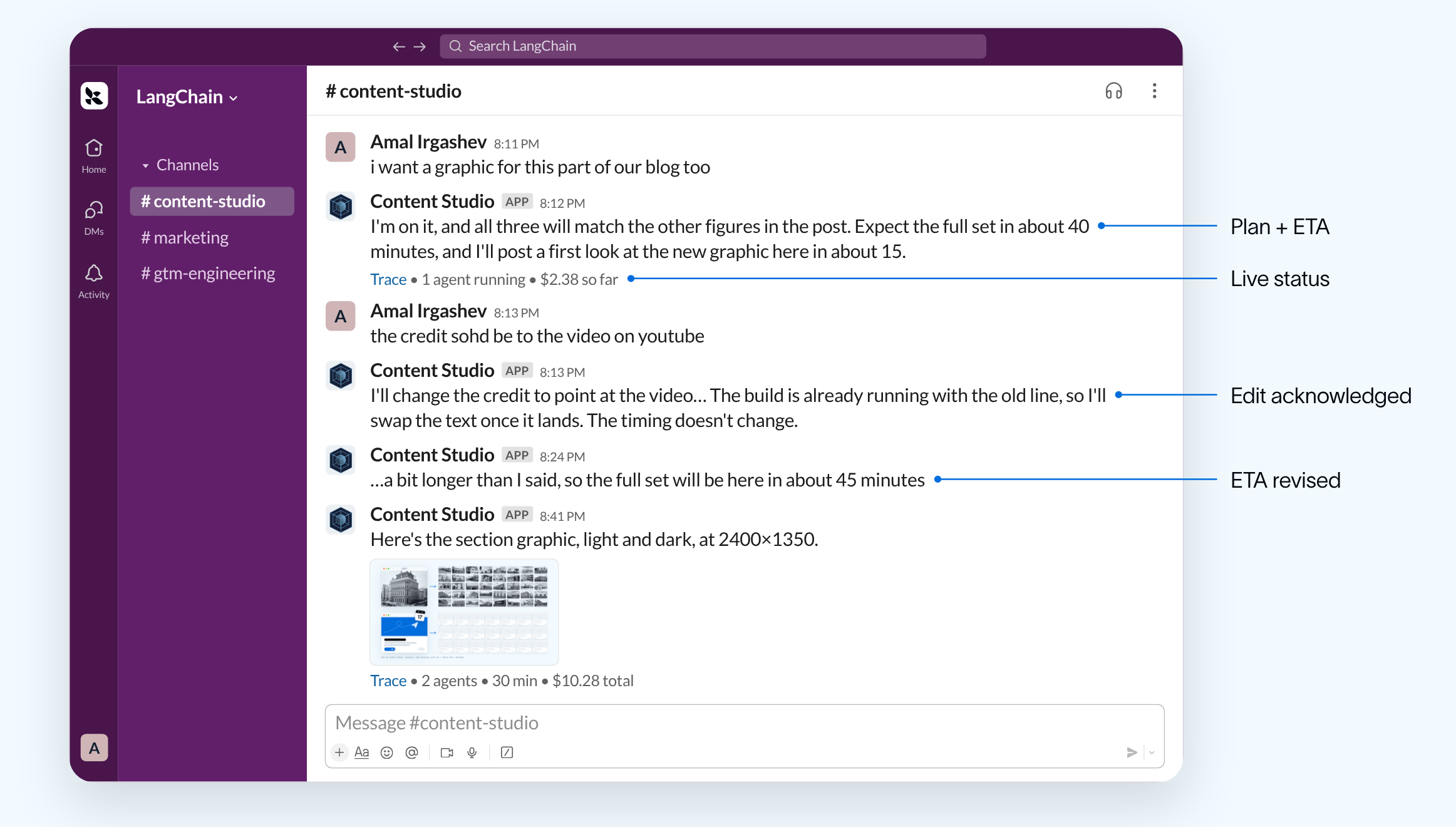
这种方法最清晰的测试之一来自一项通宵任务:为一份 52 页的演示文稿更换外观。智能体首先创建了三张示例幻灯片并审查了自己的工作,然后按编号批次处理演示文稿的其余部分以供批准。它还在过程中新增了两张幻灯片。整个通宵期间,主智能体运行了约一个小时,而其子智能体总共工作了六个多小时,全程没有阻塞对话。
### 自我改进的测试框架
一位与团队合作数月的设计师会了解团队的偏好,不需要听到同样的反馈两次。如果没有记忆,智能体将在每个新线程中从零开始。为避免这种情况,我们构建了两个学习循环。快速循环在人们给出反馈时捕获反馈,而慢速循环则在后台从已完成的项目中学习。
**快速循环:**当有人分享规则或偏好时,智能体在同一轮中将其保存。[Managed Deep Agents](https://docs.langchain.com/langsmith/python/managed-deep-agents-memory) 将记忆以纯文件形式存储为两层,一层在团队内共享,另一层特定于每个人。
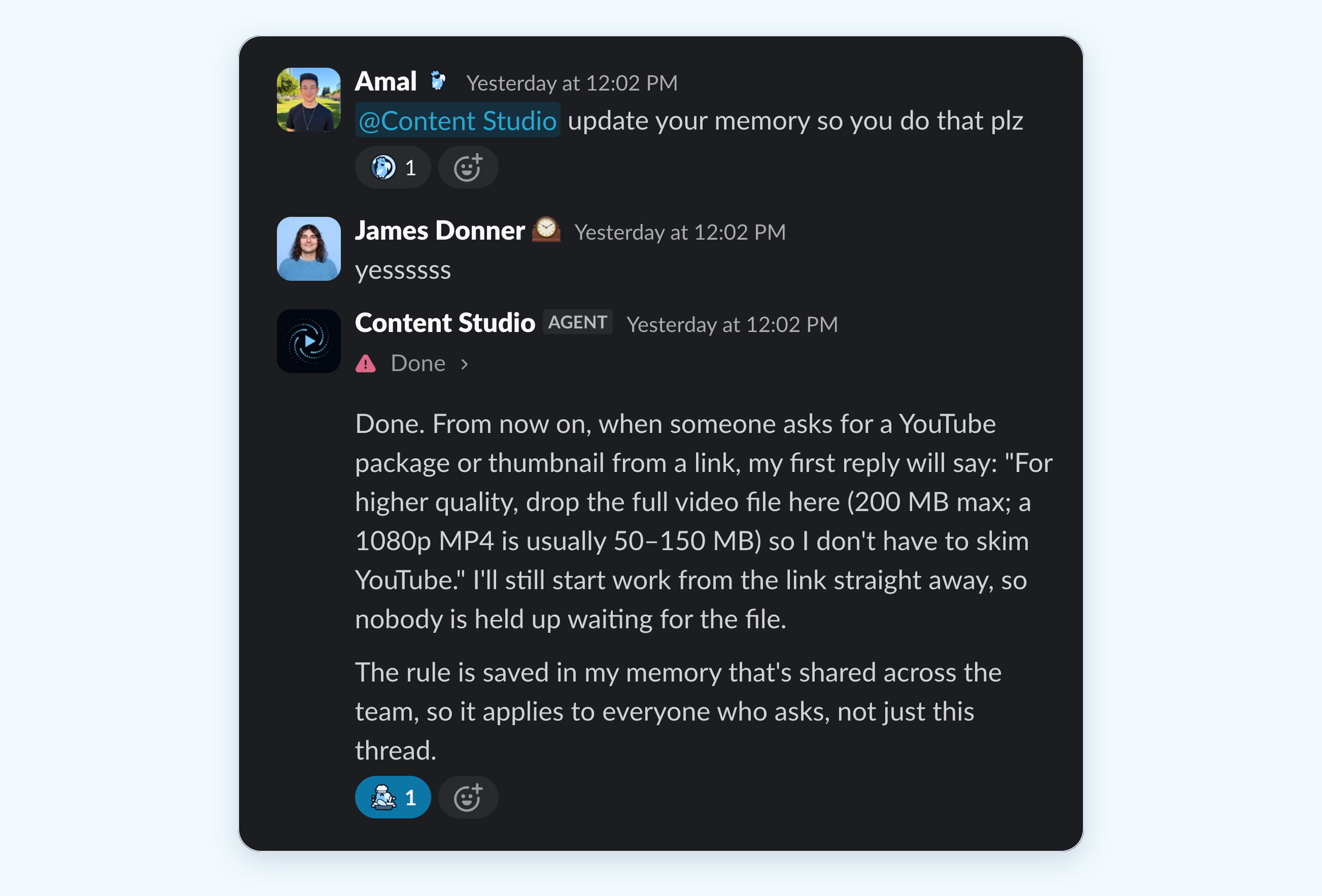
个人偏好会跨线程保留,但共享标准优先,并且为公司频道创建的任何内容都遵循公司语气。每一层都有一个 `AGENTS.md` 文件,在每次模型调用时加载。在早期版本增长到 500K token 后,我们现在将这些文件限制为 200 行的索引。
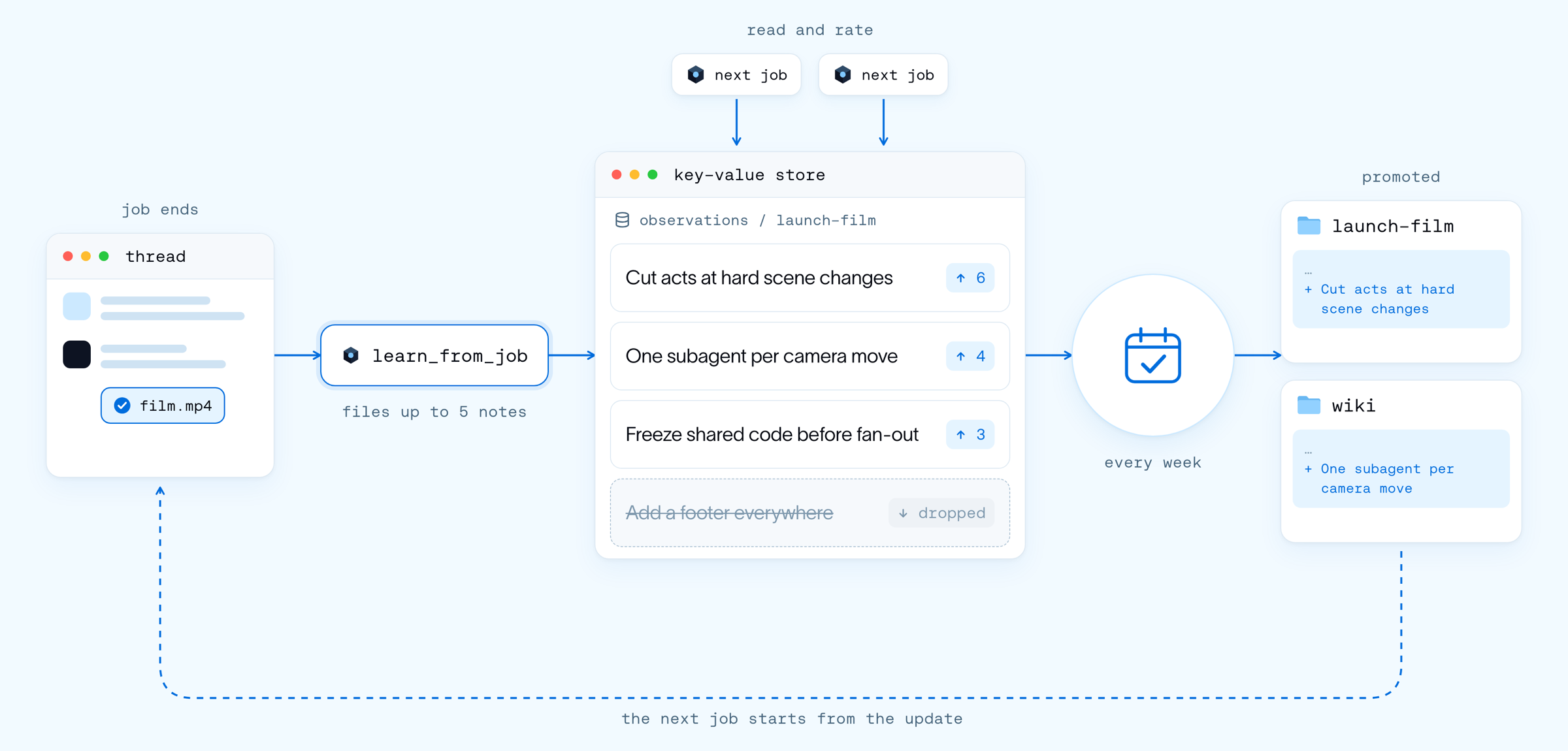
**慢速循环:**每个任务完成后,我们的 `learn_from_job` 工具会启动一个轻量级子智能体,捕获最多五条有证据支持的教训,并将它们与所使用的技能关联起来。未来的任务会读取并评价这些教训,每周一次,一个后台智能体会将证明有用的教训纳入技能和 wiki。
## 下一步
还记得那些早期的评审吗?最大的改进来自于将设计师的判断捕获到一个智能体可以学习的共享环境中,而不是让它分散在评审线程中。在此过程中,我们让设计工作对更多人变得可及。
接下来,我们希望让该智能体管理整个营销活动生命周期,其中部分功能已经可用。在获得授权审批人批准后,它会通过 Buffer 发布公司社交帖子,为员工起草可从个人账号分享的帖子,并运行定时例程,包括每日审查并推荐值得引用的帖子。
我们的目标是更进一步,让一个获批的创意方向能在同一个线程中承载整个营销活动。该智能体将撰写简报、为每个渠道创建素材、安排帖子发布、帮助团队扩大传播,并利用效果数据为下一次营销活动提供参考。所有内容在公开发布前仍会由人工审核和批准。
> **Build your own design agent:** The [open-source repo](https://github.com/langchain-ai/design-agent) has the harness from this post: the sandbox computer, skills, wiki and memory, async subagents and the Slack UX. Fork it, add your brand tokens, fonts and skills, and deploy it to your team's Slack with [Managed Deep Agents](https://docs.langchain.com/langsmith/python/managed-deep-agents-overview).
>
> 然后请于 10 月 28 日参加 [GTM Engineering Live](https://events.langchain.com/gtm-engineering-live-series/design-agent/)。我们将深入介绍 harness 和 UX 的内部机制,并展示本文未能容纳的工作。
## 正文 · 原文
The promo above was made by Content Studio, our design agent that can create videos, social graphics, recreated UI images, slide decks, and more from just a single prompt in Slack. Every asset the agent produces is written in code.
Content Studio was built entirely in-house on [Managed Deep Agents](https://www.langchain.com/blog/introducing-managed-deep-agents). It’s now one of the most widely used GTM agents within our company, but it didn’t start out that way. Early feedback was… not great.

So how did we go from such low quality to this?

We've spent four months teaching Content Studio our taste and design principles, mostly by watching it get things wrong in front of the whole company.
This post walks through how our GTM Engineering team worked with our design team to build Content Studio from scratch: what good design means to us, how we taught the agent our taste, and the harness that lets it make anything from a still to a launch film.
> **We've open-sourced our design agent.** Fork the [open-source repo](https://github.com/langchain-ai/design-agent), add your brand tokens, fonts and skills, and deploy it to your team's Slack with [Managed Deep Agents](https://docs.langchain.com/langsmith/python/managed-deep-agents-overview).
>
> Then join us at [GTM Engineering Live](https://events.langchain.com/gtm-engineering-live-series/design-agent/) on October 28. We'll go under the hood of the harness and the UX, and show the work that didn't fit in this post.
## Building a design agent for scale
LangChain moves fast. We have constant product launch campaigns, webinars, blogs and events. Each initiative needs assets, from blog headers and diagrams to decks, videos and ad creatives. Our design team was stretched thin, with repetitive requests crowding out more strategic and innovative work. As a lean startup, we needed a low-friction way for anyone at the company to create high-quality, on-brand work.
To address these needs, we built Content Studio, a design agent that lives in Slack. A team member describes what they want and attaches accompanying content or briefs, and the agent returns finished, on-brand files. To build Content Studio, we needed three things:
1. **Our designers' expert judgment**, written into the agent's skills and checks so it knows what good looks like.
2. **A custom environment** around the model, including a video editing computer with tools for every layer of the design work.
3. **The right UX**, so a whole team can collaborate on a project that runs for hours from one Slack thread.

[Managed Deep Agents](https://docs.langchain.com/langsmith/python/managed-deep-agents-overview) gave us everything we needed to productionize Content Studio inside our company: a managed [LangSmith Sandbox](https://www.langchain.com/langsmith/sandboxes), integration with Slack, managed tools, scoped agent memory and scheduling agent runs. This allows a small team to spend its time on the design work, the skills, tools and Slack experience, instead of the plumbing.
## Key results
- Content Studio has delivered over 3,000 assets across the company, including more than 80 slide decks. One of its decks was even used in our most-watched organic YouTube video.
- Posts with its work drew about 4.5M views on X.
- On the LangChain account, posts with its visuals have earned about 2x the likes and 3.7x the bookmarks of other posts.
- Three in four requests now come from outside marketing, and 75% of users are repeat visitors who come back every week.
- The median request now costs about 50 cents in model spend, down from about $8 in mid-September. Our own code shrank by about 80% after the migration to [Managed Deep Agents](https://docs.langchain.com/langsmith/python/managed-deep-agents-overview).

## Is AI actually good at design?
Before jumping into the build, let’s first address the debate of the century: can AI actually produce good design?
The model was already good at execution and could write HTML and CSS, chart specs and animation timelines. However, it didn't have our context, so it reached for familiar patterns, what [Anthropic calls “distributional convergence”](https://claude.com/resources/articles/improving-frontend-design-through-skills). The result could look polished and still look like a hundred others, or be beautifully animated and never get its point across. Familiar isn’t always bad, but we wanted our agent to make choices that followed its purpose.
[Katie Dill](https://www.youtube.com/watch?v=GLvFTMtw4Jk), Head of Design at Stripe, makes a helpful comparison. Under pressure to build quickly after World War II, builders copied the clean shapes and bare surfaces of modernism over and over. The copies kept the look while losing the thought and character behind it. Her warning is that AI can do the same to software. She calls it “zombie UI” and says we need a point of view, because “if you don’t, AI will give it for you.”

We don't think AI is bad at design. It just doesn't have a point of view unless you provide it, and giving it ours meant teaching it our taste.
## Teaching a design agent taste
Taste is the judgment that separates work that's correct from work that's good. In design, two layouts can use the right fonts, colors and spacing, and only one of them makes its point. Taste comes from what Dill calls "getting really good at noticing."
That noticing is how we learned to spot AI slop, which most often shows up when a brief leaves a decision to the agent.
For example, the image on the left below was created by a local coding agent with our brand skill (which includes colors, fonts, logos, etc.). But the final result missed critical components, such as the correct logo lockup, text alignment, and which colors were our primary vs. secondary brand colors.
The same prompt produced a perfectly on-brand image in Content Studio. This happened because the local agent filled in each decision that the brief didn't cover with what it had seen most. With this methodology, Content Studio filled the same gaps with our choices.

Left: Local coding agent with our brand skill. Right: Content Studio, from the same prompt.
The guidelines we gave Content Studio started with the basics, including color tokens, font weights, spacing, and alignment. But much of the improvement came from what we added on top. We introduced design principles, like having one focal point per frame, guardrails against common AI design patterns, and the reasoning behind each piece of feedback. Combined with better underlying models, these helped Content Studio learn to think and communicate more like a designer.
It didn't start that way. In one of our early motion graphics, a bird flies off screen with a ribbon of light trailing behind it for less than a second. We asked for no sharp edges, but the first pass came back clunky, with harsh, rounded edges. A designer would have understood what we meant. The edges should soften, while the tail tapers and fades in the direction opposite the bird's movement.

An early pass at “no sharp edges” (left) and what we meant (right).
By a later iteration, the agent was evaluating that detail with a designer's eye. Using a quick sketch to identify where the bird's tail should be, it built its own frame-by-frame check to ensure the ribbon stayed attached. Most viewers would never notice the detail consciously, but they'd feel it if something was off.

The agent’s own check: the ribbon’s root (yellow) stays on the bird’s tail (magenta) until it exits.
The measurable problems were the easiest to solve. Default capitalization used to come up frequently in reviews, but an automated check now catches every instance. The harder decisions are more subjective, like whether a campaign idea is strong enough, the message comes through clearly, or the execution resonates with the audience. When a designer makes one of those calls, we capture the reasoning in a skill so the agent can apply it to future drafts.
Content Studio changed who can do design work. A PM, engineer, or founder can brief the agent in Slack and walk away with something on brand and ready to ship. Three in four requests now come from outside marketing. For designers, the role has shifted closer to that of a creative director, setting the direction and reviewing the work rather than producing every asset themselves.
Getting the design judgment right was one part of the process. We also needed to give the agent the tools and environment to execute on it.
## Building a media harness
A designer works across several tools, from Photoshop for stills and a video engine for motion to a shared canvas for prototyping and collaboration. They also rely on brand guidelines, design assets, and company documentation.

An agent needs a similar setup, with a computer to work on, tools for different parts of the design process, and the context a designer brings to their work. The harness brings these pieces together. [Deep Agents](https://docs.langchain.com/oss/python/deepagents/overview) provides the underlying [harness](https://www.langchain.com/blog/the-anatomy-of-an-agent-harness), including the agent loop, planning, files, subagents, and context management. [Managed Deep Agents](https://docs.langchain.com/langsmith/python/managed-deep-agents-overview) packages and runs it in production. We built the environment around it, giving the agent a computer where it can maintain a project, work across tools, and inspect the results.
### harness\_v1
Our first version of that harness tried to do the designing for the model. The early models needed a lot of help to make a motion graphic or a launch film we'd want to ship. To compensate for what they couldn't yet figure out themselves, our intuition was to put more of our own design judgment into instructions and code.
So, we built a design system with 115 reusable UI components for titles, layouts, and animations, along with guidance on when and how to use them. This gave the model a set of existing designs to work from, reducing the number of creative decisions it had to make from scratch.

That helped it stay on brand, but the agent would just repeat the same layouts and animations for each frame without much variety:
We knew the models would eventually be great at this task, so we kept building the environment for that moment, experimenting with the skills and tooling along the way. Sometimes we'd add more references or more detailed instructions to help the model. Other times we'd remove them entirely and see what it could do on its own.
But the results still weren't where we wanted them, and closing the gap required increasingly more engineering work. We kept adding rules to the skills, writing more motion code, and building more components to compensate for what the model couldn't do.
Then Opus 5.5 arrived, and we saw an immediate jump in quality. We revisited the skills and removed most of the hard-coded rules, keeping the design principles and high-level guidance. The results improved further, with more variety and less repetition. The model was finally making creative decisions we'd previously tried to prebuild for it.
This was our [Bitter Lesson](http://www.incompleteideas.net/IncIdeas/BitterLesson.html). Rules designed to compensate for a model's weaknesses become less useful as models improve. What lasts is the environment around the model, including the tools it uses, the context it draws from, and how people guide its work. Instead of prebuilding creative decisions, we focused on making the harness flexible enough to take advantage of each new generation of models.
### Designer’s computer
To show the harness in action, we asked Content Studio to make a film about how it works with a video project end to end. The result stars a parrot in a pixel jungle narrated in the style of David Attenborough (voiced with ElevenLabs). Let's use it to walk through the layers of the harness: computer, tools and context behind its work.
Design is iterative. You make something, look at it and change it, often many times. So the agent needs a computer it can keep working on across a whole conversation. Each Slack thread gets its own [LangSmith Sandbox](https://www.langchain.com/langsmith/sandboxes), an isolated Linux machine with a filesystem and a shell, and the project lives there for the life of the thread.
Everything the agent creates is built with code, whether it's an HTML page for a slide, a data spec for a chart, or an animation timeline for a video. This makes it easy to iterate without starting over. If someone asks to bring the parrot in earlier, the agent can change a single timing value and render again without affecting the artwork or copy. With a flat image or generated video clip, even a small edit could mean recreating the entire asset.
The brief, plan, scene code, audio and renders all live in one project folder, which every subagent on the job works from.

On top of that, we installed the tools a designer would reach for at each layer of the work:

Motion is the most difficult layer. It runs on two engines:
1. **HyperFrames for editing:** [HyperFrames](https://hyperframes.heygen.com/), HeyGen's open-source video framework, turns a video into a web page. Clips, screen recordings, captions and text are just elements on that page, and a [GSAP](https://gsap.com/) timeline moves them around. So when someone asks to caption a webinar or cut a product demo, the agent edits it like a web page. Its CLI is basically the agent's editing suite: lint the composition, pull a frame to check, render the cut. We also install [HeyGen's official skills](https://github.com/heygen-com/hyperframes/tree/main/skills), so the agent learns the format from the people who built it.
2. **`motion-studio` for animation:** A web page can't blur fast motion, make things glow or turn a logo in 3D, and that's the finish we wanted for original animation. So we built our own canvas engine. The agent writes code that draws every pixel of every frame, and the engine blends up to 16 moments into each one, the same way a camera shutter blurs movement. The parrot film was made this way.

Both engines render each frame based on its timestamp, so a frame at ten seconds looks the same regardless of when it's rendered. This lets the agent inspect individual moments without rendering the entire film, while also allowing us to render multiple frames in parallel. Audio runs on the same timeline, keeping narration, music, and sound effects synchronized with the visuals.
With this setup, the agent can create almost anything. But without further guidance, it defaults to the model's own design choices rather than ours. The next challenge was teaching it to work within our brand and design standards.
### Designer's brain
We organized the agent's knowledge around four distinct functions, each with a clear purpose. Skills guide how to perform specific tasks, while the wiki provides context about our company and what good work looks like. Anything measurable is handled by a gate, a deterministic check written in code. A separate memory layer captures what people teach the agent over time.
#### Skills
The first thing the agent does with a request is work out what kind of job it is. That's handled by our `media-production` skill. We call it a **router skill** because most of it is one table. Each row maps a kind of ask (a campaign, a restyle, a thumbnail, a post, a YouTube package, a launch film, a short animation) to the path and the specialist skill that handle it. The router also decides whether the work needs a shared visual canvas, and it keeps small edits out of the full process.

For a film like the one above, the router picks the `launch-film` skill designed for directing a large motion production. Each of our 48 skills, close to 1,000 files in all, is scoped to a job rather than a topic, so its description reads like a routing rule, including when not to use it.
Skills compose instead of repeating each other. `launch-film` directs and `motion-studio` makes the picture and sound, so the craft of animation is written once. `launch-film` also carries role briefs for the subagents it will start, and a case study of a real 88-second launch film we rebuilt shot for shot in code. That case study is where the agent learned how to split a film between subagents. It cuts at hard scene changes, keeps a continuous camera move with one subagent, and freezes shared code before anyone works in parallel.

Descriptions matter for tools just as much as for skills. To keep context usage down, we put MCP tools behind a built-in search. The agent starts with only our own tools and loads additional tool schemas as needed, using keyword searches across tool names and descriptions.
#### Wiki
Skills explain how to do a job, while the wiki provides the context and reference material needed to do it well. It covers everything from brand tokens, graphic language, and voice to platforms, campaigns, and product information. A dedicated motion wiki covers directing, craft, sound, and review, alongside breakdowns of 70 reference films.
Rather than duplicating this information across skills, we link directly to the wiki. This keeps shared knowledge in one place and makes updates easier. When something like a font rule changes, we only need to update it once, and every skill can reference the latest version.

Knowing how we work doesn't necessarily make motion design cheaper. A wrong creative decision can still cost hours of rendering.
### Spec-driven design
Motion is especially expensive to get wrong, both in render time and tokens. A storyboard frame takes about 50 milliseconds to render, compared to 8 to 40 seconds for a single second of finished film. With subagents writing, rendering, and reviewing every act, those costs add up quickly. So the agent develops ideas in the storyboard first, where it can explore different directions cheaply, before moving into full production once a direction is approved.
To support that exploration, we gave the agent a library of reference films to draw inspiration from, much like a designer working from a mood board. When it can't find the right look, it uses an image model to generate new references, starting with quick drafts before refining the most promising options. These images help establish the visual direction, while the storyboard and final film are still built in code using real typography and brand assets.

Once we pick a direction, the approved storyboard becomes the spec the rest of the film is built against. Then the project moves through three stages:
1. A storyboard, to agree on the visual idea, the copy and the shots.
2. An animatic, a rough cut timed to the audio, to check the pacing that stills can't show.
3. Production, where subagents build, check and render the approved shots.
We first described this order in the skill's instructions, and the agent sometimes skipped a review to save time. Now the pipeline enforces it in code, so assembly waits until every act passes review, while the instructions still guide the creative calls. The order that must always hold lives in code, and the judgment stays in the prompt.
#### Point, don’t prompt
Picking between those directions is a team decision. Slack works well for asking for work and receiving it, but a thread is linear text and a storyboard is spatial, so feedback ends up describing where something is instead of pointing at it, and every change, even a one-word fix, has to go back through the agent as a new prompt.
[Paper](https://paper.design/) solved this for us. It's a design canvas built with agents in mind, with an MCP server that gives the agent direct control over the file. People can work in that same file, comparing directions side by side, leaving comments on specific frames, or making edits themselves. Because the canvas is shared, the agent can return to the file and use those comments and edits to guide its next iteration.
The challenge was that Paper's agent tools only run inside its desktop app, while our agent operates in a cloud sandbox. To bridge that gap, we run Paper Desktop headlessly on an always-on Linux worker, using a virtual display and an authenticated bridge to connect the two. A single setup supports the entire team.

Even after approval, turning a storyboard into a finished film can take hours. By that point, the work resembles a small project, with multiple pieces being built in parallel that need to come together. Coordinating all of this is more than a single agent turn can handle.
### Agent as a chief of staff
Consider the parrot film from earlier, midway through production in Slack. One person shares a reference, another suggests a different opening, and a third leaves feedback on frame four, all while the agent is still building. It's like a brainstorm where the person taking notes is also responsible for making the film. Synchronous subagents don't work well here because the main agent has to wait for them to finish, leaving no way for people to interact with it in the meantime.
To solve this, we made subagents asynchronous and shifted the main agent's role from implementer to chief of staff. It breaks complex projects into smaller, isolated tasks, assigns them to subagents, and runs the work in parallel. Meanwhile, it keeps the team informed as things change, so people can continue giving feedback and steering the project.
For each task, the main agent creates a subagent profile with a clear brief covering its role, relevant context, file ownership, and how to validate the work. It also selects the model and effort level based on the complexity of the task.
We also added a small set of tools for the main agent to coordinate work:
- `start_task` hands a part to a subagent in the background
- `check_tasks` shows what's running and reads finished reports
- `cancel_task` and `resume_task` stop work that no longer fits the brief, or pick it up where it left off
- `report_progress` lets a subagent send updates mid-job
- `schedule_wakeup` gives the main agent a timer to trigger another run and continue the job
Under the hood, each subagent is the ordinary [Deep Agents](https://docs.langchain.com/oss/python/deepagents/subagents) `task` tool running as a background task. When it finishes, our code queues a new run of the main agent carrying the result. People can also steer the main agent mid-run, since a message that arrives while it's working is inserted before its next model call. The subagents coordinate through the project folder, each writing only the files it owns and keeping its progress on disk.

With the work running in the background, the thread has to show what's happening. The main agent keeps it up to date with a plan and ETA, a live status line with running subagents, render progress and spend, an acknowledgment for each edit, and an approval card before anything goes public.

One of the clearest tests of this approach came from an overnight job to reskin a 52-slide presentation. The agent started by creating three sample slides and reviewing its own work before moving through the rest of the deck in numbered batches for approval. It also added two new slides along the way. Overnight, the main agent ran for about an hour while its subagents collectively worked for more than six hours, all without blocking the conversation.
### The self-improving harness
A designer who's worked with a team for months learns its preferences and doesn't need to hear the same feedback twice. Without memory, the agent would start from scratch with every new thread. To avoid this, we built two learning loops. The fast loop captures feedback as people give it, while the slow loop learns from completed projects in the background.
**The fast loop:** When someone shares a rule or preference, the agent saves it in the same turn. [Managed Deep Agents](https://docs.langchain.com/langsmith/python/managed-deep-agents-memory) stores memory as plain files in two layers, one shared across the team and another specific to each person.

Personal preferences carry across threads, but shared standards take precedence, and anything created for a company channel follows the company voice. Each layer has an `AGENTS.md` file that loads with every model call. We now limit these files to a 200-line index after an early version grew to 500K tokens.
**The slow loop:** After each job, our `learn_from_job` tool launches a lightweight subagent that captures up to five evidence-backed lessons and associates them with the skill used. Future jobs read and rate those lessons, and once a week, a background agent incorporates the ones that prove useful into the skills and wiki.

## What’s next
Remember those early reviews? The biggest improvement came from capturing our designers’ judgment in a shared environment the agent could learn from, rather than leaving it scattered across review threads. In the process, we made design work accessible to more people.
Next, we want the agent to manage the entire campaign lifecycle, and some of that is already working. It publishes company social posts through Buffer once an authorized approver signs off, drafts posts for employees to share from their own accounts, and runs scheduled routines, including a daily review that suggests posts worth quoting.
Our goal is to take this further, so a single approved creative direction can carry an entire campaign from one thread. The agent would write the brief, create assets for each channel, schedule posts, help the team amplify them, and use performance data to inform the next campaign. People would still review and approve everything before it goes public.
> **Build your own design agent:** The [open-source repo](https://github.com/langchain-ai/design-agent) has the harness from this post: the sandbox computer, skills, wiki and memory, async subagents and the Slack UX. Fork it, add your brand tokens, fonts and skills, and deploy it to your team's Slack with [Managed Deep Agents](https://docs.langchain.com/langsmith/python/managed-deep-agents-overview).
>
> Then join us at [GTM Engineering Live](https://events.langchain.com/gtm-engineering-live-series/design-agent/) on October 28. We'll go under the hood of the harness and UX, and show the work that didn't fit in this post.