# OpenRouter 教程:用 LLM 从 PDF 中抽取表格
> 原标题:How to Extract Tables from a PDF with an LLM
- 来源:OpenRouter:Announcements
- 发布时间:2026-10-29T00:00:00.000Z
- AIHOT:https://aihot.news/items/l928e49lwysm0ymgmhyjrkc3z
- 原文:https://openrouter.ai/blog/tutorials/extract-tables-from-pdf-llm/
## 摘要
OpenRouter 发布教程,讲解如何把 PDF 以文件形式连同严格 JSON schema 发给能读文件的模型,让表格以带类型的行返回,括号亏损、千分位和脚注标记等清理都写进字段描述。
## 推荐理由
OpenRouter 用五份 PDF 实测了多条抽取路由,给出严格 JSON schema 写法、两类静默失败的检查和各路由成本对比。
## 正文 · 中文译文
要用 LLM 从 PDF 中提取表格,请将 PDF 发送给[能够读取文件的模型](https://openrouter.ai/docs/guides/overview/multimodal/pdfs),同时提供一个[严格的 JSON schema](https://openrouter.ai/docs/guides/features/structured-outputs),用于描述表格中的一行。模型会返回带类型的行。数量会以整数返回,写成 (3,878) 的亏损会返回为 -3878,跨两页的表格会返回为一个列表。
我们在五个 PDF 上测试了这一点,其中两个是扫描件。每个直接读取 PDF 的模型都答对了全部 644 个单元格。我们测试中的失败来自 PDF 到达模型所经过的路径,其中两次返回了正常响应且没有报错。
## 简要说明
- 为一行定义严格的 JSON schema,可将 PDF 表格转换为带类型的行,字段描述可处理括号中的负数和脚注标记等清理工作。
- 在我们的测试中,能够读取 PDF 的模型同时处理了数字文件和扫描件。无法读取 PDF 的模型需要 `mistral-ocr` 解析器来处理扫描件。
- 通过免费 `cloudflare-ai` 解析器发送的扫描件会返回零行且没有报错,因此要拒绝空结果。
- 长表格可能会在输出 token 限制处停止,因此要拒绝任何 `finish_reason` 为“length”的响应。
## 开始之前
运行示例需要以下内容。
- 一个带有额度的 OpenRouter 账户,以及一个存储在 `OPENROUTER_API_KEY` 环境变量中的 [API key](https://openrouter.ai/settings/keys)。本指南中的模型是付费的。
- Python 3.10 或更高版本以及 `requests` 包(`pip install requests`)。
- Node.js 18 或更高版本,但仅用于接近末尾的 TypeScript 版本。
- 一个包含表格的 PDF。它可以是数字导出文件或扫描件。
如果你之前没有调用过该 API,[快速入门](https://openrouter.ai/docs/quickstart)会展示第一个请求。
代码适用于数字 PDF 和扫描件,但结果取决于 PDF 是否有文本层、扫描质量、解析器路径和模型。示例使用了五个测试 PDF,它们由已知数据生成,因此每个单元格都可以与源数据核对。它们分别是一张发票、一份季度报告、一份跨到第二页的 58 行发货日志、一份扫描的采购订单,以及一份故意做得很粗糙、带有合并单元格的扫描件。
## 第 1 步:如何发送 PDF 并取回行?
将以下内容保存为 `extract_tables.py`。它会将 PDF 作为文件内容部分发送,如我们的[PDF 输入](https://openrouter.ai/docs/guides/overview/multimodal/pdfs)页面所述,并通过[结构化输出](https://openrouter.ai/docs/guides/features/structured-outputs)请求与你的 schema 匹配的 JSON。将 `strict` 设为 true 时,支持严格模式的提供商会让输出符合 schema,因此每一行都有每个字段且类型正确。支持情况因提供商而异,结构化输出页面展示了如何仅路由到支持它的提供商。
```
import base64
import json
import os
import requests
API = "https://openrouter.ai/api/v1/chat/completions"
HEADERS = {"Authorization": f"Bearer {os.environ['OPENROUTER_API_KEY']}"}
def rows_schema(fields):
"""Wrap the fields of one row in a strict schema for {"rows": [...]}."""
return {
"type": "object",
"properties": {"rows": {"type": "array", "items": {
"type": "object", "properties": fields,
"required": list(fields), "additionalProperties": False}}},
"required": ["rows"],
"additionalProperties": False,
}
def extract_table(pdf_path, schema, model="anthropic/claude-haiku-5.5",
engine=None, max_tokens=8000):
with open(pdf_path, "rb") as f:
data_url = "data:application/pdf;base64," + base64.b64encode(f.read()).decode()
body = {
"model": model,
"max_tokens": max_tokens,
"messages": [{"role": "user", "content": [
{"type": "text", "text": "Extract every row of the table in this PDF. "
"Include rows from every page. "
"Return only rows that are in the document."},
{"type": "file", "file": {"filename": os.path.basename(pdf_path),
"file_data": data_url}},
]}],
"response_format": {"type": "json_schema",
"json_schema": {"name": "table", "strict": True,
"schema": schema}},
}
if engine:
body["plugins"] = [{"id": "file-parser", "pdf": {"engine": engine}}]
response = requests.post(API, headers=HEADERS, json=body, timeout=300)
response.raise_for_status()
data = response.json()
choice = data["choices"][0]
if choice["finish_reason"] == "length":
raise ValueError(f"Output stopped at max_tokens={max_tokens}. "
"Raise it or split the PDF.")
rows = json.loads(choice["message"]["content"])["rows"]
if not rows:
raise ValueError("No rows came back. If this PDF is a scan, use a model "
"that reads PDFs or engine='mistral-ocr'.")
return rows, data["usage"]["cost"]
LINE_ITEMS = rows_schema({
"sku": {"type": "string"},
"description": {"type": "string"},
"qty": {"type": "integer"},
"unit_price": {"type": "number",
"description": "USD, no currency symbol or thousands separator"},
"amount": {"type": "number",
"description": "USD, no currency symbol or thousands separator"},
})
```
`return` 之前的两个检查会捕获第 3 步和第 4 步中涵盖的失败,因此请保留它们。成本来自 `usage.cost`,[用量统计](https://openrouter.ai/docs/cookbook/administration/usage-accounting)会在每个响应中包含它。
在发票上运行该函数。
```
from extract_tables import extract_table, LINE_ITEMS
rows, cost = extract_table("invoice.pdf", LINE_ITEMS)
for row in rows[:3]:
print(row)
print(f"{len(rows)} rows, ${cost:.5f}")
```
```
{'sku': 'NW-4100', 'description': 'Hex bolt M8x40', 'qty': 100, 'unit_price': 60.67, 'amount': 6067.0}
{'sku': 'NW-4107', 'description': 'Flange nut M8', 'qty': 2, 'unit_price': 41.72, 'amount': 83.44}
{'sku': 'NW-4114', 'description': 'Bearing 6204-2RS', 'qty': 10, 'unit_price': 52.59, 'amount': 525.9}
10 rows, $0.00067
```
该调用耗时约六秒。PDF 显示 6,067.00,而行中保存的是 6067.0,这是一个无需先清理就能相加的数字。字段描述移除了千位分隔符。
## 第 2 步:如何处理合并单元格、括号和脚注?
PDF 表格所需的大部分清理工作都可以放入 schema 的字段描述中。我们的季度报告有一个跨四个季度列的“Fiscal 2026”表头,亏损写在括号中,并且两个分部名称(Enterprise 和 Hardware resale)上有脚注标记。字段描述处理括号和脚注标记。跨列表头不需要描述,因为字段名已经说明了每个值属于哪个季度。
```
from extract_tables import extract_table, rows_schema
THOUSANDS = {"type": "integer",
"description": "Thousands of USD. A value in parentheses, like (1,204), is negative: -1204."}
QUARTERLY = rows_schema({
"segment": {"type": "string", "description": "Segment name without footnote markers"},
"q1": THOUSANDS, "q2": THOUSANDS, "q3": THOUSANDS, "q4": THOUSANDS, "fy_total": THOUSANDS,
})
rows, cost = extract_table("quarterly.pdf", QUARTERLY)
for row in rows:
print(row)
```
```
{'segment': 'Inference API', 'q1': 1813, 'q2': 7299, 'q3': 1612, 'q4': 4422, 'fy_total': 15146}
{'segment': 'Enterprise', 'q1': 1563, 'q2': 2981, 'q3': 5544, 'q4': 7667, 'fy_total': 17755}
{'segment': 'Data products', 'q1': 3163, 'q2': 9658, 'q3': 2729, 'q4': 5854, 'fy_total': 21404}
{'segment': 'Hardware resale', 'q1': 3761, 'q2': -3878, 'q3': -9774, 'q4': -1776, 'fy_total': -11667}
{'segment': 'Professional services', 'q1': 8933, 'q2': 9511, 'q3': 7805, 'q4': 5946, 'fy_total': 32195}
{'segment': 'Total operating income', 'q1': 19233, 'q2': 25571, 'q3': 7916, 'q4': 22113, 'fy_total': 74833}
```
在 Hardware resale 这一行中,(3,878) 返回成了 -3878,而且两个片段名称里的脚注标记都不见了。
沿列向下合并的单元格也是同样的道理。在我们的粗略扫描中,每个 Category 单元格跨六到九行。我们把这个字段描述为“第一列中的类别。它是合并单元格,因此要在它覆盖的每一行上重复。”在我们的测试中,这足以让三个能读取 PDF 的模型都在全部 30 行上填入类别。
## 第 3 步:我应该使用哪种解析器路线?
如果模型能读取文件,我们就把 PDF 直接传给它。如果模型不能读取文件,我们先解析 PDF,再把结果发给模型。文件解析器插件的 `engine` 设置决定使用哪个解析器。当你在一个不能读取文件的模型上不设置它时,我们会使用 `mistral-ocr`,正如 [PDF 输入](https://openrouter.ai/docs/guides/overview/multimodal/pdfs) 页面所述。根据你的 PDF 长什么样来选择路线。
- **能读取 PDF 的模型。** 不设置 `engine`。Claude Haiku 5.5、GPT-6 Luna 和 Gemini 3.8 Flash 都能读取文件,而且这三个模型都处理了我们的两次扫描。PDF 按输入 token 计费。
- **不能读取 PDF 的模型,配合 OCR。** 使用 `engine="mistral-ocr"`,或者不设置它。它会先对每一页运行光学字符识别(OCR),在模型 token 费用之外,每 1,000 页收费 $2。
- **不能读取 PDF 的模型,配合免费解析器。** 只有当每个 PDF 都有文本层时才使用 `engine="cloudflare-ai"`。导出的发票和报告有文本层。扫描件没有。
下面是把扫描的采购订单分别用每种解析器发送给 `deepseek/deepseek-v4.1-flash` 的结果。该模型接受图像但不接受文件,所以 PDF 必须经过解析器。
```
from extract_tables import extract_table, LINE_ITEMS
# A model that can't read PDFs, with OCR in front of it
rows, cost = extract_table("scanned.pdf", LINE_ITEMS,
model="deepseek/deepseek-v4.1-flash", engine="mistral-ocr")
print(f"mistral-ocr: {len(rows)} rows, ${cost:.5f}")
# The same model with the free text parser
rows, cost = extract_table("scanned.pdf", LINE_ITEMS,
model="deepseek/deepseek-v4.1-flash", engine="cloudflare-ai")
```
```
mistral-ocr: 6 rows, $0.00211
ValueError: No rows came back. If this PDF is a scan, use a model that reads PDFs or engine='mistral-ocr'.
```
那个 `ValueError` 来自第 1 步中的空行检查。如果没有该检查,第二次调用会返回 200 OK,并带有 `finish_reason: "stop"` 和 `{"rows": []}`。解析器在扫描件上找不到文本,模型也正确地报告了空表格。没有任何东西抛出错误,所以没有该检查的流水线会存储零行,然后继续处理下一个文件。这是两个静默失败中的第一个。我们的粗略扫描表现相同,30 行中得了 0 分。
另外两种路线错误会大声失败。拼错的引擎名称会返回这个错误。
```
400 {"error":{"message":"plugins.0.pdf.engine: Invalid input","code":400}}
```
原生引擎只适用于能读取文件的模型。当我们还是在 DeepSeek V4.1 Flash 上设置 `engine="native"` 时,请求成功了一次,然后两次因提供商错误而失败。
```
400 Provider returned error: "The request was rejected. Possible causes: input exceeds the model's maximum context length, or the request contains invalid parameters."
```
在同一个模型上不设置 engine 时,我们试了两次都成功了,所以不要在不能读取文件的模型上设置 `native`。
## 第 4 步:为什么我的长表格返回时被截断了?
模型写出的每一行都会消耗输出 token,所以长表格需要较高的 `max_tokens`。我们那份 58 行的发货日志根据模型不同使用了 2,500 到 7,700 个输出 token,这让最啰嗦的模型在 `extract_table` 中默认的 8,000 之下几乎没有余量。算下来每行是 43 到 133 个 token。对于长表格,从每个预期行约 150 个 token 开始。然后测量你自己的行,并保留 `finish_reason` 检查,因为计数会因模型和 schema 而异。下面是限制太低时会发生的情况。
```
from extract_tables import extract_table, rows_schema
SHIPMENTS = rows_schema({
"date": {"type": "string", "description": "YYYY-MM-DD"},
"shipment_id": {"type": "string"},
"origin": {"type": "string"},
"destination": {"type": "string"},
"weight_kg": {"type": "number", "description": "No thousands separator"},
"status": {"type": "string"},
})
rows, cost = extract_table("shipments.pdf", SHIPMENTS, max_tokens=600)
```
```
ValueError: Output stopped at max_tokens=600. Raise it or split the PDF.
```
如果没有 `finish_reason` 检查,这个请求会以两种方式之一失败。普通 JSON 解析会在被截断的数组上抛出错误。
```
JSONDecodeError: Unterminated string starting at: line 1 column 627 (char 626)
```
第二种方式是另一个静默失败。开启 [Response Healing](https://openrouter.ai/docs/guides/features/plugins/response-healing) 插件后,JSON 能解析,你会得到 58 行中的 5 行,且没有异常。Healing 会修复输出的语法,其文档警告说它无法恢复被 `max_tokens` 截断的输出,所以它无法添加模型从未写出的行。`finish_reason` 检查能捕获这两种情况。
## 第 5 步:如何把行写入 CSV?
每一行都有 schema 中定义的键,因此 `csv.DictWriter` 可以从 schema 中获取列名,并按原样写入各行。Excel 可以直接打开结果。
```
import csv
from extract_tables import extract_table
# Define SHIPMENTS here, copied from step 4
rows, cost = extract_table("shipments.pdf", SHIPMENTS, model="openai/gpt-6-luna")
with open("shipments.csv", "w", newline="") as f:
fieldnames = list(SHIPMENTS["properties"]["rows"]["items"]["properties"])
writer = csv.DictWriter(f, fieldnames=fieldnames)
writer.writeheader()
writer.writerows(rows)
print(f"Wrote {len(rows)} rows to shipments.csv (${cost:.5f})")
```
```
Wrote 58 rows to shipments.csv ($0.00130)
date,shipment_id,origin,destination,weight_kg,status
2026-09-01,SHP-88200,Savannah,Valencia,8754.6,In transit
2026-09-01,SHP-88213,Busan,Los Angeles,2074.7,Customs hold
```
表格延伸到了第二页,并在那里重复了表头。CSV 只有一个表头,包含全部 58 行。
## 你应该使用哪个模型?
我们对全部五个 PDF 各运行了一次每条路线,共六页、644 个单元格,并将每个单元格与生成这些 PDF 时所用的数据进行了比较。每次运行都使用了上面的 `extract_table` 函数和提示词,并采用我们的默认提供商路由。每 1,000 页的成本是六页的总 `usage.cost` 按比例放大后的结果。模型和价格来自我们截至 2026 年 10 月 8 日的模型目录。这些结果描述的是这个测试集,而非模型的一般性能。
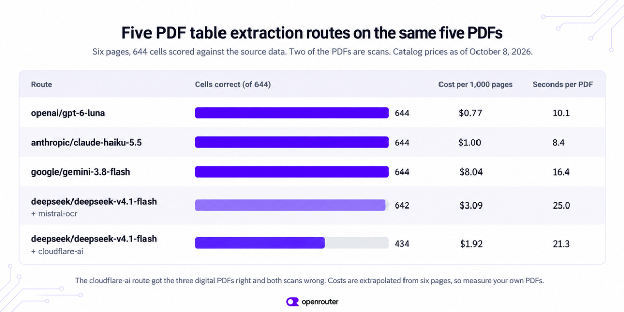
在这个测试集上,[GPT-6 Luna](https://openrouter.ai/openai/gpt-6-luna) 和 [Claude Haiku 5.5](https://openrouter.ai/anthropic/claude-haiku-5.5) 是让每个单元格都正确的最便宜路线,包括在粗糙扫描件上,两者的标价均为每百万输入 token 0.10 美元。这使得它们成为在你自己的 PDF 上进行首次测试的合理选择。[Gemini 3.8 Flash](https://openrouter.ai/google/gemini-3.8-flash) 同样准确,但在相同文件上每页成本高出八到十倍。其标价为每百万输入 token 1.50 美元,2026 年 10 月 21 日折扣至 0.75 美元。
OCR 路线的成本高于 DeepSeek 低 token 价格所暗示的水平,因为每 1,000 页 2 美元的 OCR 费用会加到每个请求上,你可以在 `usage.cost` 中看到这一点。它的两处错误是 Enterprise 和 Hardware resale 上的脚注标记,尽管 schema 要求移除它们,它却保留了。免费解析器正确处理了全部三个数字 PDF,但两个扫描件完全错误。
成本列是根据每条路线六页推算出来的。用它来比较路线,然后在选择之前,使用[黄金评估集](https://openrouter.ai/blog/tutorials/building-a-golden-eval-dataset-from-production-traffic/)在你自己的 PDF 样本上测量准确率、时间和成本,因为更密集的页面成本更高,其他布局可能表现不同。
## 什么时候 PDF 库就足够了?
如果你的所有 PDF 都是数字的,并且每个表格只有一个表头行,那么像 [pdfplumber](https://github.com/jsvine/pdfplumber) 这样的免费库就能找到表格。我们在相同文件上运行了它。它在三个数字 PDF 中找到了每个表格,并将每个单元格作为字符串返回,例如 ‘6,067.00’ 或 ‘(3,878)’。季度报告的两级表头返回为两行,合并单元格中为 `None`,而发货日志返回为两个独立的表格,每页一个。它在两个扫描件中都没有找到任何内容,因为扫描件没有可读取的文本层。
因此,当你的表格简单且 PDF 是数字的时,一个库就足够了。一旦你开始为合并表头、分页和数字格式编写清理代码,第 2 步中的 schema 维护起来工作量更少。
## TypeScript 中的相同请求
请求体在任何语言中都是相同的。将其保存为 `extract.mjs`,并在 Node.js 18 或更高版本上使用 `node extract.mjs invoice.pdf` 运行它。
```
import { readFileSync } from "node:fs";
import { basename } from "node:path";
const path = process.argv[2];
const fileData = `data:application/pdf;base64,${readFileSync(path).toString("base64")}`;
const money = { type: "number", description: "USD, no currency symbol or thousands separator" };
const schema = {
type: "object",
properties: { rows: { type: "array", items: {
type: "object",
properties: { sku: { type: "string" }, description: { type: "string" },
qty: { type: "integer" }, unit_price: money, amount: money },
required: ["sku", "description", "qty", "unit_price", "amount"],
additionalProperties: false } } },
required: ["rows"],
additionalProperties: false,
};
const res = await fetch("https://openrouter.ai/api/v1/chat/completions", {
method: "POST",
headers: { Authorization: `Bearer ${process.env.OPENROUTER_API_KEY}`,
"Content-Type": "application/json" },
body: JSON.stringify({
model: "openai/gpt-6-luna",
messages: [{ role: "user", content: [
{ type: "text", text: "Extract every row of the table in this PDF. Include rows from every page. Return only rows that are in the document." },
{ type: "file", file: { filename: basename(path), file_data: fileData } },
] }],
response_format: { type: "json_schema", json_schema: { name: "table", strict: true, schema } },
}),
});
if (!res.ok) throw new Error(`HTTP ${res.status}: ${await res.text()}`);
const data = await res.json();
const choice = data.choices[0];
if (choice.finish_reason !== "stop") throw new Error(`Unexpected finish_reason: ${choice.finish_reason}`);
const { rows } = JSON.parse(choice.message.content);
if (rows.length === 0) throw new Error("No rows came back.");
console.log(rows.length + " rows, finish_reason=" + choice.finish_reason + ", $" + data.usage.cost);
```
```
10 rows, finish_reason=stop, $0.00020275
```
脚本检查 HTTP 状态,然后应用与 Python 版本相同的两项检查。除非 `finish_reason` 为 “stop” 且 `rows` 至少有一行,否则它会停止。
## 结论
使用 LLM 从 PDF 中提取表格只需一个请求,将 PDF 作为文件部分,并使用描述一行的严格 schema。在我们的测试中,准确率来自模型直接读取 PDF,而风险来自 PDF 所走的路线。对扫描件使用文本解析器以及对长表格使用 token 限制,都返回了看起来正常的响应。`extract_table` 中的两项检查能捕获这两种情况,因此请在你运行的任何代码版本中保留它们。在确定路线之前,用你自己的 PDF 样本运行它,并比较行、时间和 `usage.cost`。
## 常见问题
### LLM 能读取扫描版 PDF 吗?
可以,前提是模型直接读取 PDF,或者你通过 mistral-ocr 解析器发送。所有三个能读取 PDF 的模型都正确识别了我们的两份扫描件,DeepSeek V4.1 Flash 配合 mistral-ocr 也是如此。像 cloudflare-ai 这样的文本解析器对扫描件会返回空结果且不报错,因为扫描件没有文本层。
在我们的六个测试页面上,按 2026 年 10 月的价格计算,使用 GPT-6 Luna 时成本折算约为每 1,000 页 $0.77,使用 Claude Haiku 5.5 时为 $1.00。经由 mistral-ocr 的模型每 1,000 页额外增加 $2 的 OCR 费用。请查看当前价格,并根据你自己的首批请求读取 `usage.cost`,因为密集表格的成本更高。
### 模型会编造 PDF 中不存在的行吗?
在我们对五份测试 PDF 的 25 次提取中,没有看到编造的行,但这并不能排除在其他文档上出现这种情况。更大的风险是漏行,原因可能是输出在 token 上限处被截断,或者解析器没有找到文本。请将行数或小计与文档进行比对。
对于表头简单的数字版 PDF,pdfplumber 免费,并且在我们所有的数字版测试文件中都找到了每一张表格。它将每个单元格作为文本返回,把多级表头拆分成单独的行,而在我们的扫描件中没有找到任何内容。Camelot 和 Tabula 是其他免费选项,但我们在本指南中没有测试它们。
## 后续步骤
- [PDF 输入](https://openrouter.ai/docs/guides/overview/multimodal/pdfs) 介绍了如何通过 URL 而非 base64 发送 PDF、解析器引擎及其价格,以及文件注解——它让你可以把解析结果发回去,这样就不必为同一个 PDF 重复支付解析费用。
- [结构化输出](https://openrouter.ai/docs/guides/features/structured-outputs) 解释了严格的 JSON schema,以及如何只路由到支持它们的提供商。
- [预设](https://openrouter.ai/docs/guides/features/presets) 将模型、系统提示词和提供商设置存储在一个名称下。把提取指令放进预设的系统提示词中,并在每个服务中调用 `@preset/your-name`,这样它们都使用相同的配置。每次请求时仍要在 `response_format` 中发送 schema,因为预设文档并未将其列在预设所存储的设置中。我们的 [预设指南](https://openrouter.ai/blog/tutorials/presets/) 介绍了具体设置步骤。
- 对于积压的 PDF,[Batch API](https://openrouter.ai/docs/batch-quickstart) 会异步运行相同的请求,通常在 24 小时内完成。`anthropic/claude-haiku-5.5:batch` 和 `openai/gpt-6-luna:batch` 按标准每 token 价格的一半计费。批处理请求以公共 URL 而非 base64 接收 PDF,因此需要先托管文件。文件 URL 仅在列出文件输入的模型上可用,因此第 3 步中 DeepSeek 配合 mistral-ocr 的方案在批处理中不可用,而在 OpenAI 模型上只能通过 Responses API 使用。我们在本指南中没有测量批处理运行情况。
- 如果你在 LangChain 中构建此功能,[ChatOpenRouter](https://openrouter.ai/blog/tutorials/langchain-chatopenrouter-setup/) 会透传 PDF 输入,并支持使用 `with_structured_output` 的严格 JSON schema。
- 如果你的源文档是图片而非 PDF,[如何向 LLM 发送图片](https://openrouter.ai/blog/tutorials/send-image-to-llm/) 介绍了图片内容部分。
## 正文 · 原文
To extract tables from a PDF with an LLM, send the PDF to a [model that can read files](https://openrouter.ai/docs/guides/overview/multimodal/pdfs), together with a [strict JSON schema](https://openrouter.ai/docs/guides/features/structured-outputs) that describes one row of the table. The model returns typed rows. Quantities come back as integers, a loss written as (3,878) comes back as -3878, and a table that runs across two pages comes back as one list.
We tested this on five PDFs, two of them scans. Every model that read the PDF directly got all 644 cells right. The failures in our tests came from the route the PDF took to reach the model, and two of them returned a normal response with no error.
## Tl;dr
- A strict JSON schema for one row turns a PDF table into typed rows, and field descriptions handle cleanup such as negatives in parentheses and footnote markers.
- Models that read PDFs handled both digital files and scans in our tests. A model that can’t read PDFs needs the `mistral-ocr` parser for scans.
- A scan sent through the free `cloudflare-ai` parser returns zero rows with no error, so reject empty results.
- Long tables can stop at the output token limit, so reject any response whose `finish_reason` is “length”.
## Before you start
You need the following to run the examples.
- An OpenRouter account with credits, and an [API key](https://openrouter.ai/settings/keys) stored in the `OPENROUTER_API_KEY` environment variable. The models in this guide are paid.
- Python 3.10 or later and the `requests` package (`pip install requests`).
- Node.js 18 or later, but only for the TypeScript version near the end.
- A PDF that contains a table. It can be a digital export or a scan.
If you haven’t called the API before, the [quickstart](https://openrouter.ai/docs/quickstart) shows a first request.
The code works with digital PDFs and scans, but results depend on whether the PDF has a text layer, the scan quality, the parser route and the model. The examples use five test PDFs that we generated from known data, so that every cell could be checked against the source. They are an invoice, a quarterly report, a 58-row shipment log that runs onto a second page, a scanned purchase order, and a deliberately rough scan with merged cells.
## Step 1: How do I send a PDF and get rows back?
Save the following as `extract_tables.py`. It sends the PDF as a file content part, as described on our [PDF inputs](https://openrouter.ai/docs/guides/overview/multimodal/pdfs) page, and asks for JSON that matches your schema through [structured outputs](https://openrouter.ai/docs/guides/features/structured-outputs). With `strict` set to true, providers that support strict mode hold the output to the schema, so every row has every field with the right type. Support varies by provider, and the structured outputs page shows how to route only to providers that support it.
```
import base64
import json
import os
import requests
API = "https://openrouter.ai/api/v1/chat/completions"
HEADERS = {"Authorization": f"Bearer {os.environ['OPENROUTER_API_KEY']}"}
def rows_schema(fields):
"""Wrap the fields of one row in a strict schema for {"rows": [...]}."""
return {
"type": "object",
"properties": {"rows": {"type": "array", "items": {
"type": "object", "properties": fields,
"required": list(fields), "additionalProperties": False}}},
"required": ["rows"],
"additionalProperties": False,
}
def extract_table(pdf_path, schema, model="anthropic/claude-haiku-5.5",
engine=None, max_tokens=8000):
with open(pdf_path, "rb") as f:
data_url = "data:application/pdf;base64," + base64.b64encode(f.read()).decode()
body = {
"model": model,
"max_tokens": max_tokens,
"messages": [{"role": "user", "content": [
{"type": "text", "text": "Extract every row of the table in this PDF. "
"Include rows from every page. "
"Return only rows that are in the document."},
{"type": "file", "file": {"filename": os.path.basename(pdf_path),
"file_data": data_url}},
]}],
"response_format": {"type": "json_schema",
"json_schema": {"name": "table", "strict": True,
"schema": schema}},
}
if engine:
body["plugins"] = [{"id": "file-parser", "pdf": {"engine": engine}}]
response = requests.post(API, headers=HEADERS, json=body, timeout=300)
response.raise_for_status()
data = response.json()
choice = data["choices"][0]
if choice["finish_reason"] == "length":
raise ValueError(f"Output stopped at max_tokens={max_tokens}. "
"Raise it or split the PDF.")
rows = json.loads(choice["message"]["content"])["rows"]
if not rows:
raise ValueError("No rows came back. If this PDF is a scan, use a model "
"that reads PDFs or engine='mistral-ocr'.")
return rows, data["usage"]["cost"]
LINE_ITEMS = rows_schema({
"sku": {"type": "string"},
"description": {"type": "string"},
"qty": {"type": "integer"},
"unit_price": {"type": "number",
"description": "USD, no currency symbol or thousands separator"},
"amount": {"type": "number",
"description": "USD, no currency symbol or thousands separator"},
})
```
The two checks before the `return` catch the failures covered in steps 3 and 4, so leave them in. The cost comes from `usage.cost`, which [usage accounting](https://openrouter.ai/docs/cookbook/administration/usage-accounting) includes in every response.
Run the function on the invoice.
```
from extract_tables import extract_table, LINE_ITEMS
rows, cost = extract_table("invoice.pdf", LINE_ITEMS)
for row in rows[:3]:
print(row)
print(f"{len(rows)} rows, ${cost:.5f}")
```
```
{'sku': 'NW-4100', 'description': 'Hex bolt M8x40', 'qty': 100, 'unit_price': 60.67, 'amount': 6067.0}
{'sku': 'NW-4107', 'description': 'Flange nut M8', 'qty': 2, 'unit_price': 41.72, 'amount': 83.44}
{'sku': 'NW-4114', 'description': 'Bearing 6204-2RS', 'qty': 10, 'unit_price': 52.59, 'amount': 525.9}
10 rows, $0.00067
```
The call took about six seconds. The PDF shows 6,067.00, and the row holds 6067.0, which is a number you can add up without cleaning it first. The field description is what removed the thousands separator.
## Step 2: How do I handle merged cells, parentheses and footnotes?
Most of the cleanup a PDF table needs can go into the field descriptions of the schema. Our quarterly report has a “Fiscal 2026” header that spans four quarter columns, losses written in parentheses, and footnote markers on two segment names (Enterprise and Hardware resale). Field descriptions handle the parentheses and the footnote markers. The spanning header needs no description, because the field names already say which quarter each value belongs to.
```
from extract_tables import extract_table, rows_schema
THOUSANDS = {"type": "integer",
"description": "Thousands of USD. A value in parentheses, like (1,204), is negative: -1204."}
QUARTERLY = rows_schema({
"segment": {"type": "string", "description": "Segment name without footnote markers"},
"q1": THOUSANDS, "q2": THOUSANDS, "q3": THOUSANDS, "q4": THOUSANDS, "fy_total": THOUSANDS,
})
rows, cost = extract_table("quarterly.pdf", QUARTERLY)
for row in rows:
print(row)
```
```
{'segment': 'Inference API', 'q1': 1813, 'q2': 7299, 'q3': 1612, 'q4': 4422, 'fy_total': 15146}
{'segment': 'Enterprise', 'q1': 1563, 'q2': 2981, 'q3': 5544, 'q4': 7667, 'fy_total': 17755}
{'segment': 'Data products', 'q1': 3163, 'q2': 9658, 'q3': 2729, 'q4': 5854, 'fy_total': 21404}
{'segment': 'Hardware resale', 'q1': 3761, 'q2': -3878, 'q3': -9774, 'q4': -1776, 'fy_total': -11667}
{'segment': 'Professional services', 'q1': 8933, 'q2': 9511, 'q3': 7805, 'q4': 5946, 'fy_total': 32195}
{'segment': 'Total operating income', 'q1': 19233, 'q2': 25571, 'q3': 7916, 'q4': 22113, 'fy_total': 74833}
```
In the Hardware resale row, (3,878) came back as -3878, and the footnote markers are gone from both segment names.
A merged cell that runs down a column works the same way. In our rough scan, each Category cell spans six to nine rows. We described that field as “The category in the first column. It is a merged cell, so repeat it on every row it covers.” In our test, that was enough for all three models that read PDFs to fill in the category on all 30 rows.
## Step 3: Which parser route should I use?
If a model can read files, we pass the PDF to it directly. If it can’t, we parse the PDF first and send the model the result. The `engine` setting of the file-parser plugin chooses the parser. When you leave it unset on a model that can’t read files, we use `mistral-ocr`, as the [PDF inputs](https://openrouter.ai/docs/guides/overview/multimodal/pdfs) page states. Choose the route by what your PDFs look like.
- **A model that reads PDFs.** Leave `engine` unset. Claude Haiku 5.5, GPT-6 Luna and Gemini 3.8 Flash all read files, and all three handled both of our scans. The PDF is billed as input tokens.
- **A model that can’t read PDFs, with OCR.** Use `engine="mistral-ocr"`, or leave it unset. It runs optical character recognition (OCR) on each page first, for $2 per 1,000 pages on top of the model’s tokens.
- **A model that can’t read PDFs, with the free parser.** Use `engine="cloudflare-ai"` only if every PDF has a text layer. Exported invoices and reports have one. Scans don’t.
Here is the scanned purchase order sent to `deepseek/deepseek-v4.1-flash` with each parser. That model accepts images but not files, so the PDF has to go through a parser.
```
from extract_tables import extract_table, LINE_ITEMS
# A model that can't read PDFs, with OCR in front of it
rows, cost = extract_table("scanned.pdf", LINE_ITEMS,
model="deepseek/deepseek-v4.1-flash", engine="mistral-ocr")
print(f"mistral-ocr: {len(rows)} rows, ${cost:.5f}")
# The same model with the free text parser
rows, cost = extract_table("scanned.pdf", LINE_ITEMS,
model="deepseek/deepseek-v4.1-flash", engine="cloudflare-ai")
```
```
mistral-ocr: 6 rows, $0.00211
ValueError: No rows came back. If this PDF is a scan, use a model that reads PDFs or engine='mistral-ocr'.
```
That `ValueError` comes from the empty-rows check in step 1. Without the check, the second call returns 200 OK with `finish_reason: "stop"` and `{"rows": []}`. The parser found no text on the scan, and the model correctly reported an empty table. Nothing raises an error, so a pipeline without the check stores zero rows and moves on to the next file. This is the first of the two silent failures. Our rough scan behaved the same way and scored 0 of 30 rows.
Two other route mistakes fail loudly. A misspelled engine name returns this error.
```
400 {"error":{"message":"plugins.0.pdf.engine: Invalid input","code":400}}
```
The native engine is meant only for models that read files. When we set `engine="native"` on DeepSeek V4.1 Flash anyway, the request worked once and then failed twice with a provider error.
```
400 Provider returned error: "The request was rejected. Possible causes: input exceeds the model's maximum context length, or the request contains invalid parameters."
```
Leaving engine unset on the same model worked both times we tried it, so don’t set `native` on a model that can’t read files.
## Step 4: Why did my long table come back cut off?
Every row the model writes costs output tokens, so a long table needs a high `max_tokens`. Our 58-row shipment log used between 2,500 and 7,700 output tokens depending on the model, which left the most verbose model little room under the default of 8,000 in `extract_table`. That works out to between 43 and 133 tokens per row. For long tables, start with about 150 tokens per expected row. Then measure your own rows and keep the `finish_reason` check, since the count varies by model and schema. Here is what happens when the limit is too low.
```
from extract_tables import extract_table, rows_schema
SHIPMENTS = rows_schema({
"date": {"type": "string", "description": "YYYY-MM-DD"},
"shipment_id": {"type": "string"},
"origin": {"type": "string"},
"destination": {"type": "string"},
"weight_kg": {"type": "number", "description": "No thousands separator"},
"status": {"type": "string"},
})
rows, cost = extract_table("shipments.pdf", SHIPMENTS, max_tokens=600)
```
```
ValueError: Output stopped at max_tokens=600. Raise it or split the PDF.
```
Without the `finish_reason` check, this request fails in one of two ways. Plain JSON parsing raises an error on the cut-off array.
```
JSONDecodeError: Unterminated string starting at: line 1 column 627 (char 626)
```
The second way is the other silent failure. With the [Response Healing](https://openrouter.ai/docs/guides/features/plugins/response-healing) plugin turned on, the JSON parses and you get 5 rows of 58 with no exception. Healing repairs the syntax of the output, and its docs warn that it can’t recover output cut off by `max_tokens`, so it can’t add the rows the model never wrote. The `finish_reason` check catches both cases.
## Step 5: How do I write the rows to CSV?
Every row has the keys defined in the schema, so `csv.DictWriter` can take its column names from the schema and write the rows as they are. Excel opens the result directly.
```
import csv
from extract_tables import extract_table
# Define SHIPMENTS here, copied from step 4
rows, cost = extract_table("shipments.pdf", SHIPMENTS, model="openai/gpt-6-luna")
with open("shipments.csv", "w", newline="") as f:
fieldnames = list(SHIPMENTS["properties"]["rows"]["items"]["properties"])
writer = csv.DictWriter(f, fieldnames=fieldnames)
writer.writeheader()
writer.writerows(rows)
print(f"Wrote {len(rows)} rows to shipments.csv (${cost:.5f})")
```
```
Wrote 58 rows to shipments.csv ($0.00130)
date,shipment_id,origin,destination,weight_kg,status
2026-09-01,SHP-88200,Savannah,Valencia,8754.6,In transit
2026-09-01,SHP-88213,Busan,Los Angeles,2074.7,Customs hold
```
The table ran onto a second page with its header repeated there. The CSV has one header and all 58 rows.
## Which model should you use?
We ran each route once over all five PDFs, which came to six pages and 644 cells, and compared every cell with the data the PDFs were generated from. Every run used the `extract_table` function and prompt above, with our default provider routing. The cost per 1,000 pages is the total `usage.cost` for the six pages, scaled up. The models and prices are from our model catalog as of October 8, 2026. These results describe this test set, not model performance in general.

On this test set, [GPT-6 Luna](https://openrouter.ai/openai/gpt-6-luna) and [Claude Haiku 5.5](https://openrouter.ai/anthropic/claude-haiku-5.5) were the cheapest routes that got every cell right, including on the rough scan, and both list at $0.10 per million input tokens. That makes them a reasonable first test on your own PDFs. [Gemini 3.8 Flash](https://openrouter.ai/google/gemini-3.8-flash) was just as accurate but cost eight to ten times as much per page on the same files. Its list price is $1.50 per million input tokens, discounted to $0.75 on October 21, 2026.
The OCR route costs more than DeepSeek’s low token price suggests, because the $2 per 1,000 pages for OCR is added to every request, and you can see it in `usage.cost`. Its two misses were the footnote markers on Enterprise and Hardware resale, which it kept even though the schema asked for them to be removed. The free parser got all three digital PDFs right and both scans completely wrong.
The cost column is extrapolated from six pages per route. Use it to compare routes, then measure accuracy, time and cost on a sample of your own PDFs before you choose one, using a [golden eval set](https://openrouter.ai/blog/tutorials/building-a-golden-eval-dataset-from-production-traffic/), because denser pages cost more and other layouts may behave differently.
## When is a PDF library enough?
If all your PDFs are digital and each table has a single header row, a free library such as [pdfplumber](https://github.com/jsvine/pdfplumber) will find the tables. We ran it on the same files. It found every table in the three digital PDFs and returned each cell as a string, such as ‘6,067.00’ or ‘(3,878)’. The quarterly report’s two-level header came back as two rows with `None` in the merged cells, and the shipment log came back as two separate tables, one per page. It found nothing in either scan, because a scan has no text layer to read.
So a library is enough when your tables are simple and your PDFs are digital. Once you’re writing cleanup code for merged headers, page breaks and number formats, the schema from step 2 is less work to maintain.
## The same request in TypeScript
The request body is the same in any language. Save this as `extract.mjs` and run it with `node extract.mjs invoice.pdf` on Node.js 18 or later.
```
import { readFileSync } from "node:fs";
import { basename } from "node:path";
const path = process.argv[2];
const fileData = `data:application/pdf;base64,${readFileSync(path).toString("base64")}`;
const money = { type: "number", description: "USD, no currency symbol or thousands separator" };
const schema = {
type: "object",
properties: { rows: { type: "array", items: {
type: "object",
properties: { sku: { type: "string" }, description: { type: "string" },
qty: { type: "integer" }, unit_price: money, amount: money },
required: ["sku", "description", "qty", "unit_price", "amount"],
additionalProperties: false } } },
required: ["rows"],
additionalProperties: false,
};
const res = await fetch("https://openrouter.ai/api/v1/chat/completions", {
method: "POST",
headers: { Authorization: `Bearer ${process.env.OPENROUTER_API_KEY}`,
"Content-Type": "application/json" },
body: JSON.stringify({
model: "openai/gpt-6-luna",
messages: [{ role: "user", content: [
{ type: "text", text: "Extract every row of the table in this PDF. Include rows from every page. Return only rows that are in the document." },
{ type: "file", file: { filename: basename(path), file_data: fileData } },
] }],
response_format: { type: "json_schema", json_schema: { name: "table", strict: true, schema } },
}),
});
if (!res.ok) throw new Error(`HTTP ${res.status}: ${await res.text()}`);
const data = await res.json();
const choice = data.choices[0];
if (choice.finish_reason !== "stop") throw new Error(`Unexpected finish_reason: ${choice.finish_reason}`);
const { rows } = JSON.parse(choice.message.content);
if (rows.length === 0) throw new Error("No rows came back.");
console.log(rows.length + " rows, finish_reason=" + choice.finish_reason + ", $" + data.usage.cost);
```
```
10 rows, finish_reason=stop, $0.00020275
```
The script checks the HTTP status and then applies the same two checks as the Python version. It stops unless `finish_reason` is “stop” and `rows` has at least one row.
## Conclusion
Extracting a table from a PDF with an LLM takes one request, with the PDF as a file part and a strict schema that describes one row. In our tests, the accuracy came from a model reading the PDF directly, and the risk came from the route the PDF took. A text parser on a scan and a token limit on a long table both returned responses that looked normal. The two checks in `extract_table` catch both cases, so keep them in any version of the code you run. Before you settle on a route, run a sample of your own PDFs through it and compare the rows, the time and `usage.cost`.
## Frequently asked questions
### Can an LLM read a scanned PDF?
Yes, if the model reads the PDF directly or you send it through the mistral-ocr parser. All three models that read PDFs got both of our scans right, and so did DeepSeek V4.1 Flash with mistral-ocr. A text parser such as cloudflare-ai returns an empty result for a scan with no error, because a scan has no text layer.
On our six test pages, at October 2026 prices, the cost scaled to about $0.77 per 1,000 pages with GPT-6 Luna and $1.00 with Claude Haiku 5.5. A model behind mistral-ocr adds $2 per 1,000 pages for OCR. Check current prices and read `usage.cost` from your own first requests, because dense tables cost more.
### Will the model invent rows that aren’t in the PDF?
We didn’t see invented rows in 25 extractions of our five test PDFs, but that doesn’t rule them out on other documents. Missing rows were the bigger risk, caused by output cut off at the token limit or a parser that found no text. Compare the row count or a subtotal against the document.
For digital PDFs with simple headers, pdfplumber is free and found every table in our digital test files. It returns each cell as text, split multi-level headers into separate rows, and found nothing in our scans. Camelot and Tabula are other free options, but we didn’t test them for this guide.
## Next steps
- [PDF inputs](https://openrouter.ai/docs/guides/overview/multimodal/pdfs) covers sending PDFs by URL instead of base64, the parser engines and their prices, and file annotations, which let you send parsed results back so you don’t pay to parse the same PDF twice.
- [Structured outputs](https://openrouter.ai/docs/guides/features/structured-outputs) explains strict JSON schemas and how to route only to providers that support them.
- [Presets](https://openrouter.ai/docs/guides/features/presets) store the model, the system prompt and provider settings under one name. Put the extraction instruction in the preset’s system prompt and call `@preset/your-name` from every service, so they all use the same configuration. Keep sending the schema in `response_format` with each request, because the presets docs don’t list it among the settings a preset stores. Our [presets guide](https://openrouter.ai/blog/tutorials/presets/) walks through the setup.
- For a backlog of PDFs, the [Batch API](https://openrouter.ai/docs/batch-quickstart) runs the same requests asynchronously, usually within 24 hours. `anthropic/claude-haiku-5.5:batch` and `openai/gpt-6-luna:batch` list at half the standard per-token price. Batch requests take PDFs as public URLs, not base64, so host the files first. File URLs work only on models that list file input, so the DeepSeek with mistral-ocr route from step 3 isn’t available in batch, and on OpenAI models they work only through the Responses API. We didn’t measure batch runs for this guide.
- If you build this inside LangChain, [ChatOpenRouter](https://openrouter.ai/blog/tutorials/langchain-chatopenrouter-setup/) passes PDF inputs through and supports strict JSON schemas with `with_structured_output`.
- If your source documents are images rather than PDFs, [How to send an image to an LLM](https://openrouter.ai/blog/tutorials/send-image-to-llm/) covers the image content part.