# Claude Code 触发用量上限后如何用 OpenRouter 继续编码
> 原标题:Hit Your Claude Code Usage Limit? How to Keep Coding
- 来源:OpenRouter:Announcements
- 发布时间:2026-10-28T00:00:00.000Z
- AIHOT:https://aihot.news/items/wgss1ksoafvu62x799sdfs0fo
- 原文:https://openrouter.ai/blog/tutorials/claude-code-usage-limit/
## 摘要
OpenRouter 介绍 Claude Code 触发用量上限时改用 OpenRouter API key 继续编码的方法:设置三个环境变量或用 Ori Harness 的 ori claude 命令,即可按 token 付费使用同样的 Claude 模型,没有五小时和每周限制。
## 推荐理由
OpenRouter 实测了 Claude Code 走 API key 计费的真实成本,并提醒 Claude Code 自印的价格可能偏高。
## 正文 · 中文译文
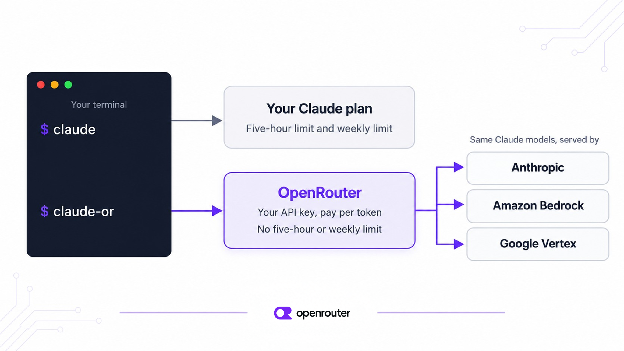
当你的 Claude Code 使用额度用尽时,你可以通过 OpenRouter API 密钥运行 Claude Code 来继续编码。通过 OpenRouter,Claude Code 使用按 token 付费的 API 密钥运行,使用相同的 Claude 模型,且没有五小时窗口限制。你只需设置三个环境变量,等额度重置后再切回你的套餐即可。
我们用 Claude Code 测试了这套配置。下面的输出和费用来自这些运行。
## 简要说明
- 你的 Claude 套餐有五小时限制和每周限制。OpenRouter API 密钥两者都没有。你改为按使用的 token 付费。
- 最快的配置方式是 Ori Harness:`ori claude` 会在该会话中通过 OpenRouter 启动 Claude Code,使用浏览器登录,无需粘贴密钥。
- 要手动操作,需用三个环境变量让 Claude Code 指向 OpenRouter。我们把它们放进一个名为 `claude-or` 的 shell 函数中,这样 `claude` 仍然使用你的套餐。
- 从 Claude Sonnet 5.5 开始。一次典型的简短 Claude Code 会话在 Sonnet 5.5 上花费 $0.16,在 Opus 5.5 上花费 $0.31,在 Haiku 5.5 上花费不到一美分。
- 不要相信 Claude Code 打印出的费用。在我们的测试中,它显示某次运行花费 $0.375,而我们实际被收取 $0.008。请改为查看你的密钥或 Activity 页面。
- 当你的套餐重置后,再次输入 `claude`。无需撤销任何操作。
## 为什么 Claude Code 会触及使用额度限制?
Claude 套餐有两个同时生效的限制。第一个在你首次提示后五小时重置。第二个每七天重置一次。Anthropic 并未公布任一限制的确切提示次数。Claude Code 使用的 token 比普通聊天多得多,因此你可能会在任务进行到一半时用尽额度。此时,Claude Code 会停止并告诉你额度何时重置。[Anthropic 关于使用额度的帮助文章](https://support.claude.com/en/articles/11647753-how-do-usage-and-length-limits-work)解释了这两个限制。
OpenRouter API 密钥不是这样运作的。你为使用的每个 token 付费,只要还有余额就可以继续使用。
## 最快的方式:通过 Ori Harness 运行 Claude Code
[Ori Harness](https://openrouter.ai/docs/guides/ori/harness) 会以已配置好的 OpenRouter 设置启动你机器上已有的 Claude Code。安装它并通过它启动 Claude Code:
```
curl -fsSL https://openrouter.ai/labs/ori/install.sh | bash
ori claude --model anthropic/claude-sonnet-5.5
```
Ori 会打开浏览器,让你用 OpenRouter 账户登录。它使用 OAuth,因此无需创建或粘贴密钥。只有你用 `ori claude` 启动的会话才通过 OpenRouter 运行,所以直接使用 `claude` 仍会使用你的套餐,等套餐重置后输入 `claude` 即可切回。用量会计入你的 OpenRouter 账单。如果你属于某个组织,账户上带有预算限制的[护栏](https://openrouter.ai/docs/guides/features/guardrails)会限制其可花费的金额,OpenRouter 也会将其应用于 Ori 会话。
下面的步骤是手动完成同样的事情,使用 API 密钥和 shell 函数。如果你想要一个带有独立信用额度、适用于任何账户的密钥,请使用这些步骤。第 4 步中的费用建议对两种方式都适用。
## 第 1 步:获取 OpenRouter API 密钥并设置限额
在[API 密钥页面](https://openrouter.ai/settings/keys)创建一个密钥并为其设置信用额度。我们将自己的设为 $4。这样,即使是很长的会话也不会花费超过 $4。信用额度是控制 OpenRouter 支出的几种方式之一。[我们关于在团队中管理 AI 支出的指南](https://openrouter.ai/blog/insights/governing-team-ai-spend/)介绍了其他方式。
要检查限额,请向我们的 API 查询你的密钥:
```
curl https://openrouter.ai/api/v1/key \
-H "Authorization: Bearer $OPENROUTER_API_KEY"
```
这是响应中重要的部分:
```
{
"data": {
"limit": 4,
"limit_remaining": 4,
"usage": 0
}
}
```
`limit_remaining` 数字告诉你密钥上还剩多少钱。你可以随时运行此检查。在请求之后,新总额可能需要几秒钟才会显示。
## 第 2 步:添加一个切换到你的密钥的命令
你可以把这些变量加到 shell 配置文件里,但那样每次 Claude Code 会话都会消耗你的密钥。我们希望你的普通 `claude` 命令继续使用你的套餐,所以把这些变量放进一个小型 shell 函数里。把下面这段加到 `~/.zshrc` 或 `~/.bashrc` 中:
```
claude-or() {
ANTHROPIC_BASE_URL="https://openrouter.ai/api" \
ANTHROPIC_AUTH_TOKEN="$OPENROUTER_API_KEY" \
ANTHROPIC_API_KEY="" \
ANTHROPIC_DEFAULT_SONNET_MODEL="anthropic/claude-sonnet-5.5" \
ANTHROPIC_DEFAULT_OPUS_MODEL="anthropic/claude-opus-5.5" \
ANTHROPIC_DEFAULT_HAIKU_MODEL="anthropic/claude-haiku-5.5" \
CLAUDE_CODE_SUBAGENT_MODEL="anthropic/claude-haiku-5.5" \
claude "$@"
}
```
前三行是关键:
- `ANTHROPIC_BASE_URL` 让 Claude Code 把请求发送给我们。
- `ANTHROPIC_AUTH_TOKEN` 存放你的 OpenRouter 密钥。
- `ANTHROPIC_API_KEY` 必须为空。如果不为空,Claude Code 可能会尝试登录 Anthropic。
其余四行是可选的。它们告诉 Claude Code 为 Sonnet、Opus 和 Haiku 分别使用哪个 Claude 模型。它们还会把子代理——Claude Code 自行启动的较小辅助任务——发送到 Haiku 5.5。
这些变量只在你输入 `claude-or` 时生效。保存文件并打开一个新终端,让这个函数生效。
## 第 3 步:检查 Claude Code 是否在使用你的密钥
在开始实际工作之前,检查 Claude Code 是把请求发送到 OpenRouter,而不是发送到你的套餐。最快的方法是发送一个简短的提示,然后看是哪个模型回答的。在你的终端中运行:
```
claude-or --model sonnet -p "Reply with exactly: ok" --output-format json
```
这是我们响应中关键的部分:
```
{
"is_error": false,
"result": "ok"
}
```
回复返回时没有报错。完整输出中的 `modelUsage` 字段指明了回答的模型,在我们的运行中是 `anthropic/claude-sonnet-5.5`。我们用 `--model haiku` 运行了同样的提示,`modelUsage` 显示的是 `anthropic/claude-haiku-5.5`。
然后再次运行第 1 步中的密钥检查。如果 `usage` 增加了,说明请求计费到了你的密钥而不是套餐。如果没有增加,说明 Claude Code 没有读取到这些变量。打开一个新终端再试一次。
## 第 4 步:控制成本
使用密钥时,每条消息都要付费。表格显示了三个 Claude 5.5 模型的价格。它还显示了 OpenRouter 上真实 Claude Code 会话(2 到 9 条消息)的费用中位数。
| 模型 | 每 100 万输入 token 价格 | 每 100 万输出 token 价格 | 会话费用中位数(2 到 9 条消息) |
| --- | --- | --- | --- |
| Claude Opus 5.5 | $4.00 | $20.00 | $0.305 |
| Claude Sonnet 5.5 | $2.00 | $10.00 | $0.155 |
| Claude Haiku 5.5 | $0.10 | $0.50 | $0.007 |
_价格截至 2026 年 10 月 21 日。会话费用来自我们的[会话费用数据集](https://openrouter.ai/docs/api/api-reference/datasets/cost-per-session-by-harness-and-model),涵盖截至 2026 年 10 月 18 日的 30 天。_
从 Sonnet 5.5 开始。它的每次会话费用约为 Opus 5.5 的一半,能处理大多数日常编码工作。遇到难题时,输入 `/model opus` 切换,完成后切换回来。如果你在我们的 API 上构建自己的应用,还可以在较便宜的模型对答案没有信心时,[自动把请求转给更强的模型](https://openrouter.ai/blog/insights/confidence-thresholds-for-model-escalation-routing/)。
每个新会话开始时,都会带上约 28,000 个 token 的 Claude Code 自身指令和工具列表(在我们运行 Claude Code 2.1.307 时是 28,156 个,这个数字会随版本变化)。它们会在第一次请求时写入提示缓存,所以第 3 步中一个单词的提示在 Sonnet 5.5 上约花费 $0.07,在 Haiku 5.5 上不到半美分。
子代理在 Haiku 上很便宜。当我们让 Sonnet 5.5 启动一个子代理时,主代理运行在 Sonnet 5.5 上,子代理运行在 Haiku 5.5 上,正如函数所设置的那样。
Haiku 也能自行处理小修复。我们给 Haiku 5.5 一个包含两个 bug 和三个失败测试的购物车文件。它修复了两个 bug,三个测试全部通过,这次运行我们被计费 $0.008。
不要依赖 Claude Code 打印的费用。在那次 Haiku 运行中,Claude Code 报告的是 $0.375,但我们被计费 $0.008。Claude Code 使用 Anthropic 自己的价格表来计算会话费用,当它不认识某个 OpenRouter 模型名称时就会猜测。要查看你实际花了多少钱,用第 1 步的命令检查 `limit_remaining`,或打开你的[活动页面](https://openrouter.ai/activity)。
## 第 5 步:套餐重置后切换回来
当你的套餐限额重置后,输入 `claude` 而不是 `claude-or`。你不需要更改任何内容,因为 OpenRouter 设置只存在于该函数内部。在我们的测试中,普通的 `claude` 使用套餐的模型进行了回答,而我们 OpenRouter 密钥的用量没有变化。
## 如果 API 密钥用完了会怎样?
当你的密钥达到信用额度上限,或你的账户余额耗尽时,我们会在请求到达模型之前将其停止,并返回一个错误。该错误包含一个 `limit_source` 字段,告诉你原因:
- `openrouter_key_limit` 表示该密钥已用完其限额。
- `openrouter_credits` 表示你的账户余额不足。
要继续使用,请在 API 密钥页面提高密钥的限额,或为你的账户充值。我们的[限额页面](https://openrouter.ai/docs/api_reference/limits)解释了每一种限额,包括团队管理员可以设置的限额。
## 常见问题
### OpenRouter 对 Claude Code 有使用限制吗?
没有五小时或每周的限制。唯一的限制在于花费:你有多少余额、你为密钥设置的限额,以及你的团队管理员设置的任何预算。
### 这些模型和我 Claude 套餐上的模型一样吗?
是的。它们是 Anthropic 的 Claude 模型。我们从 Anthropic 以及 Amazon Bedrock 和 Google Vertex 等云服务商处获取这些模型,如果某个服务商出现问题,[我们会将你的请求发送到另一个服务商](https://openrouter.ai/docs/guides/routing/provider-selection)。对于 Claude Code,我们建议[将 Anthropic 设为首选服务商](https://openrouter.ai/docs/guides/routing/provider-selection),因为 Claude Code 仅保证在 Anthropic 上可用。
### 达到限额时我可以使用更便宜的模型吗?
可以。Sonnet 5.5 每会话的成本约为 Opus 5.5 的一半,而 Haiku 5.5 每会话的成本不到一美分。你也可以在该函数的某个变量中放入不同的模型。许多人通过 OpenRouter 在 Claude Code 中使用其他模型。本月,GLM 5.3 Flash 是[我们应用页面上的 Claude Code](https://openrouter.ai/apps/claude-code) 中第二常用的模型,仅次于 Claude Opus 5.5。不过,Claude Code 是为 Claude 模型构建的,所以请先在小任务上尝试任何其他模型。如果你从自己的代码中调用我们的 API,你还可以[列出备用模型](https://openrouter.ai/docs/guides/routing/model-fallbacks),以便在第一个模型失败时将请求转移到第二个模型。有关降低每次请求费用的更多方法,请参阅[我们的 OpenRouter 最低成本 LLM 推理指南](https://openrouter.ai/blog/tutorials/how-to-get-the-lowest-cost-llm-inference-on-openrouter/)。
### Claude Code 的使用限额何时重置?
五小时限额在该窗口内第一个提示词之后五小时重置。每周限额在开始后七天重置。Claude Code 在阻止你时会显示重置时间,这样你就知道何时再次输入 `claude`。
### 如何查看我还剩多少用量?
在你的 Claude 套餐上,Claude Code 在阻止你时会告诉你限额何时重置。在 OpenRouter 上,使用 `GET /api/v1/key` 检查 `limit_remaining`,或打开你的活动页面。
## 后续步骤
我们的[Claude Code 设置指南](https://openrouter.ai/docs/cookbook/coding-agents/claude-code-integration)提供了完整的设置说明,包括一个在你工作时显示费用的状态栏。如果你想每天都将 OpenRouter 与 Claude Code 一起使用,而不仅仅是在达到限额时,[我们的 Claude Code 教程](https://openrouter.ai/blog/tutorials/claude-code-openrouter/)会引导你完成。要在不管理密钥的情况下在 OpenRouter 上运行它,[Ori Harness](https://openrouter.ai/docs/guides/ori/harness) 可以用一条命令启动 Claude Code 或其他代理 CLI。如果你是为团队进行此设置,[工作区预算](https://openrouter.ai/docs/guides/features/workspaces/workspace-budgets)可让你限制每个团队的花费。
## 正文 · 原文
When you hit your Claude Code usage limit, you can keep coding by running Claude Code on an OpenRouter API key. Through OpenRouter, Claude Code runs on a pay-per-token API key with the same Claude models and no five-hour window. You set three environment variables, and you switch back to your plan when it resets.
We tested this setup with Claude Code. The outputs and costs below come from those runs.
## Tl;dr
- Your Claude plan has a five-hour limit and a weekly limit. An OpenRouter API key has neither. You pay for the tokens you use instead.
- The quickest setup is Ori Harness: `ori claude` starts Claude Code on OpenRouter for that session, with a browser sign-in and no key to paste.
- To do it by hand, three environment variables point Claude Code at OpenRouter. We put them in a shell function called `claude-or`, so `claude` still uses your plan.
- Start with Claude Sonnet 5.5. A typical short Claude Code session costs $0.16 on Sonnet 5.5, $0.31 on Opus 5.5, and less than one cent on Haiku 5.5.
- Don’t trust the cost Claude Code prints. In our test, it showed $0.375 for a run we were billed $0.008 for. Check your key or the Activity page instead.
- When your plan resets, type `claude` again. There is nothing to undo.
## Why does Claude Code hit a usage limit?
Claude plans have two limits that run at the same time. The first resets five hours after your first prompt. The second resets every seven days. Anthropic does not publish an exact number of prompts for either one. Claude Code uses many more tokens than a normal chat, so you can run out in the middle of a task. When that happens, Claude Code stops and tells you when your limit resets. [Anthropic’s help article on usage limits](https://support.claude.com/en/articles/11647753-how-do-usage-and-length-limits-work) explains both limits.
An OpenRouter API key does not work this way. You pay for each token you use, and you can keep going as long as you have credit.
## The quickest way: run Claude Code through Ori Harness
[Ori Harness](https://openrouter.ai/docs/guides/ori/harness) starts the Claude Code already on your machine with OpenRouter settings in place. Install it and start Claude Code through it:
```
curl -fsSL https://openrouter.ai/labs/ori/install.sh | bash
ori claude --model anthropic/claude-sonnet-5.5
```
Ori opens a browser so you can sign in with your OpenRouter account. It uses OAuth, so there is no key to create or paste. Only sessions you start with `ori claude` run on OpenRouter, so plain `claude` keeps using your plan, and you switch back by typing `claude` when your plan resets. The usage goes on your OpenRouter bill. If you are in an organization, a [guardrail](https://openrouter.ai/docs/guides/features/guardrails) with a budget limit on your account caps what it can spend, and OpenRouter applies it to Ori sessions too.
The steps below do the same thing by hand, with an API key and a shell function. Use them if you want a key with its own credit limit, which works on any account. The cost advice in Step 4 applies either way.
## Step 1: Get an OpenRouter API key and set a limit
Create a key on the [API keys page](https://openrouter.ai/settings/keys) and give it a credit limit. We set ours to $4. That way, even a long session cannot spend more than $4. A credit limit is one of several ways to control spending on OpenRouter. [Our guide to governing AI spend across a team](https://openrouter.ai/blog/insights/governing-team-ai-spend/) covers the others.
To check the limit, ask our API about your key:
```
curl https://openrouter.ai/api/v1/key \
-H "Authorization: Bearer $OPENROUTER_API_KEY"
```
This is the part of the response that matters:
```
{
"data": {
"limit": 4,
"limit_remaining": 4,
"usage": 0
}
}
```
The `limit_remaining` number tells you how much money is left on the key. You can run this check at any time. After a request, it can take a few seconds for the new total to show.
## Step 2: Add a command that switches to your key
You could add the variables to your shell profile, but then every Claude Code session would charge your key. We want your normal `claude` command to keep using your plan, so we put the variables in a small shell function instead. Add this to `~/.zshrc` or `~/.bashrc`:
```
claude-or() {
ANTHROPIC_BASE_URL="https://openrouter.ai/api" \
ANTHROPIC_AUTH_TOKEN="$OPENROUTER_API_KEY" \
ANTHROPIC_API_KEY="" \
ANTHROPIC_DEFAULT_SONNET_MODEL="anthropic/claude-sonnet-5.5" \
ANTHROPIC_DEFAULT_OPUS_MODEL="anthropic/claude-opus-5.5" \
ANTHROPIC_DEFAULT_HAIKU_MODEL="anthropic/claude-haiku-5.5" \
CLAUDE_CODE_SUBAGENT_MODEL="anthropic/claude-haiku-5.5" \
claude "$@"
}
```
The first three lines are the ones that matter:
- `ANTHROPIC_BASE_URL` tells Claude Code to send its requests to us.
- `ANTHROPIC_AUTH_TOKEN` holds your OpenRouter key.
- `ANTHROPIC_API_KEY` must be empty. If it is not, Claude Code may try to sign in to Anthropic instead.
The other four lines are optional. They tell Claude Code which Claude model to use for Sonnet, Opus, and Haiku. They also send sub-agents, the smaller helper tasks Claude Code starts on its own, to Haiku 5.5.
These variables only apply when you type `claude-or`. Save the file and open a new terminal so the function is ready.

## Step 3: Check that Claude Code is using your key
Before you start real work, check that Claude Code is sending its requests to OpenRouter and not to your plan. The quickest way is to send one short prompt and look at which model answered. Run this in your terminal:
```
claude-or --model sonnet -p "Reply with exactly: ok" --output-format json
```
This is the part of our response that matters:
```
{
"is_error": false,
"result": "ok"
}
```
The reply came back with no error. The `modelUsage` field in the full output names the model that answered, and in our run it was `anthropic/claude-sonnet-5.5`. We ran the same prompt with `--model haiku`, and `modelUsage` named `anthropic/claude-haiku-5.5`.
Then run the key check from Step 1 again. If `usage` has gone up, the requests were billed to your key and not to the plan. If it hasn’t, Claude Code did not pick up the variables. Open a new terminal and try again.
## Step 4: Keep the cost down
On a key, you pay for every message. The table shows our prices for the three Claude 5.5 models. It also shows the median cost of a real Claude Code session of two to nine messages on OpenRouter.
| Model | Price per 1M input tokens | Price per 1M output tokens | Median session cost (2 to 9 messages) |
| --- | --- | --- | --- |
| Claude Opus 5.5 | $4.00 | $20.00 | $0.305 |
| Claude Sonnet 5.5 | $2.00 | $10.00 | $0.155 |
| Claude Haiku 5.5 | $0.10 | $0.50 | $0.007 |
_Prices as of October 21, 2026. Session costs come from our [session-cost dataset](https://openrouter.ai/docs/api/api-reference/datasets/cost-per-session-by-harness-and-model) and cover the 30 days to October 18, 2026._
Start with Sonnet 5.5. It costs about half as much per session as Opus 5.5 and handles most everyday coding. When a problem is hard, type `/model opus` to switch, and switch back when you are done. If you build your own app on our API, you can also [move a request to a stronger model automatically](https://openrouter.ai/blog/insights/confidence-thresholds-for-model-escalation-routing/) when the cheaper model is not confident in its answer.
Every new session starts with about 28,000 tokens of Claude Code’s own instructions and tool list (28,156 in our run on Claude Code 2.1.307, and the number changes between versions). They are written to the prompt cache on the first request, so a one-word prompt in Step 3 costs about $0.07 on Sonnet 5.5 and less than half a cent on Haiku 5.5.
Sub-agents are cheap on Haiku. When we asked Sonnet 5.5 to start a sub-agent, the main agent ran on Sonnet 5.5, and the sub-agent ran on Haiku 5.5, as the function sets.
Haiku can also handle small fixes on its own. We gave Haiku 5.5 a shopping-cart file with two bugs and three failing tests. It fixed both bugs, all three tests passed, and we were billed $0.008 for the run.
Don’t rely on the cost Claude Code prints. For that Haiku run, Claude Code reported $0.375, but we were billed $0.008. Claude Code prices the session with Anthropic’s own price table, and it guesses when it doesn’t recognize an OpenRouter model name. To see what you are really spending, check `limit_remaining` with the Step 1 command, or open your [Activity page](https://openrouter.ai/activity).
## Step 5: Switch back when your plan resets
When your plan’s limit resets, type `claude` instead of `claude-or`. You do not need to change anything, because the OpenRouter settings only live inside the function. In our test, plain `claude` answered on the plan’s model, and the usage on our OpenRouter key did not change.
## What happens if the API key runs out?
When your key reaches its credit limit, or your account runs out of credit, we stop the request before it reaches the model and return an error. The error includes a `limit_source` field that tells you why:
- `openrouter_key_limit` means the key has used up its limit.
- `openrouter_credits` means your account is out of credit.
To keep going, raise the key’s limit on the API keys page or add credit to your account. Our [limits page](https://openrouter.ai/docs/api_reference/limits) explains every kind of limit, including ones a team admin can set.
## Frequently asked questions
### Does OpenRouter have usage limits for Claude Code?
There are no five-hour or weekly limits. The only limits are on spending: how much credit you have, the limit you set on your key, and any budget your team admin has set.
### Are the models the same as on my Claude plan?
Yes. They are Anthropic’s Claude models. We get them from Anthropic and from cloud providers like Amazon Bedrock and Google Vertex, and if one provider has a problem, [we send your request to another](https://openrouter.ai/docs/guides/routing/provider-selection). For Claude Code, we recommend [setting Anthropic as your first choice of provider](https://openrouter.ai/docs/guides/routing/provider-selection), because Claude Code is only guaranteed to work with Anthropic.
### Can I use a cheaper model when I hit the limit?
Yes. Sonnet 5.5 costs about half as much per session as Opus 5.5, and Haiku 5.5 costs less than a cent per session. You can also put a different model in one of the variables in the function. Many people use other models in Claude Code through OpenRouter. This month, GLM 5.3 Flash is the second most used model in [Claude Code on our apps page](https://openrouter.ai/apps/claude-code), after Claude Opus 5.5. Claude Code is built for Claude models, though, so try any other model on a small task first. If you call our API from your own code, you can also [list fallback models](https://openrouter.ai/docs/guides/routing/model-fallbacks) so a request moves to a second model when the first one fails. For more ways to lower what you pay per request, see [our guide to the lowest-cost LLM inference on OpenRouter](https://openrouter.ai/blog/tutorials/how-to-get-the-lowest-cost-llm-inference-on-openrouter/).
### When does the Claude Code usage limit reset?
The five-hour limit resets five hours after the first prompt in that window. The weekly limit resets seven days after it starts. Claude Code shows the reset time when it stops you, so you know when to type `claude` again.
### How do I check how much usage I have left?
On your Claude plan, Claude Code tells you when your limit resets when it stops you. On OpenRouter, check `limit_remaining` with `GET /api/v1/key`, or open your Activity page.
## Next steps
Our [Claude Code setup guide](https://openrouter.ai/docs/cookbook/coding-agents/claude-code-integration) has the full setup, including a status line that shows your cost as you work. If you want to use OpenRouter with Claude Code every day, not only when you hit a limit, [our Claude Code tutorial](https://openrouter.ai/blog/tutorials/claude-code-openrouter/) walks you through it. To run it on OpenRouter without managing a key, [Ori Harness](https://openrouter.ai/docs/guides/ori/harness) starts Claude Code, or another agent CLI, with one command. If you are setting this up for a team, [workspace budgets](https://openrouter.ai/docs/guides/features/workspaces/workspace-budgets) let you limit how much each team can spend.