# LangChain 详解 Deep Agents 的上下文工程:如何记住信息而不塞满上下文窗口
> 原标题:Context Engineering with Deep Agents: How To Remember Without Keeping Everything In Context
- 来源:LangChain:Blog
- 发布时间:2026-10-14T17:00:00.000Z
- AIHOT:https://aihot.news/items/za03v9avbq4fpb2y5b1ql1t27
- 原文:https://www.langchain.com/blog/context-engineering-deep-agents-remember
## 摘要
LangChain 发布博客,介绍其开源 Agent 框架 Deep Agents 如何用 middleware 做上下文工程,应对长任务中的 context rot。
## 推荐理由
LangChain 以竞争分析 Agent 为例,讲清 offloading、summarization、skills、subagents 和长期记忆五类上下文管理技术如何通过 middleware 落地。
## 正文 · 中文译文
如果你曾在考试前一晚临时抱佛脚,你就知道那种感觉:你学得越多,前面几章的内容就越开始从记忆中溜走。
智能体也有同样的问题。当它们承担更长的任务时,它们会接收越来越多的信息(指令、工具结果、文件等);最终这会变成远超模型_上下文窗口_舒适容纳范围的[上下文](https://docs.langchain.com/oss/python/langchain/context-engineering)。模型携带的历史记录、噪声和工具输出越多,其准确性和推理能力往往就越差。
在智能体工程领域,我们称之为[上下文腐化](https://news.ycombinator.com/item?id=44308711#44310054)。这篇博客介绍了管理智能体上下文窗口的技术,以及 Deep Agents 框架如何使用一种称为中间件的概念将它们注入到智能体的运行中。
### 理解上下文工程技术
简单来说,智能体就是一个被框架包裹起来的模型。
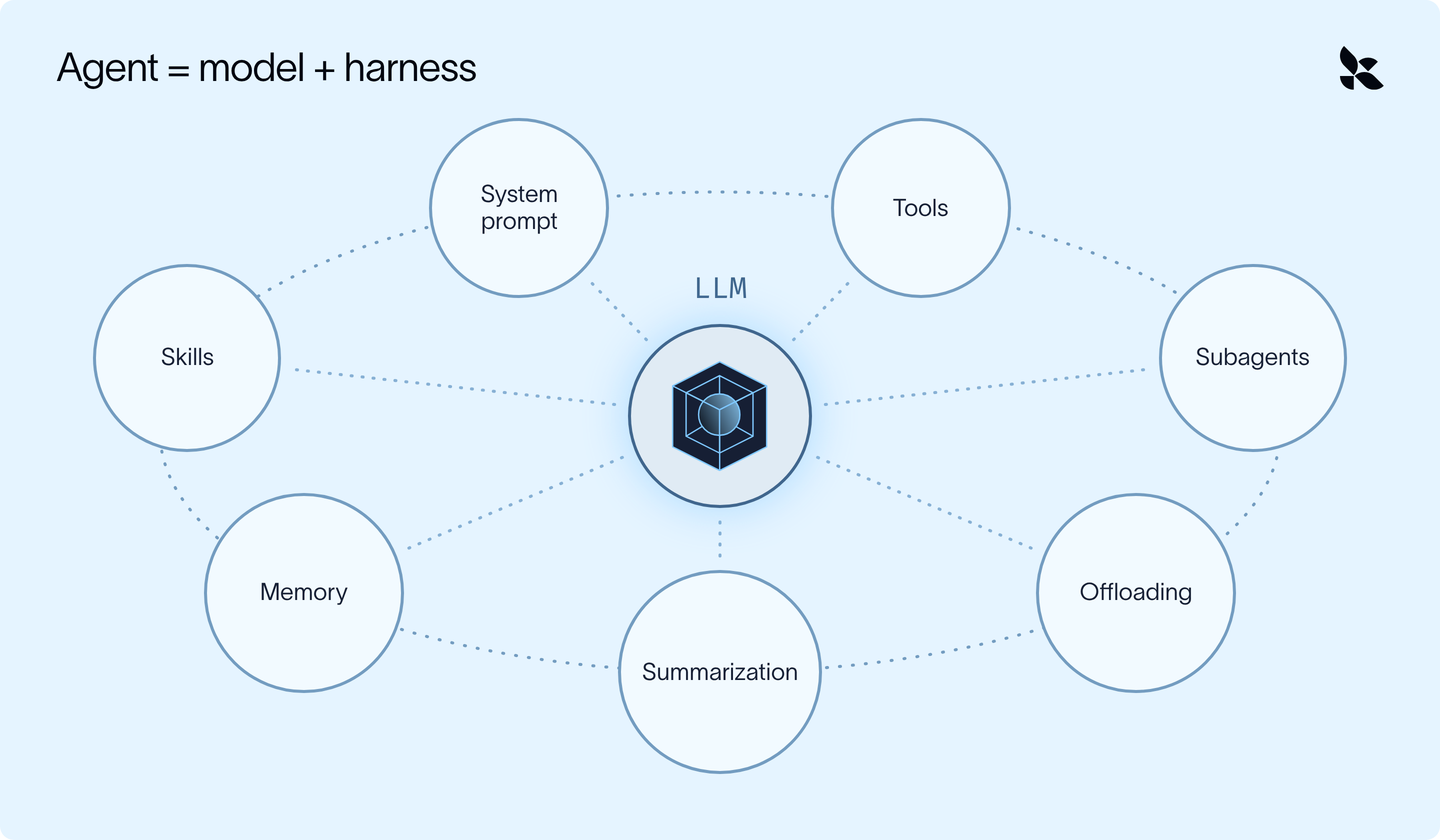
框架 = 包裹模型(LLM)
智能体可用来应对上下文腐化的上下文工程技术主要分为两类:
- 防止不必要的信息_进入_上下文窗口
- 管理并过滤_已经存在于_上下文窗口中的内容
框架会策略性地应用这些方法,以便针对给定任务让模型**在正确的时间获得正确的上下文**。
现在,要搭建一个能_出色_完成这件事的框架,说起来容易做起来难,需要大量的工作(如果你是那种考试前一晚临时抱佛脚的人,可能工作量太大了)。
[Deep Agents](https://www.langchain.com/deep-agents) 是 LangChain 的开源框架。它用各种技术包裹你选择的模型,将上下文_移出_活动窗口(移入文件、摘要或单独的智能体),这样主智能体只携带它需要的内容(并且可以在之后需要时恢复原始数据):
1. **卸载:**大型工具结果和用户消息被保存到文件系统,模型只看到预览。
2. **摘要:**当对话接近上下文限制时,较早的消息被压缩成摘要。
3. **技能:**任务知识只在模型判断其相关时才加载。
4. **子智能体:**嘈杂的工作在单独的上下文窗口中运行,只返回结果。
5. **长期记忆:**智能体学到的东西被保存到一个文件中,并延续到下一次对话。
## 将上下文工程应用于常见用例
让我们看看上述技术如何应用于一个真实世界的用例:一个竞争分析智能体。每周一,这个智能体研究五家竞争对手,并按照团队模板撰写一份报告。单次运行大致如下:
1. 拉取公司 A 的市场数据导出(数万行)
2. 搜索新闻,阅读几篇文章,并做笔记
3. 对公司 B 到 E 重复上述步骤
4. 起草报告,根据你的反馈进行修改,并排版
到第 4 步时,智能体在每次模型调用中都携带了五份原始导出数据、数十条搜索结果和两份过时的草稿。其中大部分内容与最终报告的排版无关。
检索方法([RAG](https://docs.langchain.com/oss/python/deepagents/rag) 或文件系统搜索)帮助智能体_只_拉取它需要的内容,但这仍然只解决了一半问题。即使是一个精准的智能体也会积累不必要的消息、工具结果和中间工作,因此框架还必须管理已经存在于上下文窗口内及其周围的内容。
## 如何实现这些技术:中间件
Agent 在一个循环中运行:模型决定要做什么、调用工具、读取结果,然后重复,直到任务完成。[中间件](https://docs.langchain.com/oss/python/langchain/middleware/overview)是接入该循环中特定位置的代码:例如在 Agent 启动之前、每次模型调用前后,或每次工具调用前后。
- 在每个位置,它都可以读取上下文,并在下一步运行之前修改上下文。
- Every context engineering technique in this post is a piece of middleware hooked into one of those points.
- 其中大部分都是内置的,因此你无需编写任何中间件即可使用这些技术(除非你想自定义某些特定内容)。
## 卸载:将其移出上下文窗口
我们的 Agent 并不总是需要看到每次工具调用或人类消息返回的_所有_数据,尤其是在数据量很大的情况下。
例如,每次 pull\_market\_report 工具调用都会返回一份完整的数据导出(数千行);然而,Agent 只需要其中的几个数字,因此可以限制模型只看到这些行。
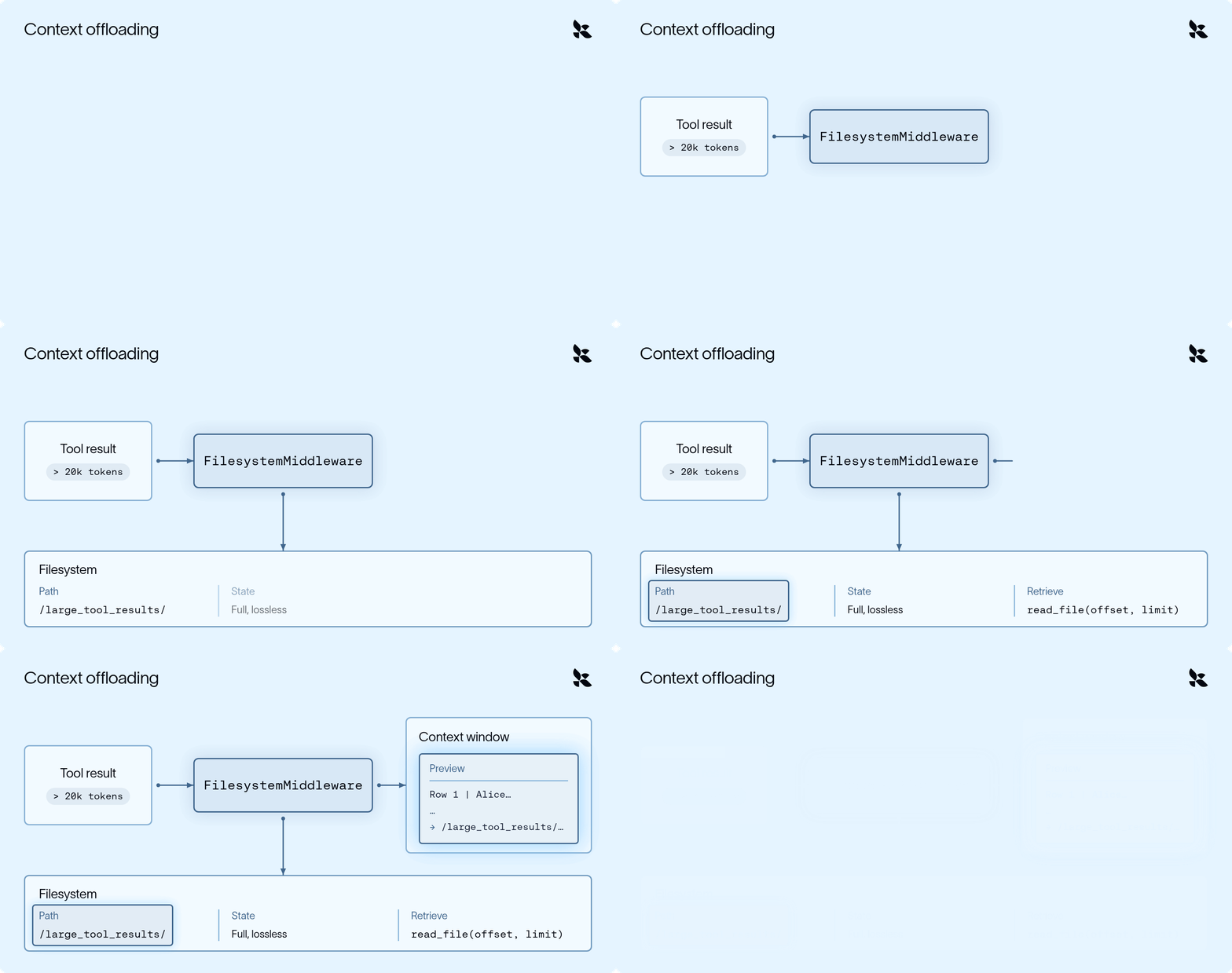
工具结果卸载过程(动画)
FilesystemMiddleware 在每次调用工具时都会运行:
1. 当工具结果超过约 20,000 个 token 时,完整结果会在进入对话之前被写入 /large\_tool\_results/{tool\_call\_id}。
2. 模型只会看到一个简短的预览(开头和结尾的几行)以及文件路径。
3. 当 Agent 之后需要 Company B 的季度营收时,它会用 read\_file 逐页读取该文件。
过大的用户/人类消息,例如粘贴的通话记录,也会以更高的阈值(50,000 个 token)得到同样的处理,并被保存到 /conversation\_history/。
## 摘要:压缩已有内容
尽管我们尽力卸载冗长的工具调用,但在长时间运行中,上下文仍会逐渐堆积(例如五家公司的搜索、笔记和草稿)。摘要可用于将我们 Agent 的整个上下文窗口浓缩为对目前为止所发生情况的总结,使其能够继续进行研究任务。
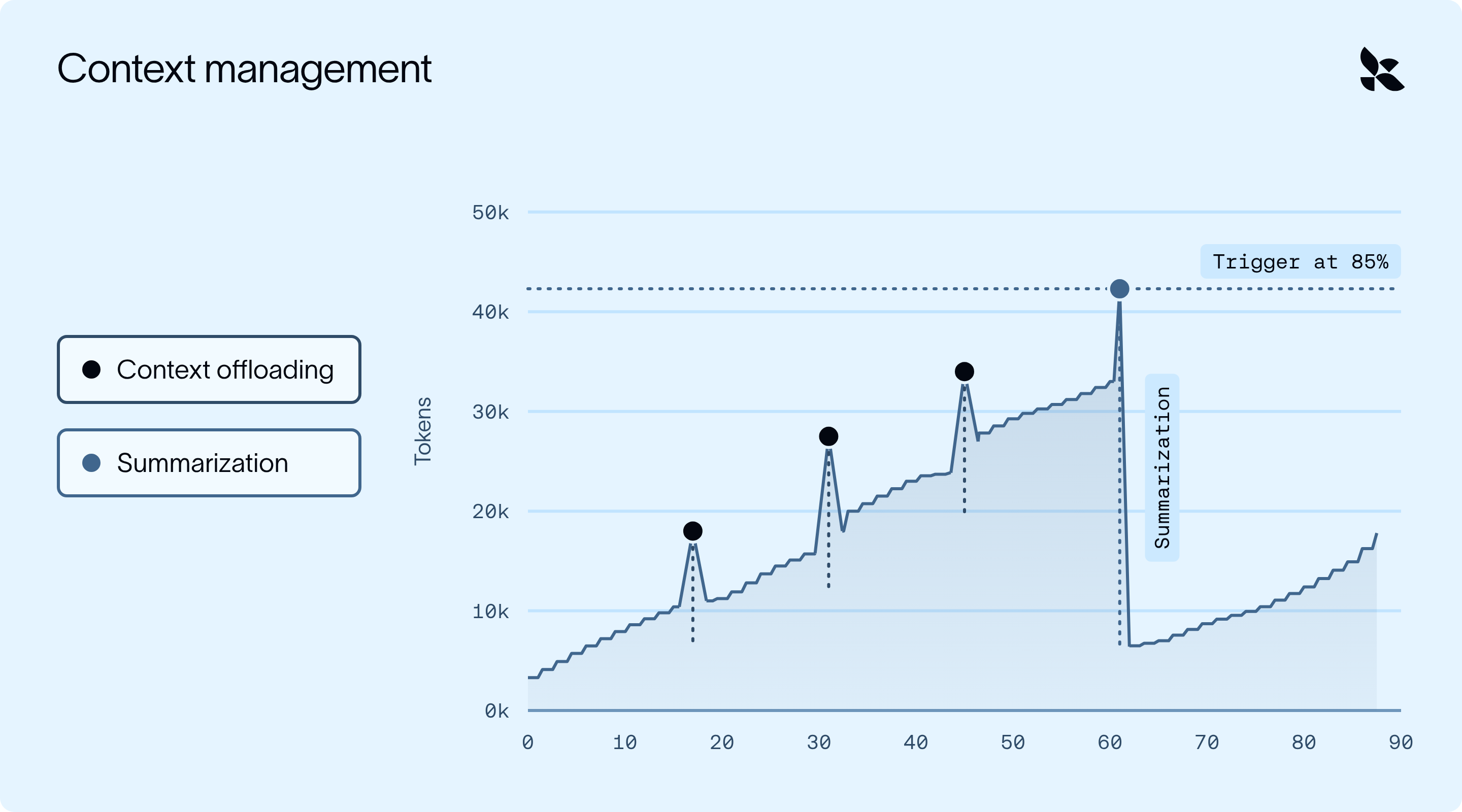
卸载阻止了小的尖峰,而摘要则“重置”了整体的攀升
- 尖峰是大型工具结果/人类消息到达;卸载会在模型看到之前将每一个替换为简短预览,因此上下文只会小幅增长。
- 摘要处理缓慢的攀升:一旦使用量达到 85%,较早的消息会被浓缩为摘要,上下文随之回落。
SummarizationMiddleware 在每次模型调用之前检查 token 使用量:
1. 一旦使用量越过阈值(默认是模型上下文窗口的 85%),就会进行一次单独的 LLM 调用,将较早的消息浓缩为单个摘要
2. 较早的消息会从上下文窗口中移除,而最近的消息则逐字保留。
3. 模型现在会先看到摘要,然后看到最近的消息(因此最近的内容不会被改写)。
两个重要细节:
- **它是可恢复的。**被摘要的消息会写入 /conversation\_history/{session\_id}.md。如果 Agent 在起草时需要 Company A 研究中的某个细节,它可以将其读回。
- **它会循环进行。**随着运行继续,使用量会再次攀升,下一次摘要会包含上一次的摘要。
**你也可以在主题变化时进行摘要**,而不仅仅是在某个 token 阈值时。自定义摘要提示词可能会有所帮助。
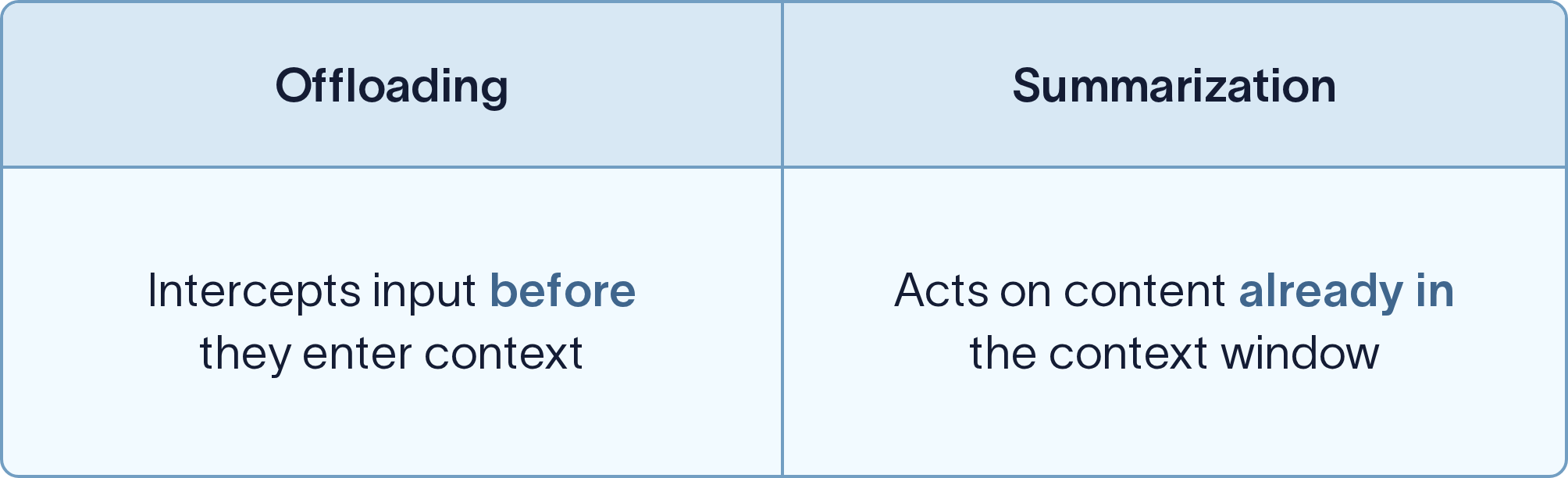
我们关于[Deep Agents 上下文管理](https://www.langchain.com/blog/context-management-for-deepagents)的文章更详细地介绍了这两者。
## 技能:仅在需要时加载信息
假设你的销售团队有一套固定的季度业务回顾格式。智能体每季度只需要这些指令一次,所以把它们放在系统提示里意味着每次调用都要为它们付费(消耗 token 和响应时间)。相反,你可以把这些信息打包成一个 skill。
skill 是一个指令文件夹(可选包含脚本和参考文档),为智能体提供完成某项专门任务所需的内容。
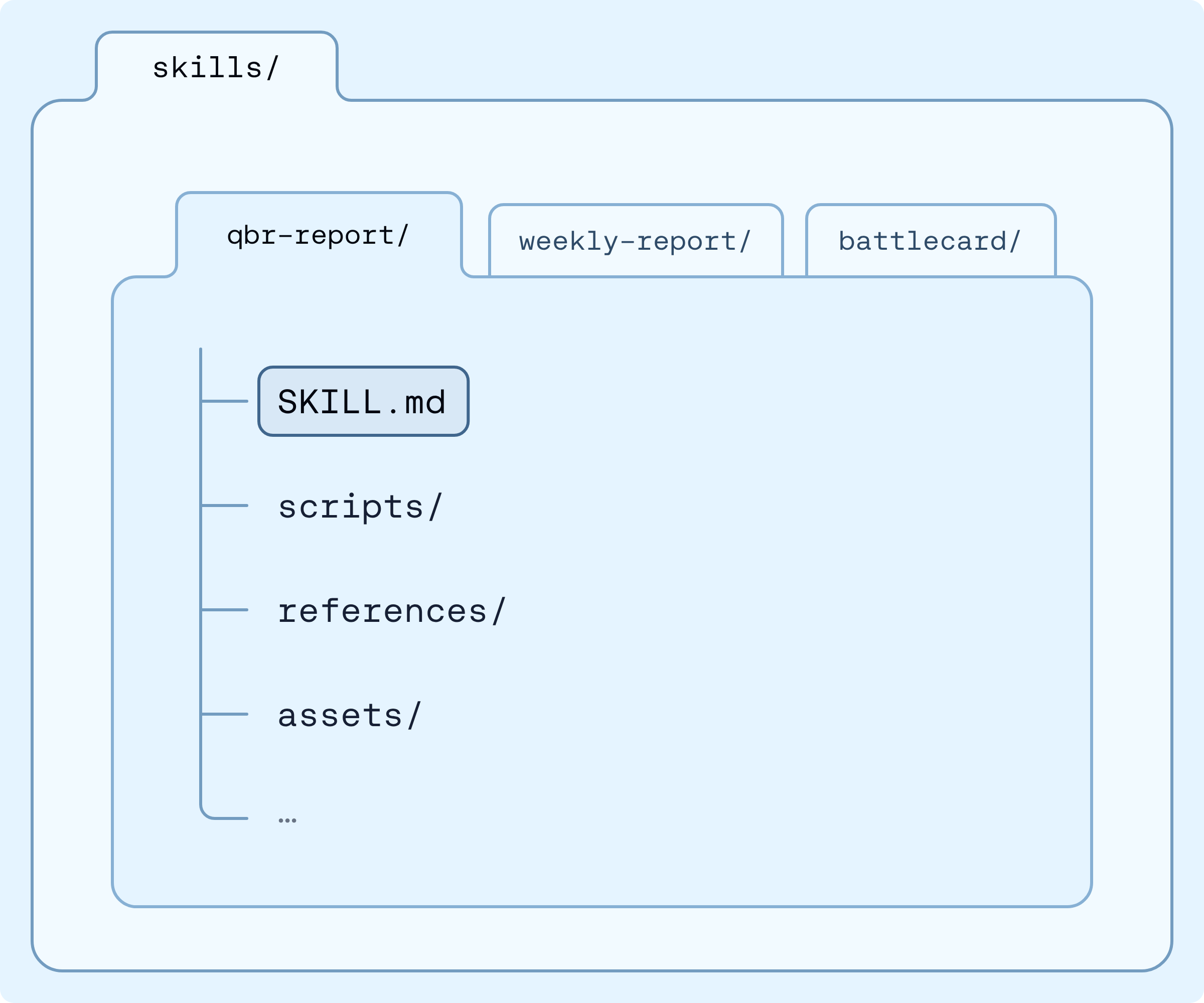
skill 文件夹的结构
智能体一开始只看到一段简短描述,只有当 QBR 出现时才加载 qbr-report 的完整指令(其他任务永远不会携带它们)。
Skill 分层加载上下文,因此窗口会一直保持很小,直到某些内容真正相关时才加载。这被称为渐进式披露:模型一开始只看到一份“菜单”,在需要时才拉取完整配方,因此十个 skill 消耗的上下文大约相当于十条单行说明。
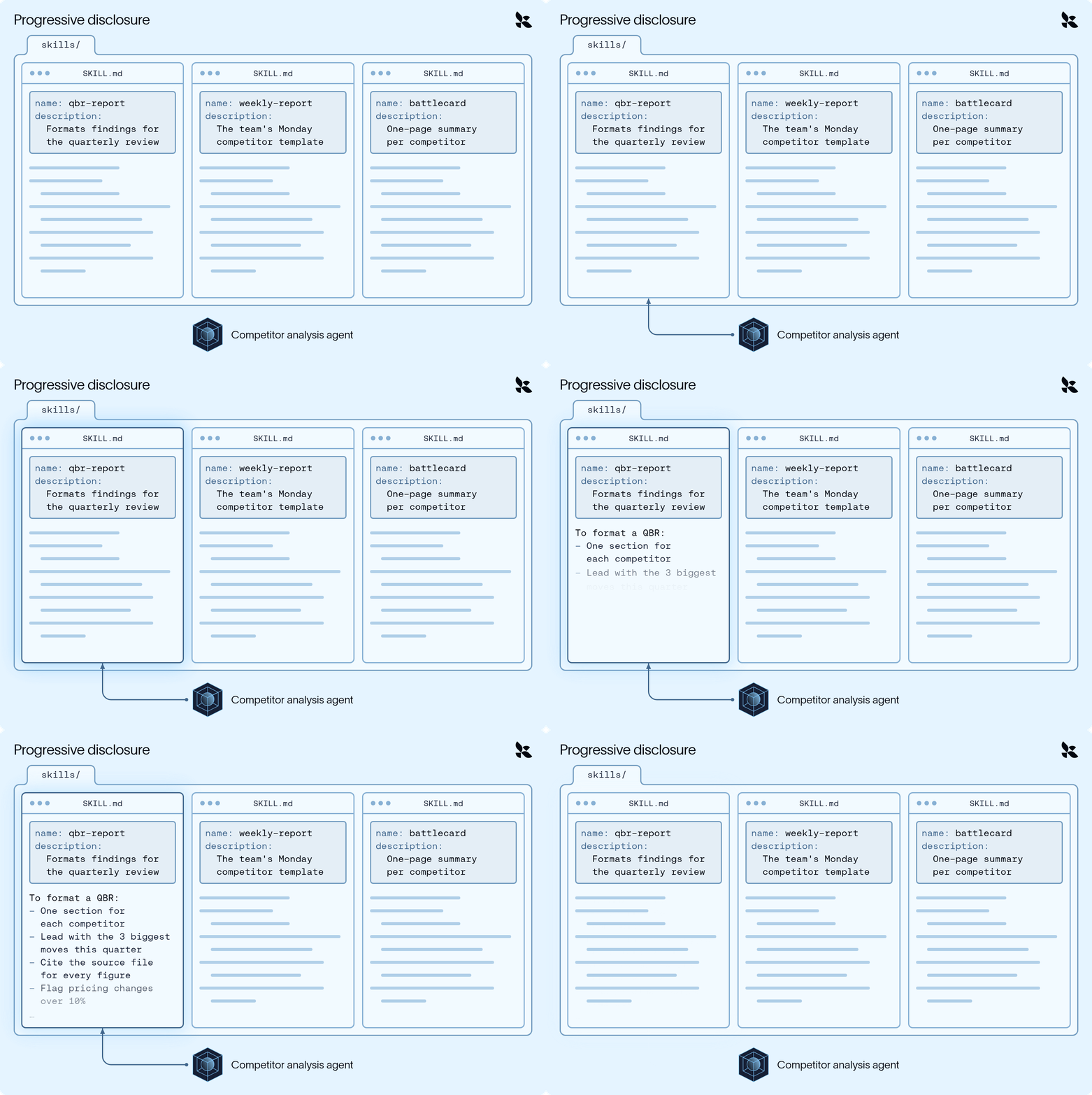
渐进式披露(动画)
你把智能体指向你的 skill,SkillsMiddleware 使用两个钩子:
1. 在智能体启动前,它扫描 skills 文件夹,只读取每个 SKILL.md 的头部。
2. 在每次模型调用时,它把这些名称和描述添加到系统提示中。
完整指令只有在模型判断某个 skill 相关时才会进入上下文(并通过 read\_file 工具读取它),因此我们的智能体在没有模板的情况下进行研究,只在需要格式化 QBR 时才加载它。
## 子智能体:隔离嘈杂的工作
卸载能有效应对过大的结果,但对于你_已知_会很嘈杂的工作(比如通过数十次搜索和页面研究一家公司),子智能体是一个很好的设计选择。子智能体在自己的上下文窗口中完成这些工作,只返回最终结果,这样主智能体永远不会看到“噪音”。
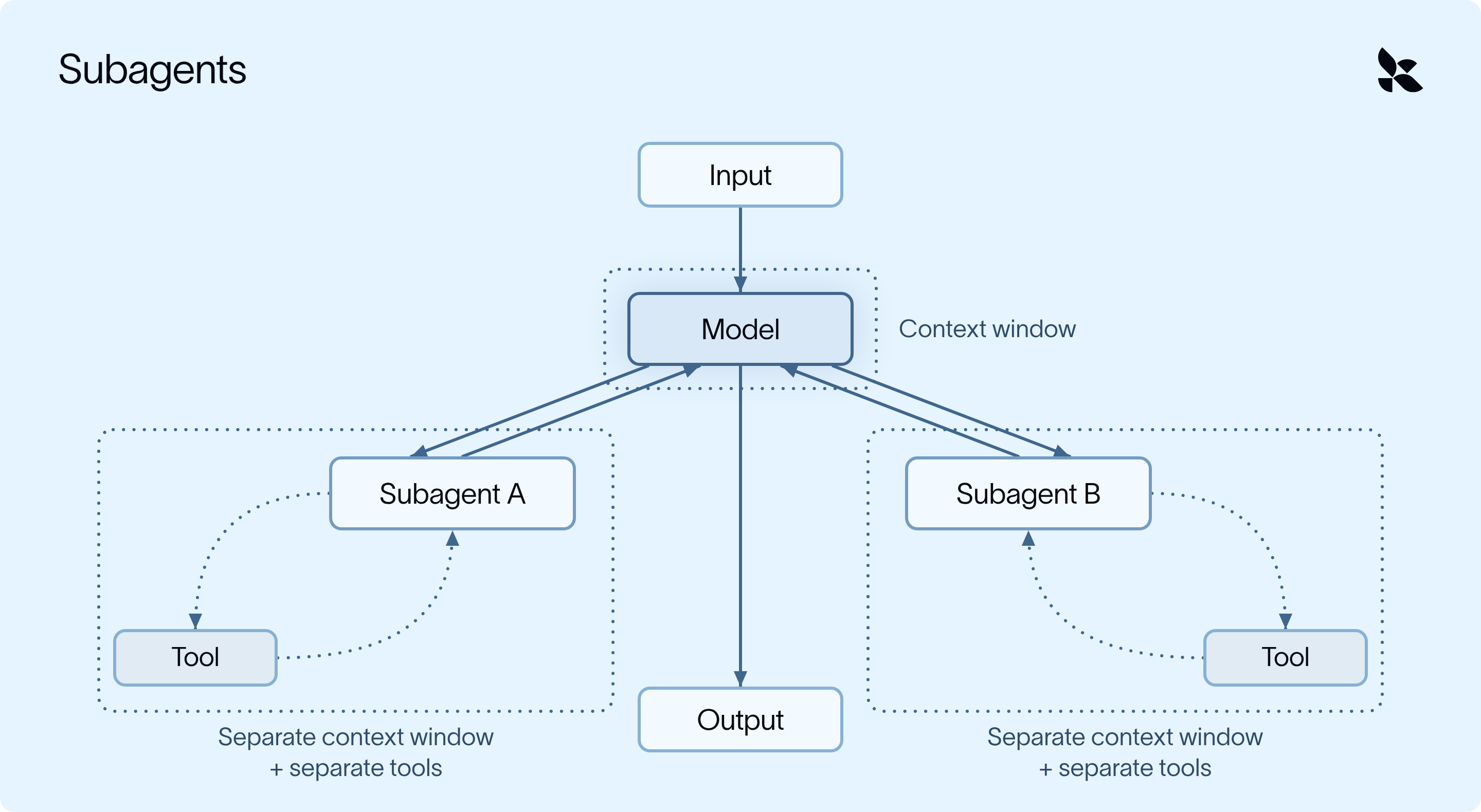
SubAgentMiddleware 允许我们为子智能体自定义系统提示和可用工具。
```
market_researcher = {
"name": "market-researcher",
"description": "Researches a company and returns the 3 most notable developments.",
"system_prompt": "Use pull_market_report, then return 3 short bullet points. Do not return the raw report.",
"tools": [pull_market_report],
}
agent = create_deep_agent(model=model, subagents=[market_researcher])
```
在我们的场景中,主智能体把每家公司交给 market-researcher 子智能体。
研究子智能体在自己的上下文中读取完整报告,只返回三条要点,因此主智能体只看到这三条要点(甚至看不到原始报告的预览)。此外,由于子智能体任务往往规模小且范围明确,它们通常可以运行在更便宜的模型上并并行执行。
## 长期记忆:跨对话持久保存
到最后,你的智能体会学到很多东西。有些有用,有些没用。
假设你告诉智能体:“摘要里用要点,不要用段落。”如果没有记忆,你可能每周都要重复这句话。在 Deep Agents 中,长期记忆就是一个 markdown 文件。你用一个参数把智能体指向它,MemoryMiddleware 会处理其余的事情:
1. **加载:**在运行开始时读取该文件。
2. **注入:**在每次模型调用时把其内容添加到系统提示中。
3. **更新:**当智能体学到值得保留的内容(比如你的格式偏好)时,它会更新该文件。
## 更换模型,保留记忆
Deep Agents 与提供商无关,这一点也延续到了记忆上。因为记忆是你自己存储中的一个普通文件(而不是由某个提供商持有的东西),你可以把同一个后端指向不同的模型:
```
agent = create_deep_agent(
model="openai:gpt-6", # different provider, same memory
memory=["/memories/AGENTS.md"],
backend=backend,
store=store,
)
```
下周,另一个模型可以读取同一个文件,并且仍然用要点写摘要。
## 需要牢记的上下文工程策略
无论你是基于 Deep Agents 构建、使用其他框架,还是自己构建一个,以下是一些需要注意的事项:
- **大输入应该被卸载,而不是被截断。**截断是有损的;卸载则保持其可检索性。
- **压缩应该是可恢复的。**在摘要之后,智能体仍然可以取回它所需的细节。
- **知识应该按需加载。**系统提示中为每项任务准备的指令会在每次调用时消耗上下文。
- **嘈杂的工作应该被隔离。**拥有自己上下文的子智能体能让主智能体保持专注。
- **你应该拥有记忆。**存储在你所控制的存储中的记忆,能在模型或提供商切换后依然存活。
- **默认值应该是可自定义的。**适合某一项任务的阈值很少能适合每一项任务。
## 试一试
```
uv add deepagents
```
想向真人讲师学习更多?我将在11月3日讲解这个内容:点击[这里](https://events.langchain.com/register/agent-memory-101-context-engineering/)注册!
**要深入了解上下文工程,请查看我们免费的、自定进度的**[**LangChain Academy 上的 Deep Agents 课程。**](https://about:blank)
## 正文 · 原文
If you've ever crammed for an exam the night before, you know the feeling: the more you study, the more the early chapters start to slip.
Agents have the same problem. As they take on longer tasks, they take on more and more information (instructions, tool results, files etc.); eventually this becomes far too much [context](https://docs.langchain.com/oss/python/langchain/context-engineering) to comfortably fit in a model's _context window_. The more history, noise, and tool output a model carries, the worse its accuracy and reasoning tend to get.
In the world of agent engineering, we call this [context rot](https://news.ycombinator.com/item?id=44308711#44310054). This blog covers techniques to manage your agent’s context window and how the Deep Agents harness uses a concept called middleware to inject them into your agent’s run.
### Understanding context engineering techniques
To simplify, an agent is just a model with a harness around it.

Harness = surrounds the model (LLM)
The context engineering techniques at the agent’s disposal to address context rot primarily fall into two categories:
- Preventing unnecessary information from _entering_ the context window
- Managing and filtering what’s _already in_ the context window
The harness applies these methods strategically to get the model **the right context at the right time** for the given task.
Now wiring up a harness that does this _well_ is easier said than done, and requires a lot of work (maybe too much work if you are the kind of person who crams for exams the night before).
[Deep Agents](https://www.langchain.com/deep-agents) is LangChain’s open source harness. It wraps the model of your choice with techniques that move context _out_ of the active window (into files, summaries, or a separate agent), so that the main agent carries only what it needs (and can recover the raw data if needed later):
1. **Offloading:** large tool results and user messages are saved to the filesystem, and the model sees a preview.
2. **Summarization:** when the conversation nears the context limit, older messages are condensed into a summary.
3. **Skills:** task know-how loads only when the model decides it's relevant.
4. **Subagents:** noisy work runs in a separate context window, and only the result comes back.
5. **Long-term memory:** what the agent learns is saved to a file that carries over to the next conversation.
## Applying context engineering to common use cases
Let’s see how the techniques above can be applied in a real-world use case: a competitive analysis agent. Every Monday, this agent researches five competitors and writes a report in the team's template. A single run looks something like this:
1. Pull a market data export for Company A (tens of thousands of rows)
2. Search the news, read a few articles, and take notes
3. Repeat for Companies B through E
4. Draft the report, revise it based on your feedback, and format it
By step 4, the agent has carried five raw exports, dozens of search results, and two stale drafts through every model call. Most of it is irrelevant for formatting the final report.
Retrieval methods ([RAG](https://docs.langchain.com/oss/python/deepagents/rag), or filesystem search) help the agent pull in _only_ what it needs, but that still only solves half the problem. Even a precise agent accumulates unnecessary messages, tool results, and intermediate work, so the harness also has to manage what's already in and around the context window.
## How to implement these techniques: middleware
An agent runs in a loop: the model decides what to do, calls a tool, reads the result, and repeats until the task is done. [Middleware](https://docs.langchain.com/oss/python/langchain/middleware/overview) is code that plugs into specific points in that loop: such as before the agent starts, around each model call, or around each tool call.
- At each point it can read the context and change it before the next step runs.
- Every context engineering technique in this post is a piece of middleware hooked into one of those points.
- Most of this is built in, so you don't need to write any middleware to use these techniques (unless you want to customize something specific).
## Offloading: keeping it out the context window
Our agent doesn’t always need to see _all_ the data that’s returned from every tool call or human message, especially if it’s a large volume.
For example, each pull\_market\_report tool call returns a full data export (thousands of rows); however, the agent only needs a few numbers from it, so the model can be restricted to only see those rows.

Tool Result Offloading process (animated)
FilesystemMiddleware runs every time a tool is called:
1. When a tool result exceeds roughly 20,000 tokens, the full result is written to /large\_tool\_results/{tool\_call\_id} before it enters the conversation.
2. The model sees only a short preview (the first and last few lines) plus the file path.
3. When the agent later needs Company B's quarterly revenue, it pages through the file with read\_file.
Oversized user/human messages, like a pasted call transcript, get the same treatment at a higher threshold (50,000 tokens) and are saved to /conversation\_history/.
## Summarization: compacting what's already there
Try as we may to offload verbose tool calls, context will gradually begin to pile up over a long run (e.g. five companies' worth of searches, notes, and drafts). Summarization can be used to condense our agent’s entire context window into a summary of what has transpired so far, to allow it to continue on with its research tasks.

Offloading stops the small spikes, while summarization “resets” the overall climb
- The spikes are large tool results/human messages arriving; offloading swaps each one for a short preview before the model sees it, so context only grows by a little.
- Summarization handles the slow climb: once usage hits 85%, older messages are condensed into a summary and context drops back down.
SummarizationMiddleware checks token usage right before each model call:
1. Once usage crosses a threshold (85% of the model's context window by default), a separate LLM call condenses older messages into a single summary
2. Older messages are removed from the context window while the most recent messages are kept verbatim.
3. The model now sees the summary first, then the recent messages (so nothing recent gets paraphrased).
Two important details:
- **It's recoverable.** The summarized messages are written to /conversation\_history/{session\_id}.md. If the agent needs a detail from Company A's research while drafting, it can read it back.
- **It cycles.** As the run continues, usage climbs again, and the next summary includes the previous one.
**You can also summarize when the topic changes**, not just at a certain token threshold. It can be helpful to customize the summarization prompt.

Our post on [context management for Deep Agents](https://www.langchain.com/blog/context-management-for-deepagents) covers both in more detail.
## Skills: load information only when it's needed
Say your sales team has a specific format for quarterly business reviews. The agent only needs those instructions once a quarter, so keeping them in the system prompt means paying for them (in tokens and response time) on every call. Instead, you can package this information as a skill.
A skill is a folder of instructions (with optional scripts and reference docs) that give an agent what it needs for a specialized task.

Anatomy of a skill folder
The agent sees a short description up front and loads the full instructions for qbr-report only when a QBR comes up (other tasks never carry them).
Skills load context in layers, so the window stays small until something is actually relevant. This is called progressive disclosure: the model sees a “menu” up front and pulls in the full recipe when it needs it, so ten skills cost about as much context as ten one-liners.

Progressive Disclosure (animated)
You point the agent at your skills, and SkillsMiddleware uses two hooks:
1. Before the agent starts, it scans the skills folder and reads only the header of each SKILL.md.
2. On every model call, it adds those names and descriptions to the system prompt.
The full instructions enter context only when the model decides a skill is relevant (and reads it with a read\_file tool), so our agent researches without the template and only loads it once it's time to format a QBR.
## Subagents: isolate the noisy work
Offloading effectively combats oversized results, but subagents are a good design choice for work you already _know_ will be noisy (like researching a company across dozens of searches and pages). The subagent does that work in its own context window and returns only the final result so that the main agent never sees the “noise”.

SubAgentMiddleware allows us to customize the system prompt and tools available to our subagents.
```
market_researcher = {
"name": "market-researcher",
"description": "Researches a company and returns the 3 most notable developments.",
"system_prompt": "Use pull_market_report, then return 3 short bullet points. Do not return the raw report.",
"tools": [pull_market_report],
}
agent = create_deep_agent(model=model, subagents=[market_researcher])
```
In our case, the main agent hands each company to the market-researcher subagent.
The researcher subagent reads the full report in its own context and returns just three bullets, so the main agent only sees these three bullets (not even a preview of the raw report). Additionally, since subagent tasks tend to be small and well scoped, they can often run on a cheaper model and in parallel.
## Long-term memory: persist across conversations
By the end, your agent will have learned a lot. Some of it useful, some of it not.
Say you tell your agent, "Use bullet points in the summary, not paragraphs." Without memory, you could be repeating that every week. In Deep Agents, long-term memory is a markdown file. You point the agent at it with one argument, and MemoryMiddleware handles the rest:
1. **Load:** the file is read at the start of a run.
2. **Inject:** its contents are added to the system prompt on every model call.
3. **Update:** when the agent learns something worth keeping, like your formatting preference, it updates the file.
## Swap the model, keep the memory
Deep Agents is provider agnostic, and that carries through to memory. Because memory is a plain file in your own store (not something a provider holds onto), you can point the same backend at a different model:
```
agent = create_deep_agent(
model="openai:gpt-6", # different provider, same memory
memory=["/memories/AGENTS.md"],
backend=backend,
store=store,
)
```
Next week, a different model could read the same file and still write the summary in bullets.
## Context engineering strategies to keep in mind
Whether you build on Deep Agents, use another harness, or build one yourself, here are some things to look out for:
- **Large inputs should be offloaded, not truncated.** Truncation is lossy; offloading keeps it retrievable.
- **Compaction should be recoverable.** After summarization, the agent can still get back the detail it needs.
- **Know-how should load on demand.** Instructions for every task in the system prompt cost context on every call.
- **Noisy work should be isolated.** Subagents with their own context keep the main agent focused.
- **You should own the memory.** Memory in storage you control survives a model or provider switch.
- **Defaults should be customizable.** Thresholds that suit one task rarely suit every task.
## Try it
```
uv add deepagents
```
Want to learn more from a live instructor? I'll be covering this on November 3rd: Register [HERE](https://events.langchain.com/register/agent-memory-101-context-engineering/)!
**To go deeper on context engineering, check out our free, self-paced** [**Deep Agents course on LangChain Academy.**](https://about:blank)